Outlook Classic Rules

Steve Mc

Senior Member
Outlook version
Email Account
POP3
Operating system::    Windows 11
Outlook version:     Office 2024 Classic
Email type or host:    POP

I basically want rules to move a specific email to a specific folder. I usually create the rule based on the email. When I get to the end screen to run the rules now, it works. However, it often doesn't work when another email arrives. I never had any rules problems in Outlook 2007.

Is there some flakeyness in Classic's rules, or is it me ?

Would it be better to create the rule from scratch ?

Also, stop proceesing more rules confuses me, because I do have other rules, so not sure how that pertains.


Thanks,
 
stop proceesing more rules confuses me, because I do have other rules, so not sure how that pertains.
I means "If this Rule is triggered (Conditions are True) then we're done. Don't evaluate any more Rules for this message".

But don't forget that order matters. Rules are run in a strict top down order.
 
I usually create the rule based on the email.
Is there some flakeyness in Classic's rules, or is it me ?
Would it be better to create the rule from scratch ?
I'm using the latest MS 365 Outlook and I have not seen any new/different problems with my Rules. Either very old ones that have been with me for years or new ones.

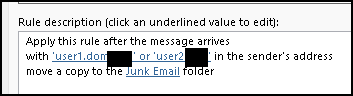
Just guessing here. Creating the Rule from an email may be adding some specific condition that only matched that message instance. If it's only some of your Rules that you create this way that are failing, a screen shot of a Rule Summary might help us debug. Be sure to redact part of any full email address. e.g.

1788697723531.png
 
It's not uncommon for rules to work when you created it with but not later. If you are using the from address, edit the rule to use the email address, not the display name. You can use words in the sender address and use the full address as the 'words'.
 
Similar threads
Thread starter Title Forum Replies Date
G Keeping Outlook Classic (desktop) PST in Google Drive folder? Using Outlook 4
S How to view backed up PSTs from Outlook 2007 in Outlook Classic's Folder pane Using Outlook 12
S Outlook 365 Outlook (classic) Calendar Peek not showing iCloud calendar events Using Outlook 4
T What is the best way of using the Classic Outlook client to change my email address? Using Outlook 5
S Rule not running in Outlook Classic unless... Using Outlook 9
J column with actual email address in Outlook Classic Using Outlook 4
S Not receving all email since converting from Outlook 2007 to Outlook Classic Using Outlook 3
Hornblower409 Outlook VBA Code Example - Unified inbox in Outlook Classic Outlook VBA and Custom Forms 5
J Need replacement for iTunes to locally (USB) sync. iPhone 17 to Classic Outlook 2024 Using Outlook 5
S Outlook Classic on 2024 Using Outlook 10
C Can't Use Custom Contact form in Outlook Classic since early January 2026 Outlook VBA and Custom Forms 7
L what are the downsides of running both classic and new outlook on same win 11 pc? Using Outlook 2
J IMAP Folders Confusion in Windows Classic Outlook Using Outlook 1
T Outlook 2019 While connecting an IMAP account in "classic" Outlook 2024 I caused a massive duplication of emails on the server (death loop) Using Outlook 5
C Outlook classic via 365 Using Outlook 2
kburrows Outlook Classic - JPG files are corrupted when opened or saved Using Outlook 3
M Outlook appointment in asp.classic Using Outlook 2
T How to fix disconnected Outlook account Using Outlook 6
N Outlook Calendar Not Showing All Events Using Outlook 5
F Outlook Data File Column Empty Using Outlook 3
B Sync Google Calendar with Outlook Using Outlook 4
C Multiple accounts on Outlook.com? Using Outlook 3
P Outlook Calendar entry being used as malware vector. Using Outlook 4
S How to Move Data from Mac Outlook to Windows Outlook? Using Outlook 4
T Creating a second email account on an Outlook client Using Outlook 2
Daviddavidsonz How to Schedule Emails in Microsoft Outlook Using Outlook 0
Rupert Dragwater Outlook 365 taking too long to synchronize each time email is being checked Using Outlook 17
Thomas Fast Best way to manage incoming customer emails automatically in Outlook? Using Outlook 2
I Outlook 2024 Windows 11 Gmail - sudden log in problems Using Outlook 15
L Fresh Install of Windows 11, saved previous image, how to retrieve Outlook Contacts Using Outlook 10
e_a_g_l_e_p_i Need help updating email in Outlook 2021 Using Outlook 10
V Outlook spam filter misbehaving Using Outlook 9
P Preventing permanent deletions in Outlook on the Web Using Outlook 0
L any trick to embedding images in new outlook and outlook on the web contacts? Using Outlook 4
L new outlook contacts searching Using Outlook 5
R Outlook 2010 Outlook 2010 migration question Using Outlook 2
W New Outlook PEOPLE blank Using Outlook 6
C New Outlook issues with Gmail, particularly labels/folders Using Outlook 4
E What is the next workaround for macro in New Outlook 1.2025.1111.100 Outlook VBA and Custom Forms 3
E Need to digitally sign macro but VBA\Outlook crash Outlook VBA and Custom Forms 4
P Outlook 2003 no longer opens "without" Folder List Showing in Navigation Pane Using Outlook 2
Hornblower409 Outlook 2010 - Never ending update Using Outlook 0
V Outlook created new profile? Using Outlook 1
J Outlook inbox question Using Outlook 4
T How to Add AT&T Contacts to Outlook 365 Using Outlook 5
F Outlook 2021 outlook on iPhone Using Outlook 1
F Outlook 2021 Outlook on iPhone asks for password Using Outlook 0
P ics calendar entries suddenly open up new Outlook Using Outlook 3
P Outlook "forgets" password until system rebooted Using Outlook 2
N Why does Outlook keeping adding to the email address I have in my notes portion of a contact? Using Outlook 2

Similar threads

Back
Top