Rule not running in Outlook Classic unless...

Steve Mc

Senior Member
Outlook version
Email Account
POP3
Operating system::    Windows 11
Outlook version:     Office 2024 Classic
Email type or host:    Pop- xxx@att.net

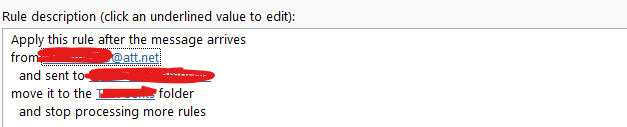
I have this rule,

1776900983869.png

that doesn't run upon sending, but if I go to 'run rules' now, it works.

Thanks,
 
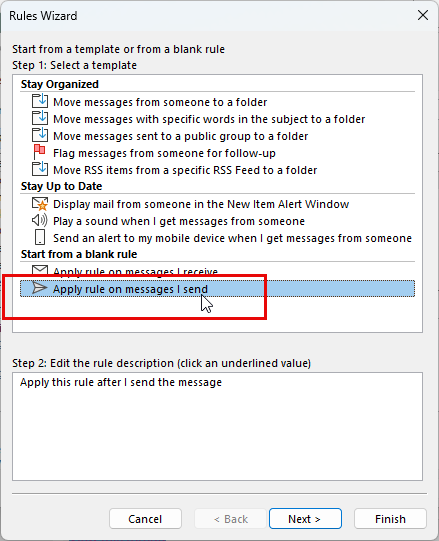
BTW - that moves a copy of the message unless you disable the option to save sent messages. But the messages are marked unread. If you want them marked read automatically you need to use a macro
 
Ok, thanks. That did work, hovever, it moves a 'copy' of the message, but leaves the original message in the sent folder. Is there a setting that will 'move' the message to another folder and not have it remain in the sent folder ?

Also, I always created a rule from the email, itself, and did not start fresh like you indicated.
 
You could turn off the option to save sent messages then create a second rule to move everything to the sent folder - first rule would not have stop processing enabled.

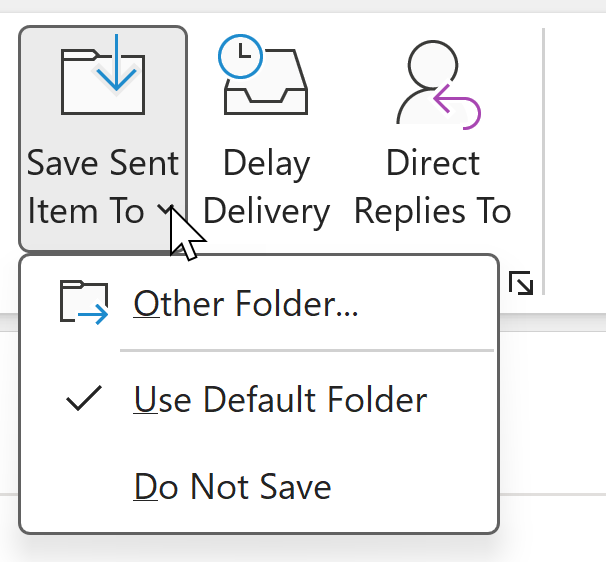
The other option is a macro that moves the messages - or set the folder when you send the message - it's on the Options tab. Recently used folders will be on the menu (i haven't used it on this mailbox.) If you are moving new messages to a specific address, a macro can open the form, set the save to location and even address it. A custom template can do the same and be pinned to the taskbar or stored in the Drafts (or other folder) for easy access.
1776963880696.png


If you are moving replies to the folder with the original, Outlook has an option to save sent messages in the same folder as the original. Conversation view shows the messages in the thread and leaves the sent message in sent folder.
 
You could turn off the option to save sent messages then create a second rule to move everything to the sent folder - first rule would not have stop processing enabled.

The other option is a macro that moves the messages - or set the folder when you send the message - it's on the Options tab. Recently used folders will be on the menu (i haven't used it on this mailbox.) If you are moving new messages to a specific address, a macro can open the form, set the save to location and even address it. A custom template can do the same and be pinned to the taskbar or stored in the Drafts (or other folder) for easy access.
View attachment 4742

If you are moving replies to the folder with the original, Outlook has an option to save sent messages in the same folder as the original. Conversation view shows the messages in the thread and leaves the sent message in sent folder.
A always, thank you very much. Though I still can't figure it out, but at least I do get a copy of the sent mail to the folder I want. I guess I'll just manually delete the email in the sent folder. Probably not a big deal. Because I can't figure out how to record macros. In Excel, I was able to record the steps, and made creating macros very easy.
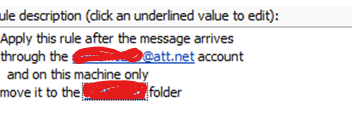
Also, I'm pretty sure this rule that I had on 2007 worked, showing that it 'moved' the email to that folder:

1776988322165.png
 
Was that set up as pop on 2007? I'm pretty sure it's always moved a copy but they changed the working on the rule.

Are you moving all mail or just some? If all, you can set Outlook to not save sent messages - it will still make the copy for the rule but not put one in the sent folder.

However, if you are using IMAP, yahoo saves a copy of messages sent through their server. You cannot turn that off.
 
Was that set up as pop on 2007? I'm pretty sure it's always moved a copy but they changed the working on the rule.

Are you moving all mail or just some? If all, you can set Outlook to not save sent messages - it will still make the copy for the rule but not put one in the sent folder.

However, if you are using IMAP, yahoo saves a copy of messages sent through their server. You cannot turn that off.
Yes, always POP. I although these past few months I've been very confused, I'm pretty sure it did work like I wanted, to move a copy from the sent to the folder I wanted and not kept in the sent folder..

I only want to move the mail I send from that account, and I did look at not saving sent messages, but isn't that a universal setting, meaning it'll not save any sent mail ? I still want all my other mail/accounts sents saved.
 
Yes, always POP. I although these past few months I've been very confused, I'm pretty sure it did work like I wanted, to move a copy from the sent to the folder I wanted and not kept in the sent folder..

I only want to move the mail I send from that account, and I did look at not saving sent messages, but isn't that a universal setting, meaning it'll not save any sent mail ? I still want all my other mail/accounts sents saved.

Correct, if you disable it, it affects all accounts. Only IMAP accounts has a per account option.

Ihave VBA samples on slipstick.com - like this one that watches the sent folder and moves the messages that are added to it. If the account has its own data file, you'll point the parh to that folder - if accounts hare a folder, you check the sending account.
 
Similar threads
Thread starter Title Forum Replies Date
Bri the Tech Guy Run Script rule not running for newly arriving messages Outlook VBA and Custom Forms 25
D Running a Program from Custom Action Rule Outlook VBA and Custom Forms 1
D Troubleshooting rule/script not running Outlook VBA and Custom Forms 5
P How to use a form from a rule running on the inbox Outlook VBA and Custom Forms 1
S Create search-folder/rule/filter looking at FROM a distro list that has nested distro lists Using Outlook 1
E Create Rule to Forward Email if Subject Begins With Using Outlook 2
P VBA to add email address to Outlook 365 rule Outlook VBA and Custom Forms 0
HarvMan Outlook 365 - Rule to Move an Incoming Message to Another Folder Using Outlook 4
B Modify VBA to create a RULE to block multiple messages Outlook VBA and Custom Forms 0
D VBA - unable to set rule condition 'on this computer only' Outlook VBA and Custom Forms 5
CWM330 This rule has a condition that the server cannot process? Using Outlook 1
A rule name into message - how? Outlook VBA and Custom Forms 5
O Mail rule issue Using Outlook 3
A manual rule sends mail to wrong folder Using Outlook 5
Aussie Outlook 365 Rule runs manually but returns the error code "an unexpected error has occurred" when incoming mail arrives Using Outlook 1
bhamberg Finding a rouge rule... Using Outlook 6
D How to get this rule to work Using Outlook 0
B Seeking help with Outlook rule Using Outlook 2
K Run a script rule to auto 'send again' on undeliverable emails? Outlook VBA and Custom Forms 1
G Save attachment run a script rule Outlook VBA and Custom Forms 0
R Rogue Outlook Rule ? Using Outlook 2
P Can I create a Rule that sends me an email when I get a Task? Using Outlook 2
E Having some trouble with a run-a-script rule (moving mail based on file type) Outlook VBA and Custom Forms 5
M How create a Rule to filter sender's email with more that one @ sign Using Outlook 1
diver864 vba for a rule to automatically accept meeting requests with 'vacation' in subject, change to all-day event, change to free, don't send reply Outlook VBA and Custom Forms 1
1 Incorrectly Setup a Rule at Domain level to not allow address from outside domain Exchange Server Administration 2
J Transport Rule to detect Keyword question.. Exchange Server Administration 2
T "Words In Recipient's Address" Rule Causes Outlook To Stop Processing Rules Using Outlook 3
R Outlook Autoforward rule do not work for NDR messages Using Outlook 1
R Setup autofoward rule on a particular folder in Outlook Using Outlook 0
N Rule for "on behalf of" - with changing names Using Outlook 2
S Unable to remove rule outlook 2010 Using Outlook 0
O Outlook 2016 This rule will only run when you check your email in Outlook.... Using Outlook 4
Nadine Rule to move attachments with specific name Outlook VBA and Custom Forms 1
N Outlook Email Rule execution through shortcut keys (VBA codes) Using Outlook 1
dweller Outlook 2010 Rule Ignores VBA Script Outlook VBA and Custom Forms 2
O Rule to move (specific) messages from Sent folder to Specific folder Using Outlook 1
S Adding new Exchange (2016) rule very slow down Microsoft Outlook Exchange Server Administration 0
B Outlook rule run a Script doesn't work Outlook VBA and Custom Forms 1
K VBA BeforeItemMove event create rule to always move to its folder. Outlook VBA and Custom Forms 4
icacream Rule based on sender / wrong sender sent to folder Using Outlook 7
L Making rule to move email to folder from one O365 domain Using Outlook 1
J Assess content of User Defined Field in Rule Using Outlook 3
S Send email via SMTP - use transport rules to add to senders inbox (then rule to move to sent items Exchange Server Administration 1
A Change order of actions in one (!) rule Outlook VBA and Custom Forms 2
J HELP- Rule to auto strip prepend from external emails Using Outlook 0
A Forward Outlook Email by Filtering using Macro Rule Outlook VBA and Custom Forms 44
A rule to flag messages not working Using Outlook 5
Brian Murphy Exchange Online Everything a Transport Rule should do and cannot Exchange Server Administration 1
J Outlook Rules - Changing auto-submit address in multiple rules, according to rule name Outlook VBA and Custom Forms 0

Similar threads

Back
Top