Outlook 365 taking too long to synchronize each time email is being checked

Rupert Dragwater

Senior Member
Outlook version
Outlook 2013 64 bit
Email Account
POP3
Operating system::    Windows 11
Outlook version:     Version 2603
Email type or host:    pop / imap / exchange

Every 5 minutes, Outlook is set to check my mail. I have 11 different email address, which are outlook.com / hotmail.ca / gmail.com. It seems each time, it's taking between 10 and 12 minutes to synchronizing to finish.
I also have many subfolders, but it seems this problem only began about a week ago. Any suggestions would help.
 
1 -- Show Progress

On the "Send/Receive" menu tab.
Click the "Send/Receive All Folders" ribbon button.
Click the "Show Progress" ribbon button.
Toggle the [Details] button if it's not showing each task.
This should show you how long it's taking for each email account.

2 -- Sync Errors

Ctrl+6 to switch to "Folders" in you Nav Pane.
For each account look in the "Sync Issues" folder and subfolders for any errors.
Open any Sync Issue messages to see the details.
 
Last edited:
You said, "Toggle the [Details] button if it's not showing each task.
This should show you how long it's taking for each email account."

If I understand you correctly, you mean when Outlook is checking for mail. When doing so, it will tell me how many minutes is left before synching. If you mean something else, let me know.

Secondly, Ctrl+6 only brings up a new webpage. Aside from that, I cannot see or find anything called "sync Issues" in any of my email accounts, including the one where 99.99$% of my subfolders are found.
Looking this up isn't giving me any help either. Further instruction is needed and please not, I am less than a novice when it comes to the technicalities with this stuff.
 
Every 5 minutes, Outlook is set to check my mail. I have 11 different email address, which are outlook.com / hotmail.ca / gmail.com. It seems each time, it's taking between 10 and 12 minutes to synchronizing to finish.
I also have many subfolders, but it seems this problem only began about a week ago. Any suggestions would help.
Sounds like it might be choking on syncing too many accounts/folders at once, try increasing the send/receive interval and disable syncing for some less important folders or accounts. Also rebuilding the Outlook data file or clearing cache sometimes helps, kinda annoying but it works sometimes
 
I've done the following... Sync Only the Inbox: Use the "Use the custom behavior defined below" option in Send/Receive settings to only synchronize the Inbox.
Also, I have increased the time to every 15 minutes checking the mail. It seems to have helped but I'll post later if changes. I'll see if I can clear the cache in a bit. Thanks for your input.
 
Ok, I thought I should report back with the ongoing results or better, non-results as to my latest experiment. Checking mail still hangs, starting at 60 seconds then after going no where, suddenly it goes up to 2 minutes, then 4 minutes and so on.
Looking at one site, I'm reading concerning clearing and rebuilding the OST. If perchance I take this route, my question is, will that bring back all my email accounts in Outlook, or will I have to add them manually all over again?
Also, doing that, will it bring back all my subdirectories? Please advise.
 
Sync Issues Folder:
What do I need to know about synchronization issues folders in Outlook?

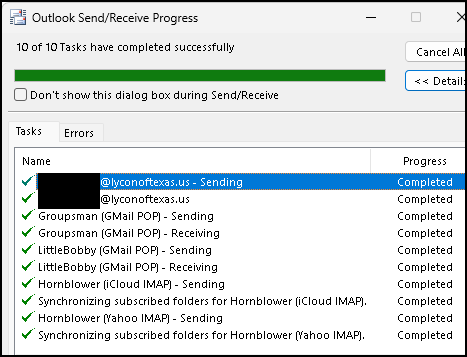
Show Progress:
The intent was to see which task are taking so long. As Outlook syncs each account it should show you what it's doing. e.g. Sending, Receiving, Syncing Folders. Is it only one account that takes so long? Or a specific step for an account?

1776502973731.png
 
Last edited:
clearing and rebuilding the OST. will that bring back all my email accounts in Outlook, or will I have to add them manually all over again?
Also, doing that, will it bring back all my subdirectories?
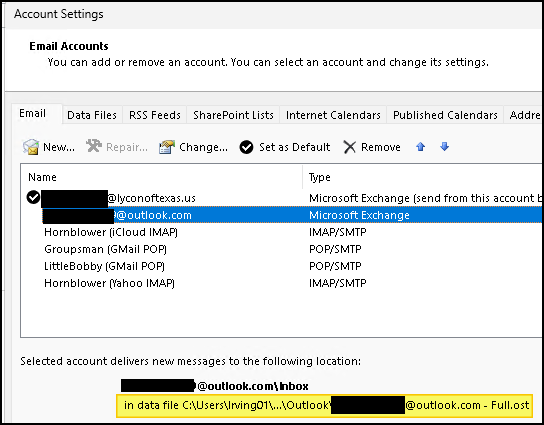
You have one OST file per email account. To see which file belongs to which account:

File -> Account Settings -> Account Settings.
On the | Email | tab, select an account and the OST file path will be shown at the bottom.

1776503654437.png


If you close Outlook and rename an OST file (xxx.ost -> xxx.ost_OLD) Outlook will recreate it the next time it starts. It will then resync all the folders for that account you have defined in your Send/Receive Groups.
Change send/receive group settings - Microsoft Support

But you will loose any data that was in any "This Computer Only" folders for that account. This is usually Contacts and Calendar. If there is any data in these folders for an account, you must Export it to a PST file before you rename the OST and then Import it back once the OST file has been rebuilt.

See: 1 -- Export any "This Computer Only" folders in the Answer by Hornblower409 Apr 16, 2026 in
outlook wont let me sign into my imap server - Microsoft Q&A

And: Import email, contacts, and calendar from an Outlook .pst file - Microsoft Support
 
I'm stumped already, for I do not see a "This Computer Only" under this particular email address.
Also, is this an alternative...
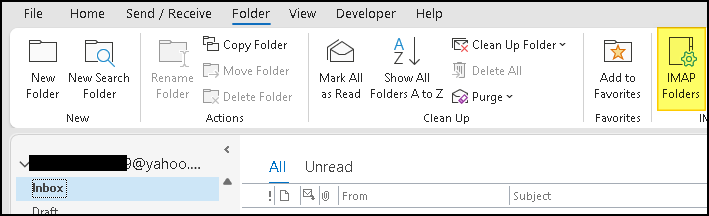
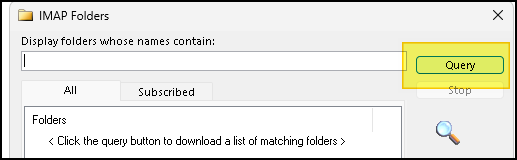
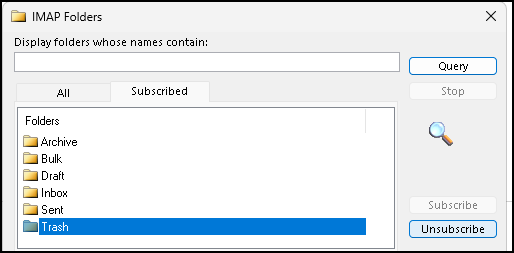
"To unsubscribe from IMAP folders in Outlook 365, right-click on your inbox or top-level folder, select IMAP Folders, click Query, select the desired folder, and click Unsubscribe. This removes the folder from your view without deleting it from the server."
The reason I'm asking this, is this is becoming a bit complex for a novice such as myself, but I'll await your further instruction.
Thank you for doing what you're doing to assist.
 
Similar threads
Thread starter Title Forum Replies Date
T How to Add AT&T Contacts to Outlook 365 Using Outlook 5
C Outlook 365 send/receive takes FOREVER - as in 40 minutes Using Outlook 7
P newly installed Office 365 includes OLD Outlook Using Outlook 6
J Renegade spam URL line displayed in old local Outlook 365 email title Using Outlook 3
C Outlook classic via 365 Using Outlook 2
G Cannot receive emails from gmail account in Outlook 365 Using Outlook 1
Rupert Dragwater Cannot reestablish gmail (email address) account in Outlook 365 Using Outlook 11
O Outlook 365 synchronisieren Exchange Server Administration 1
P Removing Outlook 365 Account from Send/Receive Using Outlook 3
HarvMan Outlook 365 Inbox Font Using Outlook 8
G Reply a selected message and remove blank space before signature Outlook 365 version 2406 64BIT Outlook VBA and Custom Forms 2
G Reply a selected message and remove blank space before signature Outlook 365 version 2406 64BIT Outlook VBA and Custom Forms 0
N Best way to sync calendar and contacts between Outlook 365 and Outlook on iPhone Using Outlook 4
M Start Outlook 365 at unified inbox Using Outlook 2
J Emails with .ICS calendar invitations attached don't contents when received in Outlook 365 Using Outlook 6
X Custom icon (not from Office 365) for a macro in Outlook Outlook VBA and Custom Forms 1
T Outlook 365 won't take new working password Using Outlook 0
P Yahoo/IMAP folder rename by Outlook desktop 365 Using Outlook 0
P VBA to add email address to Outlook 365 rule Outlook VBA and Custom Forms 0
Rupert Dragwater Background colors not saving in Outlook 365 Using Outlook 15
J Outlook 365 html inline images Using Outlook 0
Rupert Dragwater How to get Outlook 365 to open from websites Using Outlook 5
HarvMan Outlook 365 - Rule to Move an Incoming Message to Another Folder Using Outlook 4
TomHuckstep Remove Send/Receive All Folders (IMAP/POP) button from Outlook 365 Ribbon Using Outlook 2
A Outlook 365 Outlook (part of 365) now working offline - argh Using Outlook 5
G LinkedIn tab missing in Outlook 365 (but working in OWA) Using Outlook 0
P now on office 365 but getting error messages about missing Outlook 2013 cache folders Using Outlook 2
L Synch Outlook 365 calendar with iPhone Using Outlook 0
D Outlook 365 Custom forms field limit? Outlook VBA and Custom Forms 4
J Outlook 2016 Trying to get Outlook 2016 to work with Office 365 Using Outlook 0
L Duplicate calendar entries in Outlook 365 Using Outlook 3
G Stop Outlook 365 adding meetings to calendar Using Outlook 1
HarvMan Using Emojis in Outlook 365 Using Outlook 3
T Outlook 2019 Not Using Auto Compete After Deletion of 365 Using Outlook 1
CWM330 Is it me, or is Outlook 365 BUGGY? Using Outlook 3
K Outlook 365 After migrating to Outlook 365, some contacts display in emails with prefixes Using Outlook 0
HarvMan Outlook 365 loses "outlook.com" exchange server settings Using Outlook 1
D Office 365 Outlook desktop app prompts for all account passwords on startup Using Outlook 11
L Recommendations for Utility to Backup Outlook 365 Account Settings Using Outlook 2
Z New minimum Outlook for Windows version requirements for Microsoft 365/Exchange Online Using Outlook.com accounts in Outlook 27
kburrows Outlook 365 - Ribbon Customizations Disappear Using Outlook 0
C Why does Outlook (desktop) 365 for Windows keep making me input my passwords? Using Outlook 12
J Outlook 365 Outlook 2016/365 Contacts Lose Info when Favorited to the To-Do Bar Using Outlook 2
O Outlook 365 - Gmail and Outlook: how to force Outlook to start up in Gmail? Using Outlook 2
M Outlook 365 refuses to send email Using Outlook 0
P How can I stop Outlook 365 duplicating the posts? Using Outlook 1
HarvMan Toggle between calendar and email in Outlook 365 Using Outlook 12
S Mac Outlook 365 Questions Using Outlook 1
R Outlook 365 update sets delete from server flag Using Outlook 1
O Outlook 365 - How to create / copy a new contact from an existing one? Using Outlook 5

Similar threads

Back
Top