
All fonts in Outlook emails display with exaggerated character spacing

Status
Not open for further replies.

moncur83

New Member
Outlook version
Outlook 365 32 bit
Email Account
Office 365 Exchange
Here is a problem that has me stumped...

The individual characters in all of my Outlook emails are being displayed with greatly exaggerated character spacing.
This is affecting all emails - both emails I compose, and emails I have received.
It doesn't make any difference which font is used as the default font for composing emails, or which font the sender used when composing the emails that I have received from them.

I've attached an example screenshot of the exaggerated character spacing.

The problem is only with the way Outlook is displaying the emails on my PC, as opposed to the actual formatting of the emails. If I forward the emails to another PC, they display with normal character spacing between the letters. If I compose an email and check the character spacing options in the Fonts section, the character spacing is normal. The problem is not with the actual formatting, but the way Outlook is displaying/rendering the text of the emails.

The problem only affects Outlook - character spacing in Word displays correctly.
I haven't noticed the issue appearing anywhere else on the PC other than Outlook.

I have tried repairing Outlook and adjusting the settings in Outlook options -> Mail -> Message Format.
I've tried tuning off all Outlook add-ons, and deleting/recreating both Normal.dotm and NormalEmail.dotm templates in C:\Users\{USER}\AppData\Roaming\Microsoft\Templates
Nothing has made any difference.

Any suggestions would be greatly appreciated.
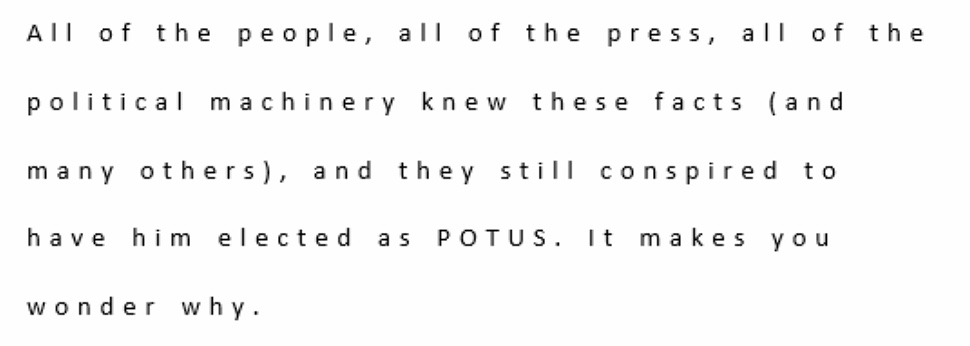
Example.jpg
 
Hi, I had the same problem.
When viewing an email check the top of Outlook for a tab called 'Immersive Reader'. Here, there is a button called 'Text Spacing' which you can toggle on or off. My guess is that it's turned on by accident.
 
Here is a problem that has me stumped...

The individual characters in all of my Outlook emails are being displayed with greatly exaggerated character spacing.
This is affecting all emails - both emails I compose, and emails I have received.
It doesn't make any difference which font is used as the default font for composing emails, or which font the sender used when composing the emails that I have received from them.

I've attached an example screenshot of the exaggerated character spacing.

The problem is only with the way Outlook is displaying the emails on my PC, as opposed to the actual formatting of the emails. If I forward the emails to another PC, they display with normal character spacing between the letters. If I compose an email and check the character spacing options in the Fonts section, the character spacing is normal. The problem is not with the actual formatting, but the way Outlook is displaying/rendering the text of the emails.

The problem only affects Outlook - character spacing in Word displays correctly.
I haven't noticed the issue appearing anywhere else on the PC other than Outlook.

I have tried repairing Outlook and adjusting the settings in Outlook options -> Mail -> Message Format.
I've tried tuning off all Outlook add-ons, and deleting/recreating both Normal.dotm and NormalEmail.dotm templates in C:\Users\{USER}\AppData\Roaming\Microsoft\Templates
Nothing has made any difference.

Any suggestions would be greatly appreciated.

View attachment 3404
pls use Open Immersive Reader for Outlook to adjust the spacing issue ,

 
Here is how to fix:

Open Word, Options, Advanced, scroll down to section General, click Web Options, Fonts tab. Change fonts there.
 
Status
Not open for further replies.
Similar threads
Thread starter Title Forum Replies Date
e_a_g_l_e_p_i How to set fonts for emails in all folders in Outlook Using Outlook 1
MattC Some fonts the wrong size in incoming emails in Outlook 2007 Using Outlook 6
C outlook.com fonts Using Outlook 2
L Ever notice that the fonts in Outlook seem to be depend on the build? Using Outlook 1
B Fonts in Outlook 2007 Using Outlook 4
N Outlook 2010 prints in small fonts Using Outlook 1
P Outlook Fonts not Sticking Using Outlook 10
D Point Size for Fonts in Custom Font Style (Outlook 2013) Using Outlook 0
B Fonts cut off when composing new email on outlook 2007 Using Outlook 1
e_a_g_l_e_p_i Is it possible it set the fonts used to read incoming mail Using Outlook 25
N Column view fonts Using Outlook 4
O Non-standard fonts - are they embedded? Using Outlook 2
T Incoming Mail Changes Fonts Using Outlook 0
L How to use different fonts for outgoing messages for different email accounts Using Outlook 0
e_a_g_l_e_p_i Just had to reinstall window 10 then Office and forgot how to control fonts sizes Using Outlook 3
Commodore What's the deal with fonts Using Outlook 6
E fonts suddenly bigger by 2x Using Outlook 3
F How to change all incoming fonts to black? Using Outlook 3
J Saving recent colors used for fonts in an email? Using Outlook 1
K Default Fonts Using Outlook 9
T Text fonts changing when exchange syncs Using Outlook 0
L what are the downsides of running both classic and new outlook on same win 11 pc? Using Outlook 0
P Preventing permanent deletions in Outlook on the Web Using Outlook 0
L any trick to embedding images in new outlook and outlook on the web contacts? Using Outlook 4
L new outlook contacts searching Using Outlook 5
R Outlook 2010 Outlook 2010 migration question Using Outlook 2
W New Outlook PEOPLE blank Using Outlook 7
C New Outlook issues with Gmail, particularly labels/folders Using Outlook 4
E What is the next workaround for macro in New Outlook 1.2025.1111.100 Outlook VBA and Custom Forms 3
E Need to digitally sign macro but VBA\Outlook crash Outlook VBA and Custom Forms 4
P Outlook 2003 no longer opens "without" Folder List Showing in Navigation Pane Using Outlook 2
Hornblower409 Outlook 2010 - Never ending update Using Outlook 0
V Outlook created new profile? Using Outlook 1
J Outlook inbox question Using Outlook 4
T How to Add AT&T Contacts to Outlook 365 Using Outlook 7
F Outlook 2021 outlook on iPhone Using Outlook 1
F Outlook 2021 Outlook on iPhone asks for password Using Outlook 0
P ics calendar entries suddenly open up new Outlook Using Outlook 3
P Outlook "forgets" password until system rebooted Using Outlook 2
N Why does Outlook keeping adding to the email address I have in my notes portion of a contact? Using Outlook 2
M Anyone integrated AI website builders with Outlook for automated client communications? Using Outlook 1
V Gmail in Outlook Using Outlook 2
T Where has the Copilot icon gone in my Outlook desktop client? Using Outlook 7
P New way by Microsoft to get people to use the new Outlook Using Outlook 4
C How to keep emails in account in Outlook after closing the IMAP account Using Outlook 1
cymumtaz IMAP calendars in New Outlook Using Outlook 5
T Constantly Have To Log In To Outlook On The Web Using Outlook.com accounts in Outlook 2
T Cannot Find Outlook Noted On Android Using Outlook 4
O Outlook 2024 not showing that messages are replied to or forwarded Using Outlook 3
C Outlook 365 send/receive takes FOREVER - as in 40 minutes Using Outlook 7

Similar threads

Back
Top