
Outlook 2024 Windows 11 Gmail - sudden log in problems

idainc

New Member
OS Version(s)
  1. Windows
Outlook version
Outlook 2019 64-bit
Email Account
IMAP
Operating system::    Windows 11
Outlook version:     2024 LTSC local
Email type or host:    IMAP

Out of the blue Gmail isnt allowing me to log in via Outlook 2024 client. I'ce read all the possible google responses and no joy yet. Can anyone shed any light on this for me ? I am not using 2FA - just a Google password and I have the correct port #'s. I am allowing Outlook to configure it for me. Do I now need an app specific password and if so where can I get it in Google. Thanks in advance.
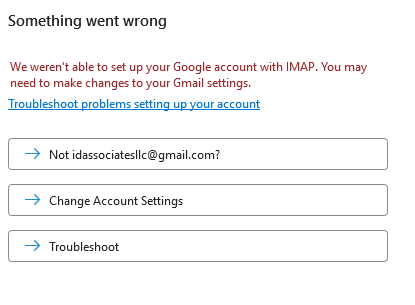
Screenshot 2026-03-16 124519.png
 
Thanks for your reply. It appears as if Google is randomly rejecting passwords as authorization if you are not using 2FA. After some research I deleted the account, repaired Office, then went into Credential manager and deleted any mention of Office and started the email address install again. I was presented a Google screen in my browser and checked a box that would allow MS Apps to make changes to email and it installed good as new.
 
As far as I know, in this case, it's Microsoft's fault.
Yes. MS Outlook install doesnt automatically redirect back to Google for permission. I had to force it by deleting credentials.
 
Google no longer allows basic username/password signins from apps like Outlook unless extra security is enabled, so that’s likely why it suddenly stopped working. You’ll need to turn on 2 Step Verification in your Google account first, then generate an App Password and use that instead of your normal password in Outlook. Once you do that, let Outlook reconfigure the account, and it should connect without issues.
 
Google no longer allows basic username/password signins from apps like Outlook unless extra security is enabled, so that’s likely why it suddenly stopped working. You’ll need to turn on 2 Step Verification in your Google account first, then generate an App Password and use that instead of your normal password in Outlook. Once you do that, let Outlook reconfigure the account, and it should connect without issues.
That only applies to POP in Outlook (and has been true for a long time) - 2FA is not required for IMAP in Outlook versions that support oAuth2.
 
That only applies to POP in Outlook (and has been true for a long time) - 2FA is not required for IMAP in Outlook versions that support oAuth2.
Google has been phasing out basic authentication across the board, not just POP, and a lot of Outlook setups still run into issues unless you use either OAuth2 or an app password. Even though newer versions support OAuth2, many people are on setups where it isn’t configured properly, so app passwords end up being the only thing that actually works. In real-world use, turning on 2FA and using an app password is usually the most reliable way to get Outlook working again.
 
iCloud mail (IMAP) uses an application specific custom password also.
 
As long as they have a current version of Outlook - either a subscription or up-to-date version of Outlook 2016 and newer, oAuth2 is supported. If you try adding the account as IMAP and use an app password, Outlook will ask for the real password.
 
Google no longer allows basic username/password signins from apps like Outlook unless extra security is enabled, so that’s likely why it suddenly stopped working. You’ll need to turn on 2 Step Verification in your Google account first, then generate an App Password and use that instead of your normal password in Outlook. Once you do that, let Outlook reconfigure the account, and it should connect without issues.
@idainc,

AFAIK, this is the correct answer.

No use fighting against 2FA ... turn it on (where-ever they want you to ... like Apple, Google, Microsoft) setup your App-Passwords thingy ... and move-on with your (now working-email and even a bit more secure) life.
 
And now this same machine and software is having a problem with iCloud contacts and calendar syncing. I can sign into Apple and get a applicaiton specific password for Outlook and sync with icloud mail. But the contacts and calendar will not sync. The iCloud add in is active but there is no iCloud icon on the taskbar. Apple advised me they have had a rash of reports of this happening.

To properly diagnose this I used a system from the day before when it worked properly and the same thing happened.
 
Apple advised me they have had a rash of reports of this happening.

To properly diagnose this I used a system from the day before when it worked properly and the same thing happened.

Nothing systematic wrong with iCloud for Windows and Outlook-2021 AFAIK. Here, I have it running on two separate Windows-11 computers, against two different sets of Windows/Outlook, email accounts, and Apple Accounts and iOS-devices.

All is fine. The "back end" seems fine to me.
 
After a lot of research and time on the phone with Apple many of these symptoms were reported immediately after a Windows Update. I used Revo uninstaller and removed iCloud 15.xxx and installed the very last version of iCloud (7.21) and it syncs my calendar and contacts perfectly. YMMV
 
Similar threads
Thread starter Title Forum Replies Date
J Need replacement for iTunes to locally (USB) sync. iPhone 17 to Classic Outlook 2024 Using Outlook 4
S Outlook Classic on 2024 Using Outlook 10
O Outlook 2024 not showing that messages are replied to or forwarded Using Outlook 3
I Outlook 2024 LTSC syncing with iCloud calendar - can only make appt. in iCloud Using Outlook 2
T Outlook 2019 While connecting an IMAP account in "classic" Outlook 2024 I caused a massive duplication of emails on the server (death loop) Using Outlook 5
Victor_50 Problem - Google Workspace will stop "unsafe" access to Outlook end 2024 Using Outlook 3
J column with actual email address in Outlook Classic Using Outlook 2
S Not receving all email since converting from Outlook 2007 to Outlook Classic Using Outlook 3
Rupert Dragwater Outlook 365 taking too long to synchronize each time email is being checked Using Outlook 12
Hornblower409 Outlook VBA Code Example - Unified inbox in Outlook Classic Outlook VBA and Custom Forms 5
Thomas Fast Best way to manage incoming customer emails automatically in Outlook? Using Outlook 1
L Fresh Install of Windows 11, saved previous image, how to retrieve Outlook Contacts Using Outlook 10
C Can't Use Custom Contact form in Outlook Classic since early January 2026 Outlook VBA and Custom Forms 7
e_a_g_l_e_p_i Need help updating email in Outlook 2021 Using Outlook 10
V Outlook spam filter misbehaving Using Outlook 9
L what are the downsides of running both classic and new outlook on same win 11 pc? Using Outlook 2
P Preventing permanent deletions in Outlook on the Web Using Outlook 0
L any trick to embedding images in new outlook and outlook on the web contacts? Using Outlook 4
L new outlook contacts searching Using Outlook 5
R Outlook 2010 Outlook 2010 migration question Using Outlook 2
W New Outlook PEOPLE blank Using Outlook 6
C New Outlook issues with Gmail, particularly labels/folders Using Outlook 3
E What is the next workaround for macro in New Outlook 1.2025.1111.100 Outlook VBA and Custom Forms 3
E Need to digitally sign macro but VBA\Outlook crash Outlook VBA and Custom Forms 4
P Outlook 2003 no longer opens "without" Folder List Showing in Navigation Pane Using Outlook 2
Hornblower409 Outlook 2010 - Never ending update Using Outlook 0
V Outlook created new profile? Using Outlook 1
J Outlook inbox question Using Outlook 4
T How to Add AT&T Contacts to Outlook 365 Using Outlook 5
F Outlook 2021 outlook on iPhone Using Outlook 1
F Outlook 2021 Outlook on iPhone asks for password Using Outlook 0
P ics calendar entries suddenly open up new Outlook Using Outlook 3
P Outlook "forgets" password until system rebooted Using Outlook 2
N Why does Outlook keeping adding to the email address I have in my notes portion of a contact? Using Outlook 2
M Anyone integrated AI website builders with Outlook for automated client communications? Using Outlook 4
V Gmail in Outlook Using Outlook 2
T Where has the Copilot icon gone in my Outlook desktop client? Using Outlook 10
P New way by Microsoft to get people to use the new Outlook Using Outlook 4
C How to keep emails in account in Outlook after closing the IMAP account Using Outlook 1
cymumtaz IMAP calendars in New Outlook Using Outlook 5
T Constantly Have To Log In To Outlook On The Web Using Outlook.com accounts in Outlook 2
T Cannot Find Outlook Noted On Android Using Outlook 4
C Outlook 365 send/receive takes FOREVER - as in 40 minutes Using Outlook 7
Kika Melo Outlook ribbon customisations do not 'stick' Using Outlook 12
J IMAP Folders Confusion in Windows Classic Outlook Using Outlook 1
A Missing Sent Emails in New Outlook Using Outlook 18
S Missing categories in Outlook calendar Using Outlook 10
P Windows 11 tries to open New Outlook when the user clicks on the mail icon on a news article Using Outlook 2
C I don't understand Outlook or Microsoft, anymore Using Outlook 12
P My Feedback to Microsoft and their response; also New Outlook roadmap Using Outlook 0

Similar threads

Back
Top