Operating system:: Windows 11
Outlook version: Office 2024 Classic
Email type or host: POP
Outlook version: Office 2024 Classic
Email type or host: POP
I haven't been here for years, but I always received great help regarding my ancient Outook 2007.
I just upgraded for Windows 10 to Windows 11, and my Outlook 2007 was a bit flakey with that upgrade, so I finally upgraded to Microsoft Home and Business 2024.
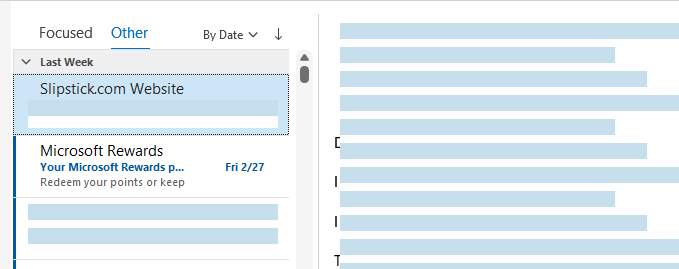
I'm really stuggling setting Classic up to match what I had in 2007. And just to begin, I've selected my view column settings to "from, subject , received , & size," but I can't figure out how have my email show along those columns. All I'm getting is a list of my emails on the left. Quite embarrasing , actually.
Thanks in advance.
I just upgraded for Windows 10 to Windows 11, and my Outlook 2007 was a bit flakey with that upgrade, so I finally upgraded to Microsoft Home and Business 2024.
I'm really stuggling setting Classic up to match what I had in 2007. And just to begin, I've selected my view column settings to "from, subject , received , & size," but I can't figure out how have my email show along those columns. All I'm getting is a list of my emails on the left. Quite embarrasing , actually.
Thanks in advance.