Outlook Classic on 2024

Steve Mc

Senior Member
Outlook version
Email Account
POP3
Operating system::    Windows 11
Outlook version:     Office 2024 Classic
Email type or host:    POP

I haven't been here for years, but I always received great help regarding my ancient Outook 2007.

I just upgraded for Windows 10 to Windows 11, and my Outlook 2007 was a bit flakey with that upgrade, so I finally upgraded to Microsoft Home and Business 2024.
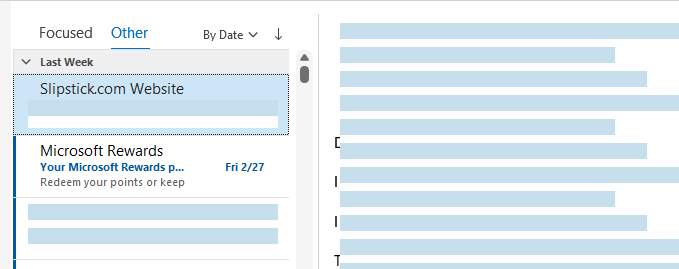
I'm really stuggling setting Classic up to match what I had in 2007. And just to begin, I've selected my view column settings to "from, subject , received , & size," but I can't figure out how have my email show along those columns. All I'm getting is a list of my emails on the left. Quite embarrasing , actually.

Thanks in advance.
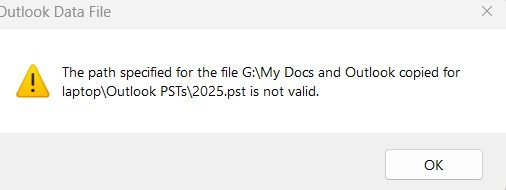
 
I just experienced another problem.

Well here’s a weird one. I imported my .pst’s to Outlook Classic from an external drive. Now , when I try open Outlook Classic, I get this prompt (see attached) . I guessing it still needs to refer to that path to open, and I don’t have that external connected very often. Is there any way of fixing this, short of, which I’m guessing, having to import those .pst’s again, this time from my C:\drive.

Thanks again,

path not valid.jpg
 
For the drive error:
#1: don't import PST files. Move to the hard drive and open them directly in outlook.
#2: to sounds like the PST is in the profile but not accessible. If Outlook won't open, open control panel, find Mail and edit the profile to remove it. If Outlook will open, go to File > Account Settings > Account Settings > data file tab and remove it.
 
Thank you. Yes, after playing around, I did figure out how to see the fields.

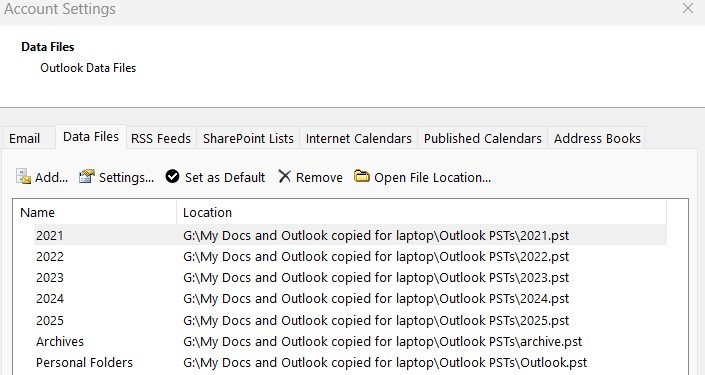
Regarding that error, The PST files did import nicely, and are available like I suspected. Outlook does open, but only if I have that external plugged in. Attached are my data files, so obviously that is why the path error.

Thank you.

data files.jpg
 
One last thing on the pst's. ATT will not be able to provide me a Secure Mail Key for my old @sbcglobal.net account for a few more weeks.
So I'm currently using a temporay @att.net account with my pst's in it. When I get my @sbcglobal.net account onto Outlook Classic, what would be the best way to transfer those pst's from my temporary @att account to the @sbc one ? Would I delete those data files, and start fresh ?

Thanks,
 
The account is added as pop? Is it a different mailbox or both aliases on one mailbox?

If the PST is all new mail, you can delete it and create a new pst. Or just remove the account and use the PST for the sbc account too. You can rename the display name.
 
Thank you. And yes, I am using POP. Let me try to explain hopefully a little better what I’d like to do. When I got 2024 for my Desktop, I didn’t realize that it had both Outlook and Classic. I was totally 19 years behind the technology (Outlook 2007), so Microsoft helped me set up an account in Outlook. An IMAP account which I was totally unfamiliar with using my @ sbcglobal.net address. I even tried importing my PSTs into that account, but only got garbage. Then I found Classic, which I thought would be a better fit for me, so was able to create a POP account (which I prefer) with a new @att.net address, which required an ATT/Yahoo secure mail key for a password. And with your help yesterday, I was able to get my PSTs onto that account.

Jumping to my laptop with Outlook 2007, I have been using my sbcglobal.net address also on it for years. Primarily as a backup. However, being that I don’t yet have my sbcglobal.net account on my desktop Classic, because I‘m waiting to be able to get that secure mail key, my Outlook 2007 has become my email usage this month, and expect it to be for March until I can get that account on Classic. So when I’m finally able to get that account on Classic, I would like to have that outlook.pst file from my laptop which has been updated from use all during March onto Classic. I’m guessing it would replace the existing outlook.pst file which was current thru February when I converted. Lastly, my pst files now on Classic were brough it via my temporary att.net account. Though on the left side view, they are showing below and seemingly separate from my att.net account, meaning:

...@att.net
Personal folders
Archives
2025,
etc.

Could they be dragged to the new account if necessary ? Would I remove that att.net account, and if so, would it remove all my psts that I have there now ? Or ... ?
Also you said I could rename the display name. When could I do that if necessary, and why ?

Thanks again for your patience with me. I hope I explained this all coherently.
 
I’m guessing it would replace the existing outlook.pst file which was current thru February when I converted.

Yes. Replace the outdated PST with the one that is current... that will get you sent mail too. Although, if you leave mail on the server, you can keep the old PST and it should download all the mail since it last downloaded mail. But that is inbox only, not mail you sent from the laptop.


Though on the left side view, they are showing below and seemingly separate from my att.net account, meaning:

...@att.net
Personal folders
Archives
2025,
etc.

Could they be dragged to the new account if necessary ? Would I remove that att.net account, and if so, would it remove all my psts that I have there now ? Or ... ?
If you remove the ATT POP acct, it just removes the account, not the PST file. You can remove the PST if you don't need it.
 
Similar threads
Thread starter Title Forum Replies Date
T Outlook 2019 While connecting an IMAP account in "classic" Outlook 2024 I caused a massive duplication of emails on the server (death loop) Using Outlook 5
C Can't Use Custom Contact form in Outlook Classic since early January 2026 Outlook VBA and Custom Forms 7
L what are the downsides of running both classic and new outlook on same win 11 pc? Using Outlook 2
J IMAP Folders Confusion in Windows Classic Outlook Using Outlook 1
C Outlook classic via 365 Using Outlook 2
kburrows Outlook Classic - JPG files are corrupted when opened or saved Using Outlook 3
M Outlook appointment in asp.classic Using Outlook 2
L Fresh Install of Windows 11, saved previous image, how to retrieve Outlook Contacts Using Outlook 10
e_a_g_l_e_p_i Need help updating email in Outlook 2021 Using Outlook 10
V Outlook spam filter misbehaving Using Outlook 9
P Preventing permanent deletions in Outlook on the Web Using Outlook 0
L any trick to embedding images in new outlook and outlook on the web contacts? Using Outlook 4
L new outlook contacts searching Using Outlook 5
R Outlook 2010 Outlook 2010 migration question Using Outlook 2
W New Outlook PEOPLE blank Using Outlook 6
C New Outlook issues with Gmail, particularly labels/folders Using Outlook 3
E What is the next workaround for macro in New Outlook 1.2025.1111.100 Outlook VBA and Custom Forms 3
E Need to digitally sign macro but VBA\Outlook crash Outlook VBA and Custom Forms 4
P Outlook 2003 no longer opens "without" Folder List Showing in Navigation Pane Using Outlook 2
Hornblower409 Outlook 2010 - Never ending update Using Outlook 0
V Outlook created new profile? Using Outlook 1
J Outlook inbox question Using Outlook 4
T How to Add AT&T Contacts to Outlook 365 Using Outlook 5
F Outlook 2021 outlook on iPhone Using Outlook 1
F Outlook 2021 Outlook on iPhone asks for password Using Outlook 0
P ics calendar entries suddenly open up new Outlook Using Outlook 3
P Outlook "forgets" password until system rebooted Using Outlook 2
N Why does Outlook keeping adding to the email address I have in my notes portion of a contact? Using Outlook 2
M Anyone integrated AI website builders with Outlook for automated client communications? Using Outlook 4
V Gmail in Outlook Using Outlook 2
T Where has the Copilot icon gone in my Outlook desktop client? Using Outlook 10
P New way by Microsoft to get people to use the new Outlook Using Outlook 4
C How to keep emails in account in Outlook after closing the IMAP account Using Outlook 1
cymumtaz IMAP calendars in New Outlook Using Outlook 5
T Constantly Have To Log In To Outlook On The Web Using Outlook.com accounts in Outlook 2
T Cannot Find Outlook Noted On Android Using Outlook 4
O Outlook 2024 not showing that messages are replied to or forwarded Using Outlook 3
C Outlook 365 send/receive takes FOREVER - as in 40 minutes Using Outlook 7
I Outlook 2024 LTSC syncing with iCloud calendar - can only make appt. in iCloud Using Outlook 2
Kika Melo Outlook ribbon customisations do not 'stick' Using Outlook 12
A Missing Sent Emails in New Outlook Using Outlook 18
S Missing categories in Outlook calendar Using Outlook 10
P Windows 11 tries to open New Outlook when the user clicks on the mail icon on a news article Using Outlook 2
C I don't understand Outlook or Microsoft, anymore Using Outlook 12
P My Feedback to Microsoft and their response; also New Outlook roadmap Using Outlook 0
A New Outlook - Cannot drag IMAP emails to Task List in MyDay Using Outlook 1
L Android Outlook Doesn't Update PC Notification Changes Using Outlook 0
A How to open Excel file saved in Outlook folder? Outlook VBA and Custom Forms 4
D.Moore Outlook desktop client suggested searches question Using Outlook 22
Y Outlook 2016 (64-bit) Copy Local Cal. Events to Another Cal. with Modified Reminder time Using Outlook 2

Similar threads

Back
Top