Thank you Diane, Plus pst files question

Steve Mc

Senior Member
Outlook version
Email Account
POP3
Operating system::    Windows 11
Outlook version:     Office 2024 Classic
Email type or host:    POP

I wanted to start out by thanking you Diane for all the patience and help you provided me these past couple of months as I was migrating from Outlook 2007 to Outlook Classic POP. I am getting a handle on it.

I manully copy my pst files every month, xxxxxxx209@sbcglobal.net.pst., xxxxxxx217@sbcglobal.net.pst. & xxxxxxx223@sbcglobal.net.pst.

Here are my accounts and structure showing on the left side ouf Outlook Classic:

xxxxxxx209@sbcglobal.net

archives

xxxxxxx217@sbcglobal.net

xxxxxxx223@sbcglobal.net

2021

2022

2023

2024

2025


Because the 209, 217 & 223 accounts are the only ones that have .psts files associated with them, they are the only ones I've copied/backup up. How can I copy/backup the Archives file, and the 2021,2022,2023,2024 & 2025 files.

Thanks
 
Close Outlook, copy the PST files to back them up. That should be the same way you backup the ones linked to your accounts.

If they are all in the same folder, you could copy the folder - but the PST files you don't update don't need backed up regularly as they rarely to never change.
 
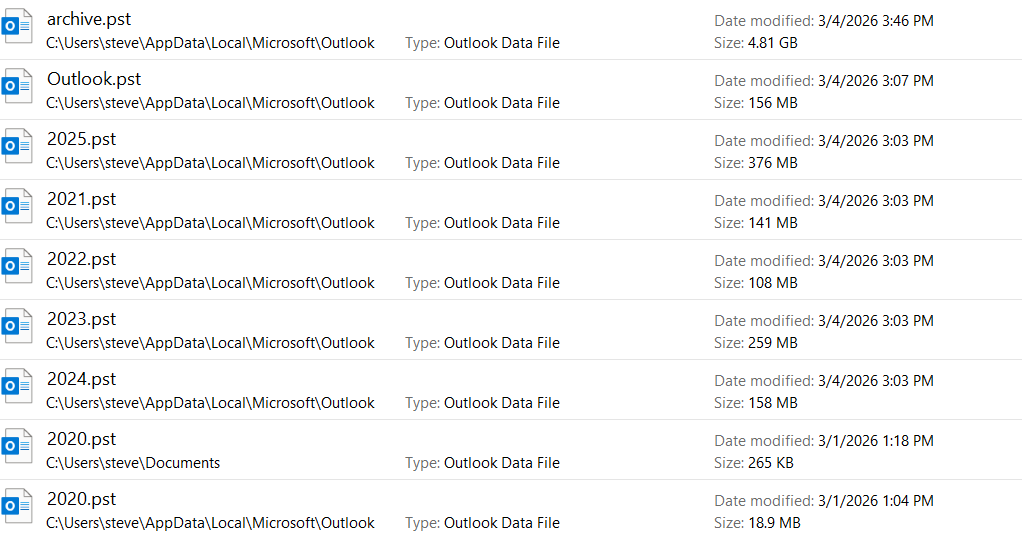
I searched for all my .pst files in C:\, and in addition to the 209, 217 & 223 .psts, these are the ones that showed up.

However, they were last updated when I still was using Outlook 2007, as you can see by the dates, 3/4/26. Also, I have used the archive file today, and a few times last week, and if it was used today, it should have today date on it, shouldn't it ? So basically, I don't know were these below Outlook Classic psts are.


1780368040466.png
 
That is the old path - newer versions of outlook use documents \ outlook files for default pst location. (Easier to backup when in documents.)

Are you are using copies? Right click on Archive name in the folder list in outlook and choose open folder location - or in File > Account Settings > Account Settings > Data files tab - what is the path to those pst?

If you don't have them in the new Outlook profile yet, move them out of appdata path and into a folder in Documents or anywhere that will be easy to backup. Then open them in Outlook.
 
Ok, thanks. I was able to find where I put them during my conversion. They were in my data drive D:\., and the the dates are updating when I add to them, so it is working. And are showing as e.g. archive.pst. And I do have easy acess to them as needed on the left side panel.

A question though...

My truncated left side panel :

209@
217 @
223@
archive
2025
2024

Would I be able to drag in the left side panel e.g. archive and the year files onto e.g. my 217@ account, so that they will then be in the 217 data file under xxxxxxx217@sbcglobal.net.pst. It would make my manual backups easier so that I would just have to go to the documents\outlook files folder intead of going to my d:\ also ?

Or are you saying I could copy my archive.pst file from D\: to documents\outlook files\xxxxxxx217@sbcglobal.net.pst.

Or just put it in documents\outlook files so they remain separate, so that that folder will show:
209.net.pst
217.net.pst
223.net.pst
archive.pst
2025.pst
, etc. ?

Thanks,
 
Or are you saying I could copy my archive.pst file from D\: to documents\outlook files\xxxxxxx217@sbcglobal.net.pst.
Nope, no need since you found the ones you are using. That was only if you were going to use the ones in appdata or are only backing up the ones in documents. But depending on your backup method, you might be able to include the PST in the D drive.

I can be easier to have all PSTs in one folder though - so if some are in docvuments and others in D, they could be all together.

Would I be able to drag in the left side panel e.g. archive and the year files onto e.g. my 217@ account, so that they will then be in the 217 data file under xxxxxxx217@sbcglobal.net.pst. It would make my manual backups easier so that I would just have to go to the documents\outlook files folder intead of going to my d:\ also ?

I'm not sure what you are asking (merging two PST files or changing the location) - but if it's changing locations, all PST should be together in the same location on the hard drive - Yes.
 
Similar threads
Thread starter Title Forum Replies Date
A Wishlist Arthur workman I need the community's assistance thank you Using Outlook 3
CWM330 Outlook 365 Hey Diane! MS 365 Biz Standard and "Potential Spam" addressed to others coming to my JUNK folder? Using Outlook 2
X Open Hyperlinks in an Outlook Email Message (Help with Diane's solution) Outlook VBA and Custom Forms 3
J Diane's Delay Delivery at Specific Times Questions Outlook VBA and Custom Forms 7
CWM030 A quick question for Diane about Exchange Exchange Server Administration 2
Jeff Rott Diane Question on "Use in a Run a Script Rule" Outlook VBA and Custom Forms 1
P Automatically 'Reply to all', and Change the Subject of Email - Diane P help! Using Outlook 0
J Halp Diane!- Notes Using Outlook 3
M Upgrading from: MS Office Professional Plus 2010 to: MS Office Professional Plus 2021 Using Outlook.com accounts in Outlook 16
V Outlook 2021 Microsoft Office Pro Plus 2021 - Inexpensive Lifetime License Using Outlook 6
klpconsulting Programmatic Access Office 365 Pro Plus & RDS Using Outlook 1
P i-Phone 6s Plus receiving 2 notifications from Outlook email Using Outlook 1
C Move from Outlook 2007 Enterprise (MOE) to Outlook Pro plus 2007 Using Outlook 1
S Customizing Connected Services in Office 2013 Pro Plus (O365) Using Outlook 1
vespinoza Upgrading to Outlook Pro Plus from Outlook/Office Standard Using Outlook 3
G Office Profession Plus 2010 is not working for custom forms Using Outlook 3
D Outlook 2010 Professional Plus Using Outlook 2
K Business Contact Manager add-on for Windows 7 Professional Plus? BCM (Business Contact Manager) 3
C Moving Business Contact Manager to Pro Plus, dropping Accounting BCM (Business Contact Manager) 1
V Already have Office 2007 Prof Plus, want to get BCM BCM (Business Contact Manager) 4
J BCM I w2007 and Office 2010 Professional Plus BCM (Business Contact Manager) 5
J Office 2007 Professional Plus BCM (Business Contact Manager) 1
S Outlook add-in multithreading (plus) Outlook VBA and Custom Forms 1

Similar threads

Back
Top