
column with actual email address in Outlook Classic

janb

Member
OS Version(s)
  1. Windows
Outlook version
Outlook 365 64 bit
Email Account
Outlook.com (as MS Exchange)
Operating system::    Windows 11
Outlook version:     Outlook Classic
Email type or host:    IMAP

How can I show the sender's actual email address in a column? The FROM column only shows the display name, which is inadequate in this day of so much fake junk mail that looks real. I found a way to create a custom field with a formula, but my version of outlook does not give me an option to use a formula.

Is there an easy way for a casual Outlook user to do this? I'm not a company or team or group. Just me using Outlook Classic for a million years.

I'm surprised (or am I?) that Microsoft doesn't offer this obviously needed option in Outlook.

Thanks for any and all help.
Jan Burch
 
How can I show the sender's actual email address in a column? The FROM column only shows the display name, which is inadequate in this day of so much fake junk mail that looks real. I found a way to create a custom field with a formula, but my version of outlook does not give me an option to use a formula.

Is there an easy way for a casual Outlook user to do this? I'm not a company or team or group. Just me using Outlook Classic for a million years.

I'm surprised (or am I?) that Microsoft doesn't offer this obviously needed option in Outlook.

Thanks for any and all help.
Jan Burch
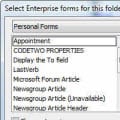
You need to install a config file - steps are in the article below. You could also do it using a macro to copy the smtp to a new field, but the cfg is easier.
 
Diane! Thank you so much. This worked like a charm.
Jan
 
How can I show the sender's actual email address in a column? The FROM column only shows the display name, which is inadequate in this day of so much fake junk mail that looks real. I found a way to create a custom field with a formula, but my version of outlook does not give me an option to use a formula.

Is there an easy way for a casual Outlook user to do this? I'm not a company or team or group. Just me using Outlook Classic for a million years.

I'm surprised (or am I?) that Microsoft doesn't offer this obviously needed option in Outlook.

Thanks for any and all help.
Jan Burch

If you prefer the convenience of shopping from home, it's easy to buy wine online and explore a wide selection of reds, whites, rosés, and sparkling wines for any occasion. Whether you're planning a dinner party or simply stocking up your collection, there's something to suit every taste.
I completely agree that this should be a standard option. Display names are easy to spoof, while the actual email address is often the first thing I check to decide whether a message is legitimate. Having a built-in column for the sender's real address would make sorting through newsletters, notifications, and suspicious emails much easier without needing custom fields or workarounds. Hopefully Microsoft adds this in a future update.
 
I completely agree that this should be a standard option. Display names are easy to spoof, while the actual email address is often the first thing I check to decide whether a message is legitimate. Having a built-in column for the sender's real address would make sorting through newsletters, notifications, and suspicious emails much easier without needing custom fields or workarounds. Hopefully Microsoft adds this in a future update.
You should see the address in the reading pane or opened message - only the message list won't show the address.
 
Similar threads
Thread starter Title Forum Replies Date
T Combine colums to an from into one column Using Outlook 1
H Outlook 2016 Custom made "Message" column Outlook VBA and Custom Forms 7
J Outlook 365 Outlook Macro to Sort emails by column "Received" to view the latest email received Outlook VBA and Custom Forms 0
S Adding a recipient's column to Sent folder in Outlook 2010 Outlook VBA and Custom Forms 1
ad24rouse Column Width of To-Do Bar Using Outlook 5
P How to add a column named categories when searching in Outlook Using Outlook 0
T Can't reposition "Flag Status" column Using Outlook 0
HappyDaddy007 "Size" on field chooser/column displaying incorrect value Using Outlook 3
P Posts in Folder No Longer Group by Conversation Column After Search Using Outlook 0
M Sorting by Day in Date Column Advanced Filter BCM (Business Contact Manager) 1
O Outlook tasks - Add text column with multiple lines Using Outlook 3
D Inbox column color coding Using Outlook 2
S Create a clickable custom column field Outlook VBA and Custom Forms 0
T Column to display which email alias a message was sent to Outlook VBA and Custom Forms 6
O Tasks - Is there a postponed date column? Using Outlook 7
N Column view fonts Using Outlook 4
O How to display senders email address (column) Using Outlook 1
D Column for To Email Address Using Outlook 0
H "Advanced find: column for full folder path? Using Outlook 1
A Can't add a column called "name" to Inbox? Using Outlook 1
D Email Icon Column Using Outlook 2
H SQL update column BCM (Business Contact Manager) 0
C How to copy same text header to multiple emails with custom text column Using Outlook 10
G Wrong display name in from column when removing pf replication Exchange Server Administration 1
R Renaming Column Heading in Contacts view Using Outlook 6
T Column Header Keyboard Shortcut Available? Using Outlook 5
F Not keep sort order after re-change column Using Outlook 1
H Calendar column of time without date? Using Outlook 0
K Sent folder only shows "From", not "To" column Using Outlook 1
S Outlook 2007 Sort Column Shading Using Outlook 1
J From column changes when message is read Using Outlook 1
A How to replace column title in address book Using Outlook 1
B Populating Additional Outlook Column with Date \ Time Using Outlook 0
J Outlook 2010 Inbox sort FROM column not working Using Outlook 29
S Custom Yes/No column field Outlook VBA and Custom Forms 2
S How to get the actual Public Folder path from Favourites Folders Outlook VBA and Custom Forms 3
C too many choices for time zones! can i reduce to actual time zones only? Using Outlook 1
Victor_50 jump to actual folder from favorite Outlook VBA and Custom Forms 1
M Actual Contacts Using Outlook 0
O Using name from address book in lieu of actual email address Outlook VBA and Custom Forms 2
T POP Sent Folder Synchronization Issue & Inbox Email Date Display Disorder Using Outlook 1
T What is the best way of using the Classic Outlook client to change my email address? Using Outlook 5
T Creating a second email account on an Outlook client Using Outlook 2
S Not receving all email since converting from Outlook 2007 to Outlook Classic Using Outlook 3
Rupert Dragwater Outlook 365 taking too long to synchronize each time email is being checked Using Outlook 17
D Request help with a macro for forwarding email Outlook VBA and Custom Forms 7
e_a_g_l_e_p_i Need help updating email in Outlook 2021 Using Outlook 10
N Why does Outlook keeping adding to the email address I have in my notes portion of a contact? Using Outlook 2
P SPAM message about Comcast email migration to Yahoo Using Outlook 1
P anything new on the supposed shutdown of comcast.net email? Using Outlook 6

Similar threads

Back
Top