Rename Favorites

Vincenzo

Senior Member
Outlook version
Outlook 2016 32 bit
Email Account
IMAP
Operating system::    win 11
Outlook version:     2024 LTSC
Email type or host:    various IMAP and exchange

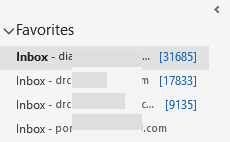
outlook LTSC 2024 - How do i rename the inboxes that I have put in Favorites so that I can tell them apart? they all just say Inbox now.
Thanks
 
If you have more than one account, they should say "inbox - email address". If you have subfolders named the same - say Inbox and Inbox \ Inbox - then both will be Inbox - email address.

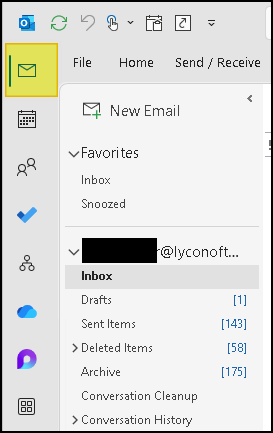
If you collapse the folder list, it only shows inbox - hovering over inbox button will NOT show the address. They will be in the same order as on the open folder list. You can click to expand the list if you need to see account names (or view other folders not visible on the collapsed list). It will collapse again as long as you don't pin it open.
1776876023214.png


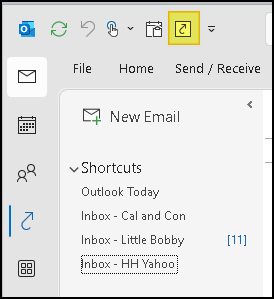
1776876079822.png
 
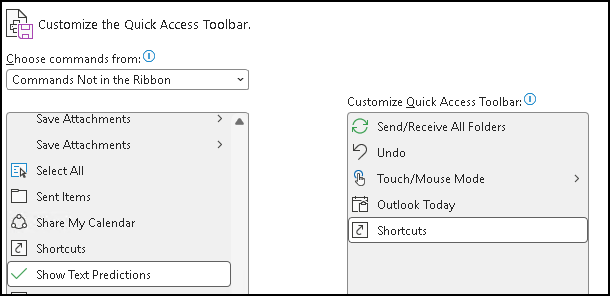
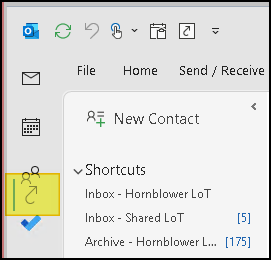
They changed the Ctrl+7 keyboard shortcut to Shortcuts to Loop. So I added Shortcuts to my QAT.
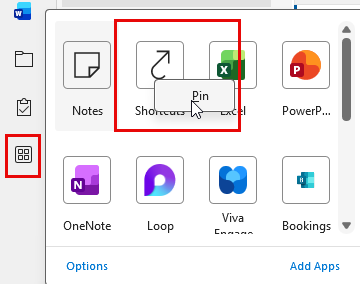
They changed how shortcuts work on the vertical rail. If you position the shortcut icon as #7, ctrl+7 works.


1776953216180.png
 
If you position the shortcut icon as #7, ctrl+7 works.
Didn't know that. Thanks.

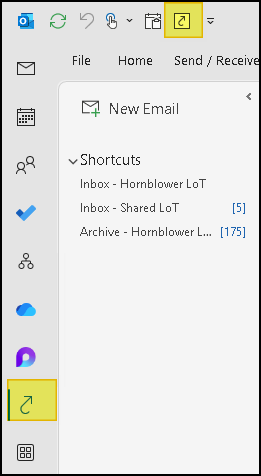
But I can't seem to get it to stay in the vertical rail. I use my QAT button to make it show:

1776967341731.png


But as soon as I click on any other button in the rail (e.g. Mail) it's gone:

1776967486541.png


And if I click and drag, it indicates I can drop it in a different position, but it doesn't move.

1776967707817.png


I CAN move other buttons on the rail. But not that one.
 
When I came back today and turned on my wife's new computer, the inboxes in Favorites now showed the email account name, like you said they should. Weird.
Thanks so much.
 
Similar threads
Thread starter Title Forum Replies Date
mikolajek Mailboxes rename macro stopped working Outlook VBA and Custom Forms 4
P Yahoo/IMAP folder rename by Outlook desktop 365 Using Outlook 0
M Outlook 365 Rename Outlook Priority Using Outlook 3
G Save and Rename Outlook Email Attachments Outlook VBA and Custom Forms 0
C How to rename subject line and forward the email Outlook VBA and Custom Forms 2
W Save and rename outlook email attachments to include domain name & date received Outlook VBA and Custom Forms 4
W Save Outlook attachment in network folder and rename to current date and time Outlook VBA and Custom Forms 18
D Autosave Attachment and Rename Outlook VBA and Custom Forms 1
F Rename Contacts Greyed Out Using Outlook 0
N Rename Subject Line with Email Content Outlook VBA and Custom Forms 3
K IMAP Server Wants to alert you to the following: cannpt rename system folder Using Outlook 1
Diane Poremsky Rename Email Accounts and Data Files in the Folder List Using Outlook 0
S VBA code to rename a task (flagged message) Outlook VBA and Custom Forms 1
C Save outlook attachments and rename/append files with identifier from subject line Outlook VBA and Custom Forms 3
D VBA script to auto download attachments and rename file according to subject line Outlook VBA and Custom Forms 23
B Your IMAP server wants to alert you to the following: cannot rename system folders Using Outlook 8
L IMAP server wants to alert you to the following: cannot rename sytem folders Using Outlook 14
T Rename Outlook 2010 .PST Files Using Outlook 14
B IMAP server wants to alert you to the following cannot rename system folders Using Outlook 3
M Outlook Today. How to rename IMAP inbox accounts to something else than inbox? Using Outlook 4
A Rename resource Exchange 2003 Using Outlook 2
O Run Rule to Rename Email and Add to Tasks Using Outlook 4
M Rename Database BCM (Business Contact Manager) 1
J how do i rename the default fields in MS Business Contact manager BCM (Business Contact Manager) 1
P Cannot understand how to use Favorites Using Outlook 4
L Favorites for People/Contacts? Using Outlook 1
L Favorites don't update Using Outlook 1
G Favorites panel entries move around after restarting Outlook 2016 Using Outlook 1
M New Message Indicator in Favorites Using Outlook 2
T Recovering Favorites From Exchange Exchange Server Administration 4
D Not enough room in Favorites Using Outlook 1
Kristine RS box added in Favorites disappears Using Outlook 6
J Favorites in Public Folders issue Outlook VBA and Custom Forms 0
Commodore Favorites vs. Shortcuts Using Outlook 1
M Automatically highlight unread mail in Favorites inbox(s) (Blue number) Using Outlook 1
P Problem: Favorites not persisting. (Oulook 2010) Using Outlook 1

Similar threads

Back
Top