
Outlook spam filter misbehaving

Vincenzo

Senior Member
Outlook version
Outlook 2016 32 bit
Email Account
IMAP
Operating system::    Windows 11
Outlook version:     2021 LTSC
Email type or host:    IMAP

Outlook 2021 LTSC is occasionally putting emails I send to myself, as well as emails from my wife, into the Junk folder.
I've turned off the Outlook Spam Filtering (see attachment)
Both emails are in the Outlook Contacts.
I've also put our email addresses into the Safe Senders tab.
I've also confirmed it is not being filtered by the webmail app or my phone.
It does not happen on all emails I send to myself, or that wife sends to me. Only occasional ones.
Any ideas?
Thanks
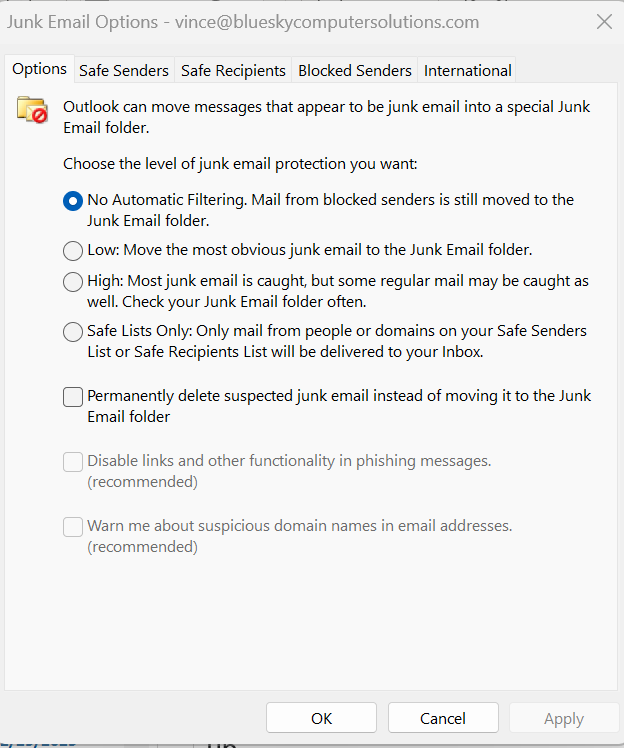


Screenshot 2026-01-13 172144.png
 
That would be your isp filtering it, not outlook. Outlook's filters haven't been updated in like 10 years, which is why no filtering, blocked list only is recommended. Safe list won't apply to IMAP mail because the server moves it before Outlook gets it in the inbox.

The only other cause would be a rule that deletes mail to you / from you.
 
Could my ISP move it to Junk folder?
I was concerned my email host, Hostgator, might be doing it. But I tested that suspicion by only having the Hostgator webmail open - no phone or Outlook. Then sent myself an email from there. It appeared in the Inbox. I waited a minute or two. Then I opened Outlook. As soon as I opened Outlook, I saw in the webmail that the email got moved to the Junk folder.

But that only happened when the email had the same content in it that a previously Junked email had. (Content that seemed innocent enough to me.)
When I created another "clean" email and tested it like that, it stayed in the Inbox when Outlook got opened.
I could post that content if you wanted, but even if it was "spammy" in some way, Outlook should not have moved it, I would think, since my email is a Safe Sender.
Also, when I went through the 46 emails in the Junk folder, there were plenty of not-spammy-looking emails in there, from my wife and friends. and several of those senders were already in the Safe Senders list, from previous instances of this happening that I had caught.
 
Hosts can move mail to the junk folder - but if you are using a custom domain, you would need to enable junk filtering. Gmail, yahoo etc will do it automatically but you are using HostGator, so they shouldn't do it on their own.

Do you have any rules? That could do it too - rules that look for words in the subject or body is a typical culprit, especially if the words are common in legit email. Rules would not be affected by the safe list.
 
I was surprised to hear you say, if I understood correctly, that Safe Senders can still be sent to Junk by rules.

I only have 3 rules on that Inbox.
Based on what you have suggested, one of them is suspect.
It looks for "line of credit" or "loc" in the subject and body. I can see now that "loc" could create false positives. Maybe " loc " would be safer.
And that rule I only created about a month ago. So the time frame fits with this issue.

So I am turning off that rule and I'll monitor for a while.
I've added the Junk folder to my Favorites section in the left column so that I can easily monitor when something goes there.

Thanks for your help.
 
Last edited:
Or remove loc from it. That would apply to any word beginning with loc - locate, location etc. You could try adding it as "loc " - the space should prevent it from matching loc*. It will let some slip in, such as if the word is at the end of a sentence or subject, so no space added.
 
Since I made those changes to my rules, I've not had any problems with the junk mail filter.
Thanks, Diane!
 
Similar threads
Thread starter Title Forum Replies Date
e_a_g_l_e_p_i Is there a good third party SPAM filter that intergrates with Outlook 2010 Using Outlook 7
O Outlook Web Access - how to disable spam filter Using Outlook 6
H Spam email in Gmail not visible in Outlook Using Outlook 3
J Renegade spam URL line displayed in old local Outlook 365 email title Using Outlook 3
F Email being marked as Spam by Gmail and not being visible in Outlook Using Outlook 5
B Spam folder not showing in Outlook Using Outlook 5
B Outlook - Mail from safe senders list being sent to Spam Folder Using Outlook 0
P Outlook 2010 trusted emails going to spam folder Using Outlook 18
V Spam folder not showing in Outlook Using Outlook 4
M godaddy says my outlook's sending spam. Using Outlook 4
Ascar_CT MS Outlook 2010 with Hotmail connector went spam control nuts Using Outlook.com accounts in Outlook 1
D Outlook Add-on for Exchange Spam Management? Exchange Server Administration 2
Paul Van Cotthem Is calendar synchronization between Office 2013 and Outlook.com capped by spam or bandwidth limits? Using Outlook.com accounts in Outlook 12
C Outlook Changing Sent Message Headings to SPAM =?UTF-8?B?4Liq4Lij4LmJ4L Using Outlook 1
L Fresh Install of Windows 11, saved previous image, how to retrieve Outlook Contacts Using Outlook 10
C Can't Use Custom Contact form in Outlook Classic since early January 2026 Outlook VBA and Custom Forms 7
e_a_g_l_e_p_i Need help updating email in Outlook 2021 Using Outlook 10
L what are the downsides of running both classic and new outlook on same win 11 pc? Using Outlook 2
P Preventing permanent deletions in Outlook on the Web Using Outlook 0
L any trick to embedding images in new outlook and outlook on the web contacts? Using Outlook 4
L new outlook contacts searching Using Outlook 5
R Outlook 2010 Outlook 2010 migration question Using Outlook 2
W New Outlook PEOPLE blank Using Outlook 6
C New Outlook issues with Gmail, particularly labels/folders Using Outlook 3
E What is the next workaround for macro in New Outlook 1.2025.1111.100 Outlook VBA and Custom Forms 3
E Need to digitally sign macro but VBA\Outlook crash Outlook VBA and Custom Forms 4
P Outlook 2003 no longer opens "without" Folder List Showing in Navigation Pane Using Outlook 2
Hornblower409 Outlook 2010 - Never ending update Using Outlook 0
V Outlook created new profile? Using Outlook 1
J Outlook inbox question Using Outlook 4
T How to Add AT&T Contacts to Outlook 365 Using Outlook 5
F Outlook 2021 outlook on iPhone Using Outlook 1
F Outlook 2021 Outlook on iPhone asks for password Using Outlook 0
P ics calendar entries suddenly open up new Outlook Using Outlook 3
P Outlook "forgets" password until system rebooted Using Outlook 2
N Why does Outlook keeping adding to the email address I have in my notes portion of a contact? Using Outlook 2
M Anyone integrated AI website builders with Outlook for automated client communications? Using Outlook 4
V Gmail in Outlook Using Outlook 2
T Where has the Copilot icon gone in my Outlook desktop client? Using Outlook 10
P New way by Microsoft to get people to use the new Outlook Using Outlook 4
C How to keep emails in account in Outlook after closing the IMAP account Using Outlook 1
cymumtaz IMAP calendars in New Outlook Using Outlook 5
T Constantly Have To Log In To Outlook On The Web Using Outlook.com accounts in Outlook 2
T Cannot Find Outlook Noted On Android Using Outlook 4
O Outlook 2024 not showing that messages are replied to or forwarded Using Outlook 3
C Outlook 365 send/receive takes FOREVER - as in 40 minutes Using Outlook 7
I Outlook 2024 LTSC syncing with iCloud calendar - can only make appt. in iCloud Using Outlook 2
Kika Melo Outlook ribbon customisations do not 'stick' Using Outlook 12
J IMAP Folders Confusion in Windows Classic Outlook Using Outlook 1
A Missing Sent Emails in New Outlook Using Outlook 18

Similar threads

Back
Top