Request help with a macro for forwarding email

dhsanjay

New Member
OS Version(s)
  1. Windows
Outlook version
Outlook 2019 64-bit
Email Account
Office 365 Exchange
Operating system::    Windows
Outlook version:     Outlook 2019
Email type or host:    exchange server

Dear Team,
Greetings. I am a novice in VBA.
Request your kind help with a macro to do the following activity on standardized emails.
Step 1) Forward the open mail with attachments
Step 2) Copy paste the body of the original email into the body of the new mail, at the top.
Step 3) Delete part of the body of the old mail. i.e. keep only the top 3 lines of the body. else since these 3 lines are standard, we can also insert later aftre deleting.
Step 4) add to email addresses.
Step 5) add cc email addresses.
Step 6) Display/ Show the new email on screen, to review.

Would be very grateful.

Regards
DHS
 
Step 1) Forward the open mail with attachments
Easy.

Step 2) Copy paste the body of the original email into the body of the new mail, at the top.
You want to replace the body with the forward header with just the body, correct? That is easy.

Step 3) Delete part of the body of the old mail. i.e. keep only the top 3 lines of the body. else since these 3 lines are standard, we can also insert later after deleting.
Exactly 3 lines or a specific number of characters? Specific # of characters or sentences / paragraphs is easy. Actual lines you see on the screen is hard, possibly impossible.

Step 4) add to email addresses.
Easy
Step 5) add cc email addresses.
Easy
Step 6) Display/ Show the new email on screen, to review.
Easy

This will do all but possibly step 3 - it uses first 1000 characters. Counting sentences or paragraphs would need some code from word added.

Code:
Sub ForwardEmail()
    Dim Item As Outlook.MailItem
    Dim myForward As Outlook.MailItem
    
' The first line is if you read the message in the reading pane, second is for opened message.
' The first line *should* work even on opened messages as long as it is still selected.
Set Item = Application.ActiveExplorer.Selection.Item(1)
'Set Item = Application.ActiveInspector.CurrentItem

Set myForward = Item.Forward
myForward.Body = Left(Item.Body, 1000)
myForward.Recipients.Add "alias@domain.com"
myForward.CC = "alias1@domain.com"
myForward.BCC = "alias2@domain.com"

myForward.Display

End Sub
 
BTW - if you want html formatting, it's
myForward.HTMLBody = Left(Item.HTMLBody, 1000)

But... the underlying html code counts towards the character count.

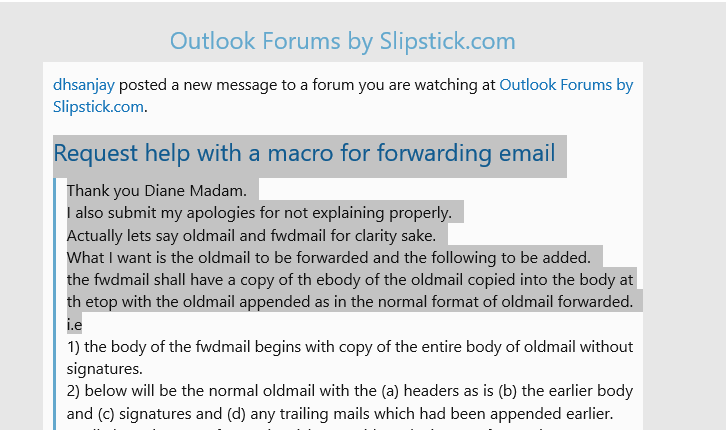
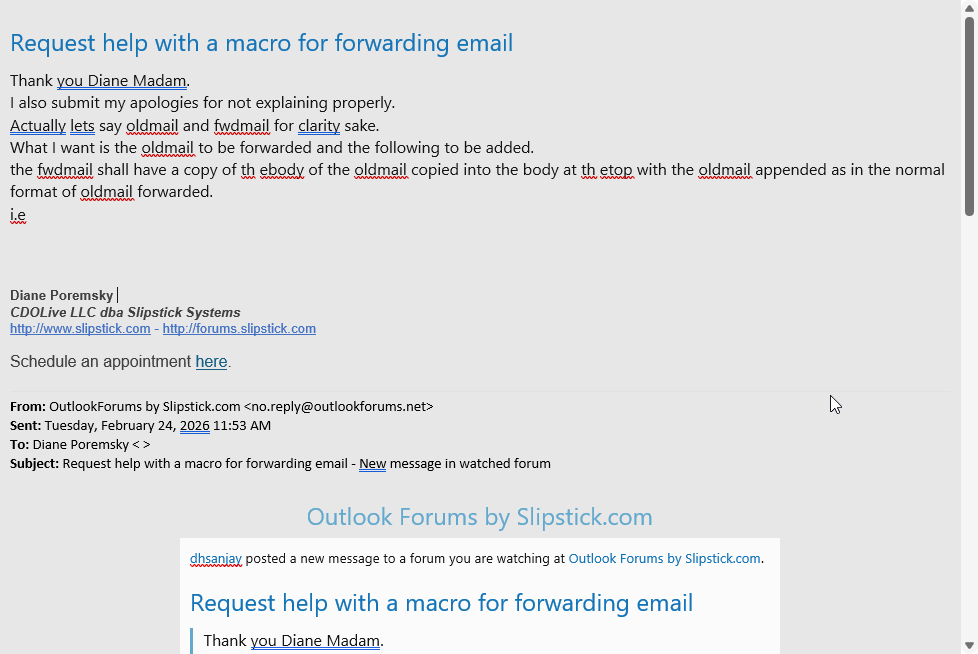
This screenshot will give you an idea of how much could be lost to HTML code - the plain text version has more lines not shown in the screenshot.

1771940974524.png
 
Thank you Diane Madam.
I also submit my apologies for not explaining properly.
Actually lets say oldmail and fwdmail for clarity sake.
What I want is the oldmail to be forwarded and the following to be added.
the fwdmail shall have a copy of th ebody of the oldmail copied into the body at th etop with the oldmail appended as in the normal format of oldmail forwarded.
i.e
1) the body of the fwdmail begins with copy of the entire body of oldmail without signatures.
2) below will be the normal oldmail with the (a) headers as is (b) the earlier body and (c) signatures and (d) any trailing mails which had been appended earlier.
3) all above in HTML format i.e. rich text without losing any formatting.
4) now in the body of the oldmail we can have two choices as below :-
4a) either leave the top 4 or 5 lines and rest of the body alone deleted leaving the signatures and trailing email as is.
4b) or the entire body of the oldmail deleted and since the statment is standard like below which can be added, but not deleting the signature and the trailing mails.
"Dear Sir,

Please find the details of PO. Request for your approval.

Regards"
5) I will try to show a schematic of what i want on the screen in the fwdmail after clicking button for forwarding.
the ribbon
to name1@domain.com
cc name2@domain.com, name3@domain.com, name4@domain.com '''' "[[ all are internal to the organisaton, suggest if only names can be added in the macro which will turn into email ds later in the email]] "
bcc
Subject : same as earlier except that the first 3 character "FW :" to be deleted
Body of fwdmail
the body copyied from oldmail
with my signature
the oldmail with the normal way of headers
the body of the oldmail with only the 4a or 4b whichever is easier
signature of oldmail
trailing emails if any

6) please also advise how to add a button for this macro to run - i know the earlier design of 2008 but after that the ribbon is little confusing to me.

Thanks once again for your kind help will be remembered for long.
Appreciate your efforts as well.

Thanks and Regards
DHS
 
Subject:
myForward.Subject = Item.subject


Keeping the forward part is mostly easy - removing signatures from an incoming message is hard. One option could be to select what you want to keep then run the macro - will add that code in a new message.

1) the body of the fwdmail begins with copy of the entire body of oldmail without signatures.
2) below will be the normal oldmail with the (a) headers as is (b) the earlier body and (c) signatures and (d) any trailing mails which had been appended earlier.

The vbcrlf adds a blank line - you can use more to add more lines "& vbcrlf & vbcrlf &" would add two blanks.

myForward.htmlBody = Left(Item.htmlBody, 1000) & vbcrlf & forward.htmlbody ' or item.htmlbody if you don't want the forward header
 
For this macro - you select the text you want to copy, then run the macro. Result is in the second screenshot.
1771958194027.png


1771958168220.png


This code is a version of these macros on this page - the instructions to set the references to Word are at the end of the article.
Create Task or Appointment and Insert Selected Text | Slipstick Systems

Code:
Sub ConvertSelectionEmail()

    Dim objNewMail As Outlook.MailItem
    Dim objMail As Outlook.MailItem
  
    ' Add reference to Word library
    ' in VBA Editor, Tools, References
    Dim objInsp As Inspector
    Dim objDoc As Word.Document
    Dim objSel As Word.Selection

    Set objMail = Application.ActiveExplorer.Selection.Item(1)
      
    On Error Resume Next
 
  If Not objMail Is Nothing Then
        If objMail.Class = olMail Then
            Set objInsp = objMail.GetInspector
            If objInsp.EditorType = olEditorWord Then
                Set objDoc = objInsp.WordEditor
                Set objWord = objDoc.Application
                Set objSel = objWord.Selection
        With objSel
             .Copy
       End With
 
            End If
        End If
    End If
    

Set objNewMail = objMail.Forward
    
    Set objInsp = objNewMail.GetInspector
    Set objDoc = objInsp.WordEditor
    Set objSel = objDoc.Windows(1).Selection

With objNewMail
    .CC = "alias1@domain.com"
    .BCC = "alias2@domain.com"
    .Subject = objMail.Subject
    objSel.PasteAndFormat (wdFormatOriginalFormatting)
    
' uses word vba to add blank lines
    objSel.Range.InsertParagraphBefore
    objSel.Range.InsertParagraphBefore
    
    .Display
End With
    
    Set objNewMail = Nothing
    Set objMail = Nothing
End Sub
 
Similar threads
Thread starter Title Forum Replies Date
F Creating Meeting Request Custom form and distribute it to domain user HELP!!! Using Outlook 0
D 2d help request-problems sharing BCM database BCM (Business Contact Manager) 1
Mark Foley The upload of "Calendar" failed. There was a problem with the request. Using Outlook 6
Potty Ash MS Outlook 2010 custom form - validation or formula to request user to check a checkbox Outlook VBA and Custom Forms 16
S Accepting meeting request from calendar keeps the meeting request in the inbox Using Outlook 2
D Add all meeting rooms to the meeting request by default Outlook VBA and Custom Forms 0
G Auto accept meeting request for non primary account Outlook VBA and Custom Forms 1
T Double clik behavior on agenda open a new meeting request Using Outlook 1
Diane Poremsky Autoaccept a Meeting Request using Rules Using Outlook 2
Diane Poremsky iPhone and the Meeting Request Bug Using Outlook 0
Y Creating custom appointment request form with multiple mail recipients Outlook VBA and Custom Forms 5
Diane Poremsky Task Request Status Update Address Missing Using Outlook 0
Diane Poremsky How to Create a Pick-a-Meeting Request Using Outlook 0
D Meeting Request - Too Many Recipients Using Outlook 0
D Leave Calendar Request Triggers To Supervisors Using Outlook 1
O How to send outlook meeting request as attachment Using Outlook 3
I Multiple events in single request Using Outlook 6
N Outlook meeting request decline behavior Using Outlook 1
S Open custom meeting request with checkbox Using Outlook 0
D Restore Delete Calendar Meeting Request Using Outlook 3
S signature in meeting request Using Outlook 2
J How create an .ics file with a multiple apointment request Using Outlook 0
M Room Reservation request showed "None" in Tracking-View Tracking Status. Exchange Server Administration 0
A Issue with respond to an email message with a meeting request Using Outlook 0
T Request Addition to Code- convertMail to AccountAppt (from www.Slipstick) Using Outlook 16
O Outlook Holiday Request Form Design Using Outlook 0
J Holiday request form Using Outlook 7
G Request Form Using Outlook 2
J Exclude myself in meetin request Using Outlook 0
J Outlook Contacts: How to filter contact phone numbers from a cti request Using Outlook 1
J outlook meeting request random people are deleted Using Outlook 2
R How to show Sent Date in Meeting Request printouts Using Outlook 1
P Not able to receive meeting request Using Outlook 2
G Autoaccept/autodeny meeting request after crosscheck with calendar Using Outlook 1
B Outlook Calendar - Time zone changes after the meeting request is accepted. Using Outlook 1
L Need to Delete One Attendee from Meeting Request Without Resending the Request Using Outlook 1
R Disable request to share a calendar Using Outlook 1
P Time Off Request - not posting to public folder once approved Using Outlook 0
E Outlook invitation request mail sending twice problem Using Outlook 1
D Sending Multiple Meeting Dates in One Meeting Request Using Outlook 4
Diane Poremsky Error: 5102. Server. Maximum request length exceeded Using Outlook.com accounts in Outlook 0
S use the custom form to show meeting request in recipient's calendar Outlook VBA and Custom Forms 1
D Tracking meeting request responses in Outlook Outlook VBA and Custom Forms 16
T Custom Task Request Deployment Outlook VBA and Custom Forms 5
E Strange save request when closing Outlook 2007 Outlook VBA and Custom Forms 4
M Create editable meeting request with attendees from .ics Outlook VBA and Custom Forms 3
À How to send a document Attachment with the Meeting Request. Outlook VBA and Custom Forms 1
D Automark incoming appointment request as private Using Outlook 3

Similar threads

Back
Top