Delete Outlook emails from MS server

Donnat

Senior Member
Outlook version
Outlook 2019 64-bit
Email Account
Outlook.com (as MS Exchange)
Hi. I use MS365 Outlook. I thought emails were periodically deleted from the MS server, but seems they are not! It’s great to be able to recover a deleted email but, I do not want all my emails to permanently be on MS Servers! I can go in and manually delete, which I have done. It’s become more difficult since I migrated off Windows to a Macbook, but I can still do it from Outlook.com

Is there an automated way to delete the emails from the server? What are you all doing about it? thanks! Donna
 
You are using Outlook desktop software?

Is the account added as an exchange account?


If you delete from outlook, the deletions will sync to the server and after 30 days, the deleted items are emptied then 15 days later, the recovery folder. So deleted items shouldn't be around longer than 45 days. But the messages are left on the server until you delete them.

POP accounts can delete as messages are downloaded - the default is after 14 days. But outlook.com has an option to save them in a subfolder of deleted items. Sent messages don't sync with POP accounts and outlook.com saves a copy of all messages sent through the account.


The best option: have the account added as Microsoft exchange and use autoarchive to move mail to a pst file so its deleted from the server.

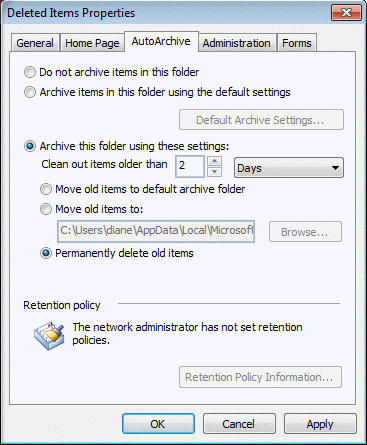
You can use auto archive to delete mail in the Deleted items folder as it ages, before the 30 days are up.
 
You are using Outlook desktop software?

Is the account added as an exchange account?

If you delete from outlook, the deletions will sync to the server and after 30 days, the deleted items are emptied then 15 days later, the recovery folder. So deleted items shouldn't be around longer than 45 days. But the messages are left on the server until you delete them.

POP accounts can delete as messages are downloaded - the default is after 14 days. But outlook.com has an option to save them in a subfolder of deleted items. Sent messages don't sync with POP accounts and outlook.com saves a copy of all messages sent through the account.

The best option: have the account added as Microsoft exchange and use autoarchive to move mail to a pst file so its deleted from the server.

You can use auto archive to delete mail in the Deleted items folder as it ages, before the 30 days are up.
Thank you for your response. Yes it is an exchange account. I am using Outlook (MS365) on Macos - I found instructions for what you posted above, but they seem a little complicated and involved (a bit above my pay grade!! ; ) I used to have a PST file - I am not sure what I have now - Macos is still a bit new to me and I don’t know where things are or what they’re called! I think I may just continue to delete manually.
 
Where is My Outlook PST File on Mac? - [SOLVED]
I found this article that very clearly explains PST on MACOS. So there is no PST, it’s OLM. That site also had the instructions I mentioned above for archiving. I’ll just continue to do it manually a couple times per year. I’m a little intimidated by the steps necessary to automate it. thanks!
 
Ah yes, if you are on mac, you won't have autoarchive and will need to do it manually. Your archive options are definitely limited, compared to windows.
Yeah, I made the decision to switch to MAC (in Aug 2023) after thinking about it for a long time. I did not want to move to Windows 11 - which I would have had to do on a new computer. I am still using MS365/Outlook for mail. I am typing on my ipad right now - which is great and MS365 works nicely on IPADOS (minus some functionality). The Macbook, after being a lifelong Windows user, is a bit difficult for me. I used to be able to do all kinds of things on my laptop and muck around - nothing major, but more than the average user; I was comfortable with managing my computer. Now, I’m afraid to even LOOK at the Mac Library or don’t know how to check things on a deeper level. It’s just so scary & foreign to me!! I’m afraid I am going to mess something up! Yes, I do need to get educated on MACOS!! It’ll take time.

I think my biggest difficulty is using MS365 on Mac. I have used the Apple counterparts and, imho, MS products are better. I prefer them over Apple’s, but using them on the Mac - with some functions available on Windows machines not on available on MAC + not being familiar with MACOS = me being not 100% comfortable or happy with what I can and cannot do on my computer.

I think maybe a cautionary note for those who want to transition from Windows to Mac - my experience is you lose certain functions or they don’t work the same or are not as robust as they are on an MS computer (which is understandable). But, it’s the path I’ve chosen. I suppose I could go back to Windows, but I am not going to do that at this time. Maybe once they’ve shaken all the bugs out of Windows 11 Hahahaha! Thanks again for your help Diane.

And BTW - if anyone has transitioned from Windows to Mac - using MS365 I’d be interested to hear about your experience. Maybe some of my experience is due to ’user error’ and/or lack of knowledge.
 
The Macbook, after being a lifelong Windows user, is a bit difficult for me. I used to be able to do all kinds of things on my laptop and muck around - nothing major, but more than the average user; I was comfortable with managing my computer. Now, I’m afraid to even LOOK at the Mac Library or don’t know how to check things on a deeper level. It’s just so scary & foreign to me!! I’m afraid I am going to mess something up! Yes, I do need to get educated on MACOS!! It’ll take time.
I got a macbook m1 in 2020 - was working on a test for linkedin that applied to both outlook mac and windows and used a hackintosh but it was really slow so I bought a real mac. LOL

Sweet little computer - took me forever to get used to the order of the ctrl/alt keys - I use ctrl+ shortcuts a lot. I tried remapping the keys but without changing the keycaps, it was too hard to learn other mac functions. Once I got used to them, I had trouble using my windows laptop. Switching between it and my desktop wasn't a problem - just the laptops because both keyboards are very similar.

I did splurge for parallels, mostly so I have windows available if it need to work on a macro or something when I only have the macbook with me.

But even 3 years later, I don't do a lot of messing in the OS, not like I do in Windows.

Outlook has a lot of limitations for me - I can't stand not being able to create custom views, see the calendar in list view etc. But if I get desperate, I have parallels. The other office apps are pretty close to parity with windows.

Unfortunately for outlook, they are bringing Outlook for windows down to the level of the mac, not making Outlook for mac closer to windows. :(
 
Unfortunately for outlook, they are bringing Outlook for windows down to the level of the mac, not making Outlook for mac closer to windows. :(
Thank you for the feedback. I need to stick with Mac and educate myself on using it. It is discouraging to hear they are deprecating functionality for Outlook!!!
 
Hi Donna! Managing emails on MS365 Outlook can indeed be a game of strategy. While emails are not automatically deleted from the server, there are ways to streamline the process. You can explore setting up email retention policies or rules within Outlook to automatically delete emails after a certain period. Additionally, using Outlook.com or other platforms for manual deletion offers flexibility, even on a Macbook. It's all about finding the right 'game plan' that suits your email management needs. Good luck
Thank you for your response. Where can I set Outlook email retention policies/rules? I know I can set rules to delete emails from Outlook Mail, but can I set rules to delete emails from the server? I have been manually logging on to outlook.com to delete from the server every few months. Which is fine if that’s what I have to do, it has to be done!! I cannot imagine leaving every email on MS servers forever, or for as long as they choose to keep them!! ; )
 
Retention policies are only available for Microsoft 365 business accounts, not outlook.com.

If you want to remove mail from the server and save a copy, archive it using classic Outlook.

If you are deleting mail in an app the deletion should sync to the server and in 30 days, it will be deleted.
 
Retention policies are only available for Microsoft 365 business accounts, not outlook.com.

If you want to remove mail from the server and save a copy, archive it using classic Outlook.

If you are deleting mail in an app the deletion should sync to the server and in 30 days, it will be deleted.
Thank you Diane, I checked the server deleted items. I used to have more functionality on deleted mail view when I was using a Windows computer, but with the Mac I don’t see date deleted, can’t sort columns, etc. I miss that!!!

And, right now I only have my ipad so there is no deleted items folder. When I go into Outlook.com my deleted items view is: “From” “Subject” “Received” (no date deleted). There are over 800 emails going back to the end of January (but again, I don’t know date deleted). When I first checked the server several months ago, there were over 3000 emails, which I manually deleted.

I just took some screen shots and will check again in a couple weeks to see if emails at the bottom of the list have dropped off.
Maybe I am wrong and they are deleting, but if not I can check/manually delete.
 
Thank you Diane, I checked the server deleted items. I used to have more functionality on deleted mail view when I was using a Windows computer, but with the Mac I don’t see date deleted, can’t sort columns, etc. I miss that!!!

And, right now I only have my ipad so there is no deleted items folder. When I go into Outlook.com my deleted items view is: “From” “Subject” “Received” (no date deleted). There are over 800 emails going back to the end of January (but again, I don’t know date deleted). When I first checked the server several months ago, there were over 3000 emails, which I manually deleted.

I just took some screen shots and will check again in a couple weeks to see if emails at the bottom of the list have dropped off.
Maybe I am wrong and they are deleting, but if not I can check/manually delete.
I've tested it before and luckily it worked for me, but not right away.
 
I'm pretty sure he doesn't mean anything by it - because he is a spammer. I had several spammers last week that replied to posts and inserted a link in the quote. His attempt failed. He logs in from a lot of different IPs worldwide.
 
I'm pretty sure he doesn't mean anything by it - because he is a spammer. I had several spammers last week that replied to posts and inserted a link in the quote. His attempt failed. He logs in from a lot of different IPs worldwide
oh, didn’t think of that!!! in all my years of using online help, I haven’t come across spammers too often, so it’s not my first thought. i usually check all url’s on Virus Total, but I would tend to trust a link in a forum. always have to be careful! thank you!
 
I didn't realize how bad it was until I opened my website for comments and hosted my own forum. It gave me a chance to see the different methods they use to get their spam in. Definite learning experience. :)
 
I'm a long time outlook user on Windows. I want/need to keep deleted email longer than 30 days. I have multiple email accounts- several gmail, one from outlook.com that's exchange hosted, and a couple hosted on a different imap server. On all of these accounts I had the slider for keeping offline set to the max value. Sometimes it seemed to keep stuff in trash forever, and sometimes they were permanently deleted after 30 days, and I didn't want to take a chance if the slider didn't work. On my primary gmail account I created a "Gmail Deleted" folder, and every three week moved whatever is in trash into that folder to get around the 30 days.

However, it seemed that some other accounts the email was kept longer- perhaps following the slider. Now I just looked and there's nothing in any of my trash folders older than 30 days. Sigh. Am I stuck with creating a "Deleted Keep" or such folder, and then trying to remember to move files into it on a periodic basis?

Maybe I'm somewhat confused on the order of events or how things worked, and with multiple email accounts of different stripes I could be missing something.
Any thoughts? THanks in advance for any ideas.
 
The sync settings have nothing to do with the deleted items automatically being deleted.

Sometimes it seemed to keep stuff in trash forever, and sometimes they were permanently deleted after 30 days,
The automatic deletion of junk mail and emptying deleted items is set by the server. Gmail and outlook.com 30 days for both folders. (That's 30 days from when it went into the folder.)

Other servers may not clear out the folders automatically.

If you want to keep deleted items longer and are not using Archive button (it moves mail to a folder named Archive), use that for the 'keep deleted' and the Deleted items for junk you don't want to keep. Or set up a Quick Step.

My reason for saying if not using Archive, is because you don't want to mix possible trash with things you really want to keep but want them out of the inbox. Archive was added for the zero-inbox people so they'd have a one button way to file mail. Backspace is the keyboard shortcut for it.
 
Similar threads
Thread starter Title Forum Replies Date
Retired Geek Outlook on MAC delete duplicate Sent emails Using Outlook 0
J Moved many emails to Outlook external folder, need to delete on Gmail server Using Outlook 14
F Outlook 2010 unable to delete emails from scanner Using Outlook 1
D Outlook 2010 registry hack - delete emails - Google Apps Using Outlook 0
H Macro to Delete Duplicate items in Outlook calendar where title is the same and date is the same Outlook VBA and Custom Forms 0
B Delete Read Receipts in Your Outlook Outlook VBA and Custom Forms 0
K How can I delete an e-mail from Outlook Using Outlook 1
J Unable to delete folders in Outlook 2019 / Windows Using Outlook 0
Horsepower Cannot delete gmail in iPhone Outlook outbox Using Outlook 1
F Wishlist Outlook suddenly began synchronizing deleted items every time I delete a single email. Using Outlook 2
R Outlook 365 update sets delete from server flag Using Outlook 1
Z Outlook 365 delete reminder you can’t make change to contents of this-read only folder Using Outlook 4
9 Outlook 2016 How to save an Outlook attachment to a specific folder then delete the email it came from? Using Outlook 1
F Delete/create/reset Exchange mailbox on Outlook.com Using Outlook.com accounts in Outlook 3
R How to delete Facebook Contacts folder in Outlook 365 Using Outlook 7
C Outlook 2016 cannot delete, email showing in root Exchange Server Administration 5
B Outlook 2016: Can't delete default calendar but I don't use it Using Outlook 7
M Can't Delete iCloud Calendar Notifications From Outlook 2016 Using Outlook 0
makinmyway Bulk Delete Contacts in iOS Outlook App Using Outlook 4
Diane Poremsky Delete an Outlook Group Using Outlook 0
L Outlook 2007 Delete Email Addresses Using Outlook 19
G Outlook calendar entry corrupted. Constant pop up when you open outlook. Unable to delete or remove. Using Outlook 2
N Outlook 2010 "permanently delete all the items and subfolders" not working Using Outlook 3
Axel_pup Outlook 2013 repositions list after delete Using Outlook 2
C Delete lines in Outlook Outlook VBA and Custom Forms 4
Rupert Dragwater How to delete old rules and create new in Outlook 2013 Using Outlook 12
UncleBill Unable to delete items from gmail IMAP Trash using Outlook 2010 Outlook VBA and Custom Forms 5
G Moving "Delete" button on Outlook for Mac Using Outlook 1
M Can't delete imap email from Outlook 2013 Using Outlook 4
T Cannot Delete a contact in Outlook Shared Contact List Using Outlook 0
L Outlook 2007 Delete and Paste Between Fields Using Outlook 25
L Outlook Contact Field Delete Using Outlook 7
mikolajek Outlook 2013 IMAP actions (message move / delete etc.) significantly delayed Using Outlook 0
P Unable to delete custom forms in outlook 2010 Using Outlook 1
E Want Outlook to delete tenative calendar entries when invite is deleted Using Outlook 3
S Outlook 2013 - All rules simply delete the email Using Outlook 1
W Cannot delete Outlook 2010 data file Using Outlook 1
S can't delete duplicate account under Outlook 2007 (Win 7) Using Outlook 16
H Hotmail set not to delete from other accounts, but did. Settings in Outlook? Using Outlook.com accounts in Outlook 0
L How can I delete stationery from Actions, New Mail Message Using in outlook 2007? Using Outlook 6
H How to delete Messages in ascending order - Outlook 2010 Using Outlook 4
S Looking for client-side method (Outlook 2007/Exchange 2007) for users to delete Outlook VBA and Custom Forms 2
R Outlook eating up delete keypress Options Outlook VBA and Custom Forms 6
P Delete Outlook subfolders using vba ? Outlook VBA and Custom Forms 1
U Not able to delete Add-in button from multiple Outlook Explorer Outlook VBA and Custom Forms 1
F Outlook 2021 Inbox delete icon missing Using Outlook 5
I Cant delete an appointment in Calendar Using Outlook 2
T Cannot delete a calendar Using Outlook 0
A Outlook 365 Delete entries in title field, address book Using Outlook 0
D Delete selected text in outgoing email body Outlook VBA and Custom Forms 0

Similar threads

Back
Top