How to fix disconnected Outlook account

td47

Member
OS Version(s)
  1. Windows
Outlook version
Outlook 2021 64 bit
Email Account
IMAP
Operating system::    Windows 11
Outlook version:     Classic Outlook 2021
Email type or host:    Exchange

Hello,since a recent ISP Internet outage, it looks like one of my 4 accounts has stopped working. We access 2 GMAIL accounts, one HOTMAIL account, and one normal @outlook account, all using the same Outlook 2021 LTSC on the laptop.

The a**********@outlook.com just shows Disconnected from Exchange, but occasionally I can see a "needs password" flash up, then disappear. I can NEVER get chance to access the window to enter the password, it seems to flash on and off every few minutes. I can see an empty screen quickly flash on and off in the foreground when Outlook is running.

The desktop with the same setup works fine. Both Windows 11 25H2.

I have seen this reported, and one fix was to use Credential Manager and remove all references to OFFICE, but I think I only need to remove the 2 entries related to the failing OUTLOOK account. The other report suggested removing the OUTLOOK account, and recreating it.

I just need advice on which is best to try. Would an Office Repair be any use?
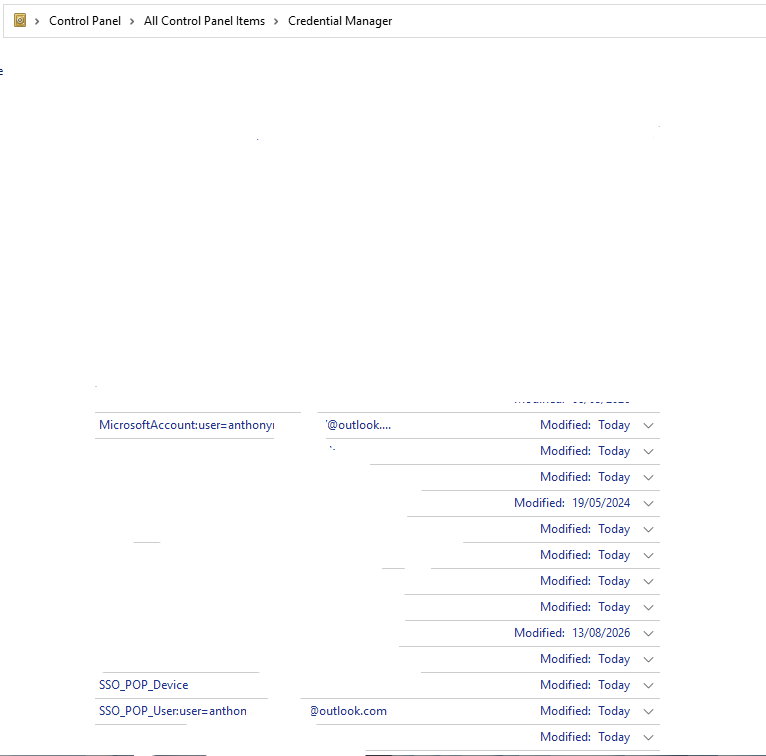
CREDENTIAL_MGR_OUTPUT.jpg
 
You can remove the account if the address is under Microsoft account user or SSO_POP but I don't believe those are for Outlook or windows. The email password is stored in windows for all Microsoft account.

Do you have a Needs Password link in the status bar when a folder in that account is selected? If so, click it and see if it stays up to enter the password.

If that fails, assuming it is not the account you sign into the computer with, look in Windows Settings - under Accounts > Your accounts. Is the account listed? If so click Remove. Close Outlook and restart.

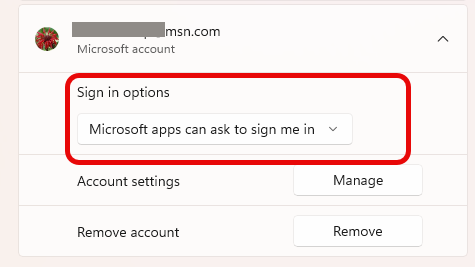
If you want to try this before removing, if it is set to "Microsoft apps can ask to sign me in" you can try changing it to "All apps need to ask me to use this account" and see if that forces it to ask for the password in Outlook.
1786714130957.png
 
Hi Diane, many thanks for the quick reply. I tried those things suggested, and even after removing the a*******.outlook account from the Microsoft account list, I still cannot get chance to enter the password. On its "live" account page, I DID get to change the password, to ensure it was the one I thought it was, so I would have success when I CAN get to enter it.

I have not yet removed any entries for it in the Credentials Manager, but it looks like after removing the failing account in the user settings, it has gone from there anyway.

Should I try an Office Repair, as I think something is "broken" in the Outlook part?
 
Repair won't hurt, but it's probably not likely to fix it. If the account is not listed in Windows Settings, try deleting it froOutlook and adding it back.

You could go to %localappdata%\Microsoft\OneAuth\accounts and delete the file for the account (open in notepad and search for the email address)
but you also may need to delete the correct folder at %localappdata%\Microsoft\IdentityCache\1\UD and offhand, I don't have a way to identify the account there.
 
I’d try Credential Manager first and remove only the credentials related to the affected Outlook account. Restart the PC and open Outlook again. If the issue continues, remove and re-add the Outlook account. I’d keep Office Repair as a last step, since the other PC works with the same setup.
 
Hello, thank you both for your useful input. I DID try removing the disconnected outlook account, but I found I could not add it back.
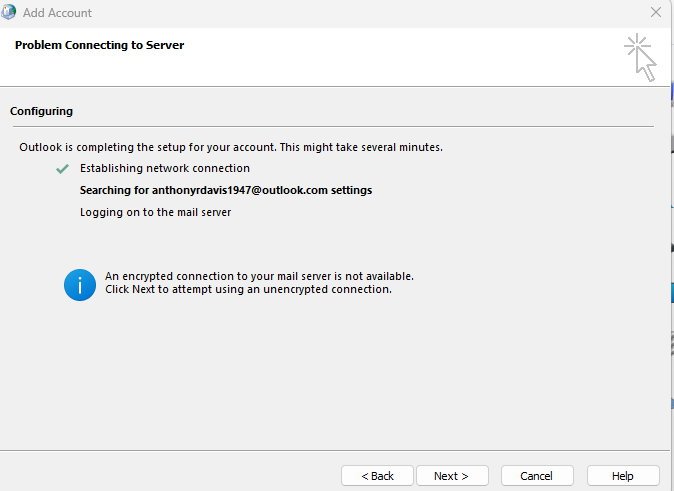
I got various errors, and DID try the PIN used for all 3 Windows accounts as well as the known passwords. See first graphic with the "Problem connecting to server".
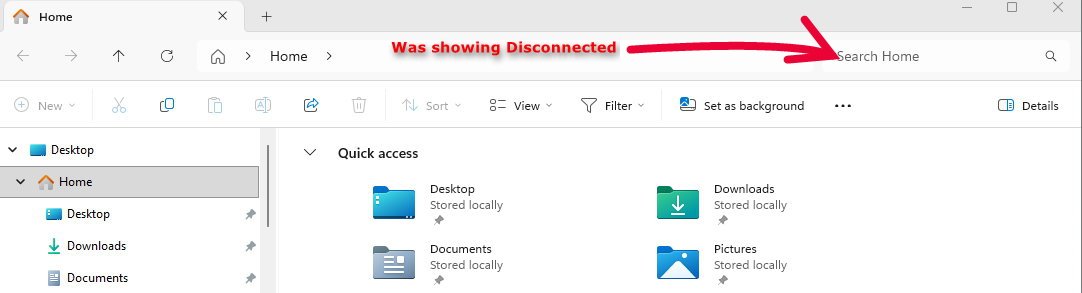
However, when I went to check that the screenshot was in the expected place, I noticed an odd thing in the File Explorer (Home section).
Instead of the usual SEARCH box, it showed "Disconnected". That was of course a red flag, so I clicked on the blue "i" information button, and got a chance to reconnect. Now THIS interface worked really well, and after I keyed over the other suggested email addresses with the bad "Disconnected" one, it wanted the PIN.
After I put that in, I stopped and started File Explorer, at it was fine, like the second picture.

Sorry I did not think to take a screen-shot before I did that, as I did not think it would work.

However, when I started up OUTLOOK again, I could add that OUTLOOK account in just fine, it took less than a minute, then about 6 minutes or so to re-sync the OST file.

It seems that after the ISP outage, things were left in an odd/bad state, and the OUTLOOK UI for adding an account was acting weird.
Certainly I had tried the PIN and password several times.
I don't know enough about the Windows Internals to judge whether this is a bug, lack of defensive code somewhere (e.g. Outlook, Windows Credential API, or OneDrive or MS 365 interference).

OL_MAIL_ADD_ERR.jpg


FILE_EXPLORER_HOME_DISCONNECTED1.jpg
 
FYI: Sorry, forgot to say, some of the attempts prior to doing the Windows Explorer reconnect of that Windows account, showed errors relating to "could not access Autodiscovery.xml". Possibly related to the disconnected account?
 
Similar threads
Thread starter Title Forum Replies Date
C Nasty Bug Lurking In Outlook For Years. The Trigger. Any Fix Or Workaround? Using Outlook 13
C Outlook - Macro to block senders domain - Macro Fix Outlook VBA and Custom Forms 1
H How to Fix 1510-370-1986 Garmin GPS Not Working Outlook VBA and Custom Forms 0
C How to fix outlook continuing to prompt fo an Exchange password Using Outlook 0
K HOW TO FIX AOL MAIL ISSUES? Using Outlook 0
M Recent Update Did not Fix Search Problems Using Outlook 7
N May 2017 Fix Didn't Fix? Using Outlook.com accounts in Outlook 6
Micheal Ivan How to fix it ? BCM (Business Contact Manager) 1
Jeff Davis Help fix my Outlook 2013? Using Outlook 28
J How to Fix “Encounter a large number of conflict items in Exchange OST file” Using Outlook 2
L Outlook 2007 Fix Phone Number Using Outlook 19
Diane Poremsky Fix the Outlook Folder Type after Exporting an IMAP Account Using Outlook 0
P Outlook 2007 Calendar Ribbon has changed and I can't fix it Using Outlook 10
M Outlook hidden even when open (maximising doesn't fix it) Using Outlook 2
mrje1 Assigned Categories keep getting deleted in mail, bug? How to fix if possible? Using Outlook 5
P Can't fix my primary email account! Using Outlook 1
B Problem with fix for "Too Many Contact Folders" Using Outlook 3
M Deleted Meeting but didnt send notice to attendees, how to fix?? Using Outlook 1
J Wasn't broke, went to fix it, now it's broke! Using Outlook.com accounts in Outlook 0
M Please can someone fix my Outlook Connector sync issue! Using Outlook.com accounts in Outlook 12
D outlook.exe application error - breakpoint has been reached. fix? BCM (Business Contact Manager) 1
R RE: Any Fix For Font & Spacing Issues in Outlook 2007? Using Outlook 2
P MICROSOFT OFFICE 2007 FREEZING UP HOW DO I FIX ? BCM (Business Contact Manager) 2
B Can I create a local PST file for SPAM on a drive that is usually disconnected? Using Outlook 3
I Disconnected Using Outlook 14
M Outlook Is Disconnected In the Morning Or After Few Hours Exchange Server Administration 1
L Oulook always "disconnected" how do I keep it open all of the time? Using Outlook 1
S How to find out wether Echange is disconnected with outlook or not Outlook VBA and Custom Forms 1
M Outlook 2007 "Connection Status..." shows 3 "Disconnected" entries of type "Directory" Using Outlook 18
N Outlook Calendar Not Showing All Events Using Outlook 0
F Outlook Data File Column Empty Using Outlook 3
S How to view backed up PSTs from Outlook 2007 in Outlook Classic's Folder pane Using Outlook 2
B Sync Google Calendar with Outlook Using Outlook 3
C Multiple accounts on Outlook.com? Using Outlook 3
S Outlook 365 Outlook (classic) Calendar Peek not showing iCloud calendar events Using Outlook 4
P Outlook Calendar entry being used as malware vector. Using Outlook 4
S How to Move Data from Mac Outlook to Windows Outlook? Using Outlook 4
T What is the best way of using the Classic Outlook client to change my email address? Using Outlook 5
T Creating a second email account on an Outlook client Using Outlook 2
Daviddavidsonz How to Schedule Emails in Microsoft Outlook Using Outlook 0
S Rule not running in Outlook Classic unless... Using Outlook 9
J column with actual email address in Outlook Classic Using Outlook 4
S Not receving all email since converting from Outlook 2007 to Outlook Classic Using Outlook 3
Rupert Dragwater Outlook 365 taking too long to synchronize each time email is being checked Using Outlook 17
Hornblower409 Outlook VBA Code Example - Unified inbox in Outlook Classic Outlook VBA and Custom Forms 5
J Need replacement for iTunes to locally (USB) sync. iPhone 17 to Classic Outlook 2024 Using Outlook 4
Thomas Fast Best way to manage incoming customer emails automatically in Outlook? Using Outlook 1
I Outlook 2024 Windows 11 Gmail - sudden log in problems Using Outlook 14
S Outlook Classic on 2024 Using Outlook 10
L Fresh Install of Windows 11, saved previous image, how to retrieve Outlook Contacts Using Outlook 10

Similar threads

Back
Top