Operating system:: Windows 10 Home
Outlook version: Office Pro Plus 2021
Email type or host: multiple
Outlook version: Office Pro Plus 2021
Email type or host: multiple
I'm referencing Relocate Search Bar in Outlook
I'm using Outlook (Classic, I guess?) from Office Pro Plus 2021. I've been using this version for months.
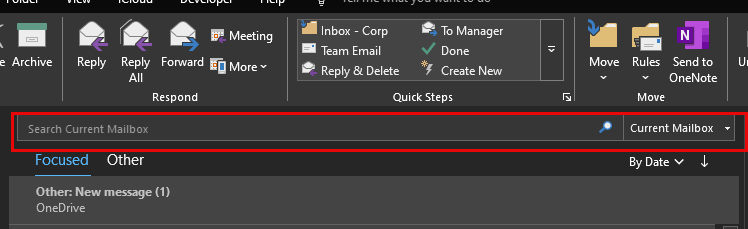
Today, I started the program up and my search bar has been moved from the top of the screen (not sure if it was in the Ribbon, but near the top ribbon/menu/title bar) to above the message list. I don't want it there.
I was VERY surprised to see that I've apparently received an update to Outlook, automatically (2605) - I had logged into my Microsoft account yesterday for another reason (OneDrive). I thought that unsubscribing from MS365 and buying a "desktop"/non-cloud version of Office meant that *I* would control my updates, but apparently not.
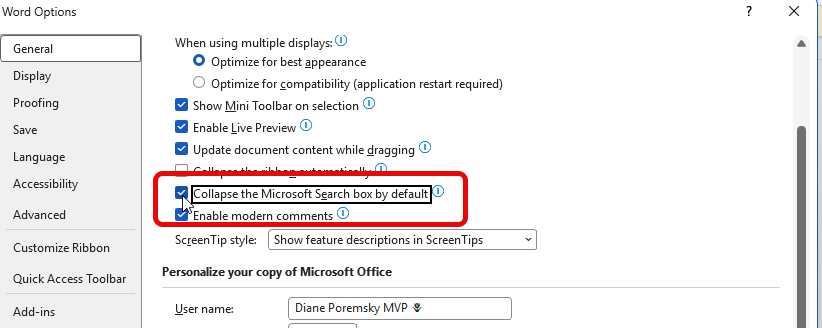
How can I move my search bar back up?
I'm using Outlook (Classic, I guess?) from Office Pro Plus 2021. I've been using this version for months.
Today, I started the program up and my search bar has been moved from the top of the screen (not sure if it was in the Ribbon, but near the top ribbon/menu/title bar) to above the message list. I don't want it there.
I was VERY surprised to see that I've apparently received an update to Outlook, automatically (2605) - I had logged into my Microsoft account yesterday for another reason (OneDrive). I thought that unsubscribing from MS365 and buying a "desktop"/non-cloud version of Office meant that *I* would control my updates, but apparently not.
How can I move my search bar back up?