Same POP account on Outlook 2024 and Outlook Classic ?

Steve Mc

Senior Member
Outlook version
Email Account
POP3
Operating system::    Windows 11
Outlook version:     Office 2024 Classic
Email type or host:    POP ***@sbcglobal.net

Can I have the same POP account on both Outlook 2024 and Outlook Classic on the same computer ?

I currenty have that POP account on Classic, but would like also have that same account on Outlook 2024 if that's possible.

Thanks
 
Can I have the same POP account on both Outlook 2024 and Outlook Classic on the same computer ? I currenty have that POP account on Classic, but would like also have that same account on Outlook 2024 if that's possible. Thanks
Yes, you can have the same POP account in both Outlook Classic and Outlook 2024 on the same computer, but be careful with the POP download settings. POP is not really designed for multiple clients unless you leave messages on the server. In each Outlook profile/account, check the advanced POP settings and make sure “Leave a copy of messages on the server” is enabled, otherwise whichever Outlook checks mail first may download and remove the messages, leaving the other one with nothing. Also keep in mind that sent mail, contacts, calendar, rules, and local folders won’t automatically sync between the two unless they’re stored somewhere shared.
 
Thank you so much.

I haven't tried it yet, but it does look promising.

Another question though. I would like 'sents' , 'contacts' and local folders to show, so how would I get them to sync by storing them somewhere shared ?
 
I still would like to know about the syncing in my prior response yesterday @ 2:26 PM, but in the meantime...

Can I make that account an IMAP account in Outlook, and if so, how would that affect my POP account data in Classic, if at all ?

Thanks,
 
Steve,

I'm still not sure where all of this is leading to. Perhaps if you could give use an outline of the "desired end state"? And why do you want two different Outlook Classic clients on the same PC?

As to IMAP - One client using POP and another using IMAP connected to the same account is doable. You need to ensure that the POP is set for "Leave Messages on the Server". But you may still have problems with Read/Unread markers, syncing folder changes, and local Sent Items. Most people would go for IMAP all around.
 
I don't have 2 Outlook Classics on the same PC. Office 2024 comes with both Outlook and Classic Outlook. When I finally upgraded to Office 2024 from Office 2007 this past Spring, Diane was advising me that Classic was much more similar to Outlook 2007, which I had been using, so I've been using Classic ever since. And upon further review, I did have problem when I first used my account with IMAP because I also use a Yahoo mail app on my iPhone with a different account, but it merged everything unwontedly. So I'm not going to go through that again, because it was a nightmare to fix it. So, I'm gonna try to put my account in Regular Outlook as a POP account.

But I still would like to know, as stated above:

Another question though. I would like 'sents' , 'contacts' and local folders to show, so how would I get them to sync by storing them somewhere shared ?

Thanks again,
 
Office 2024 comes with both Outlook and Classic Outlook
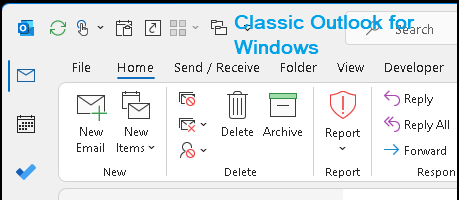
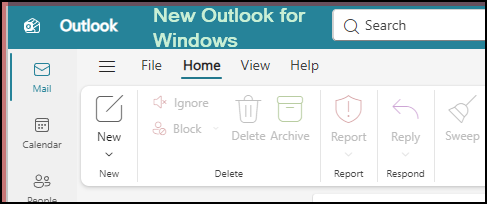
So that part of the discussion is about New Outlook for Windows and Classic Outlook for Windows running side-by-side?

1789171273016.png
1789171410151.png

If so, then - Yes. You can run both clients side-by-side using the same email accounts. With all the POP limitations already discussed.
 
I did have problem when I first used my account with IMAP because I also use a Yahoo mail app on my iPhone with a different account, but it merged everything unwontedly.
I have no experience with the Yahoo Mail app for iOS and I can not explain what might have happened, or why. In my experience, a standard IMAP account works fine when accessed from multiple clients. I access my GMail account via IMAP from multiple Outlook clients and have never had any problems like you describe. But your mileage may vary.
 
I would like 'sents' , 'contacts' and local folders to show, so how would I get them to sync by storing them somewhere shared ?
"Sent" for an IMAP account is on the server. So any IMAP clients will see it.

Contacts, Calendars and any other non-email data for an IMAP account in Classic Outlook is stored in "This Computer Only" folders for each account which can not be shared.

But, you can setup a "Default" PST file that can be shared by multiple IMAP accounts.
See: Configure and Use IMAP Accounts | Slipstick Systems
 
So that part of the discussion is about New Outlook for Windows and Classic Outlook for Windows running side-by-side?

View attachment 4834 View attachment 4836
If so, then - Yes. You can run both clients side-by-side using the same email accounts. With all the POP limitations already discussed.
Thanks. I'm guessing I would have to manually enter any subfolders I have under my inbox ? Also, could I import my .pst from Classic to Outlook ? And where would the new Outlook psts be ? I know where my Classic PSTs are.


So that part of the discussion is about New Outlook for Windows and Classic Outlook for Windows running side-by-side?

View attachment 4834 View attachment 4836
If so, then - Yes. You can run both clients side-by-side using the same email accounts. With all the POP limitations already discussed.
 
"Sent" for an IMAP account is on the server. So any IMAP clients will see it.

Contacts, Calendars and any other non-email data for an IMAP account in Classic Outlook is stored in "This Computer Only" folders for each account which can not be shared.

But, you can setup a "Default" PST file that can be shared by multiple IMAP accounts.
See: Configure and Use IMAP Accounts | Slipstick Systems

No, I dont want to use IMAP.
 
No, I dont want to use IMAP.
Then before we go on to your other Questions, if you would please, could you do a quick test to see if your email account can be connected as POP in New Outlook for Windows? Microsoft doc says that New Outlook supports POP, but I've seen multiple reports that it doesn't work for many email hosting services, other than GMail and Yahoo.

I see that this same problem is being discussed in another thread: remove from this device ?

I'll wait for a resolution there before continuing.
 
I believe yo're right.

I don't seem to be able to set it up as POP. It just connects, I assume, as IMAP.
 
Similar threads
Thread starter Title Forum Replies Date
L IMAP and POP email in same Outlook system Using Outlook 1
L what are the downsides of running both classic and new outlook on same win 11 pc? Using Outlook 2
H Macro to Delete Duplicate items in Outlook calendar where title is the same and date is the same Outlook VBA and Custom Forms 0
R Outlook 2021 Having problem setting up outlook 2021 with windows 11. I have 3 gmail accounts and I want the 3 gmail, emails to merge into the same outlook input. Using Outlook.com accounts in Outlook 0
E Outlook - eliminate same adresses from to, and bc line Outlook VBA and Custom Forms 0
O Same email address, same person, names in so many ways Using Outlook 4
B Outlook 2016 Unable to view images or logos on the outlook 2016 emails the same html code works well when i use outlook 2010 Using Outlook 0
M Outlook on 3 Computers Shows Different Total Items on Same Account Using Outlook 3
A Two Inboxes, Same Email? Using Outlook 3
R Disable conversation thread from replying of recipients in the same subject. Please help Using Outlook 0
jChambler iCloud folders in Outlook are not the same as on iCloud Using Outlook 6
glnz How set up new IMAP on Outlook-Office 365 and merge in pst from Outlook 2003 for same two email accounts? Using Outlook 5
M Same file "stuck" on top of file list in "Attach File" drop down Using Outlook 4
X Unable to send an email from one account to another on same PC Using Outlook 2
P Desktop doesn't index Outlook IMAP files, laptop Outlook does index those same IMAP files Using Outlook 2
N Move emails of same conversation to same subfolder Using Outlook 6
S Received mail as part of DL, need to auto-CC the same when replying Outlook VBA and Custom Forms 5
I get count of all emails with same conversation ID Outlook VBA and Custom Forms 2
R Shortcut for attaching the same file repeatedly Using Outlook 6
M warning for too many appointments on a same day in Outlook Using Outlook 1
A saving attachement to folder named the same as rule name Outlook VBA and Custom Forms 0
M Ensure the same inbox view across multiple outlook instances Using Outlook.com accounts in Outlook 7
L set task reminder date to same as start date (without affecting due date) Using Outlook 0
M Why delivery receipt size is same than sent email size or even larger? Using Outlook 1
C How to copy same text header to multiple emails with custom text column Using Outlook 10
D Calendar - color coded items are now the same color Using Outlook 2
K Outlook 2010 - Set the category based on category of other emails in same conversatio Using Outlook 20
B Mail on both laptop and mobile at same time Using Outlook 2
P Outlook Macro keeps running for the same messagage Using Outlook 2
M Can't open same msg file more than once at the same time in Outlook 2010 Using Outlook 7
L Delete code and commandbutton at the same time. Using Outlook 1
njs27 Start date of occurrence same as PatternStartDate Outlook VBA and Custom Forms 6
G How to let data in an account user defined field appear in the same field all related opportunities BCM (Business Contact Manager) 1
A Use same BCM data in 2 offices BCM (Business Contact Manager) 3
A After receiving the same email 3 times, Outlook starts sending it to junk Using Outlook 1
K Help! I selected every contact and mistakenly made them all the same category Using Outlook 1
S Searching contacts across GAL and local address book at same time Using Outlook 1
D Move email to same folder as the rest of the conversation Using Outlook 1
J How to create fields that will use the same value on different record types BCM (Business Contact Manager) 2
R View two Inboxfolders at the same time in split creen Using Outlook 1
J How to Reply or Forward a message and Archive it in same step? Using Outlook 0
D ActivitiesTab in OL2000 - same functionality in OL2013? Using Outlook 1
B Excel 2010 vba to post appts to different outlook calendars at the same time Using Outlook 6
J outlook problem it allow to book meeting room at the same day & time Using Outlook 0
Z Keep Unread Messages in same folder Using Outlook 2
D Multiple Users Updating Custom Form At Same Time Using Outlook 1
K Save a received email in a mailbox subfolder which is the same as the @email Using Outlook 1
Commodore Renamed folder staying at the same position Using Outlook 3
E "Current View" settings across multiple users on same Exchange 2007 account. Using Outlook 1
A In Contacts Phone List View, allow alpha jump w/single key, same as Card views Using Outlook 4

Similar threads

Back
Top