Fresh Install of Windows 11, saved previous image, how to retrieve Outlook Contacts

lneva

New Member
OS Version(s)
  1. Windows
Outlook version
Outlook 365 64 bit
Email Account
IMAP
Operating system::    Win11
Outlook version:     Outlook 365
Email type or host:    IMAP

I did a fresh install of Windows 11 but before doing that I made an image of the drive using "Backup and Restore".
However, I did not export the contacts or anything else from Outlook before doing the fresh Win11 install (my mistake). Is there a way to retrieve the Outlook Contacts? I have mounted the VHD from that image and have access to what looks like every file on the old C drive.

The email accounts used inside Outlook are all Gmail account, if that makes a difference, but it doesn't look like contacts are part of the Gmail account as they are not available when using a browser to access Gmail.
I'm not sure what other information you might need to help me out.

Thanks,
Les
 
Do you know if contacts were in a folder named “(This computer only)" ? If yes, and you can get the Gmail ost file out - then they can be recovered using ost to PST software - you can use the trial version of ost to PST to look in the ost and see if the contacts are there. I generally recommend the stellar or kernel versions.

ETA: if the contacts are there and the ost is small (under 5 GB) I can export it.
 
Diane's answer is all that can help you at the moment. But for "next time" ...

I would suggest you follow the instructions in this article to keep your Contacts and Calendar separate from your GMail/IMAP account in a PST file. I do this with any new Outlook setups that involves IMAP accounts. It has saved my ass more than once.

Using IMAP Accounts in Outlook | Slipstick Systems
 
Diane's answer is all that can help you at the moment. But for "next time" ...

I would suggest you follow the instructions in this article to keep your Contacts and Calendar separate from your GMail/IMAP account in a PST file. I do this with any new Outlook setups that involves IMAP accounts. It has saved my ass more than once.

Using IMAP Accounts in Outlook | Slipstick Systems
Thanks for the suggestion. As I mentioned I made the mistake of not doing that this time. I've done that many times in the past, just had a brain fluff this time.
 
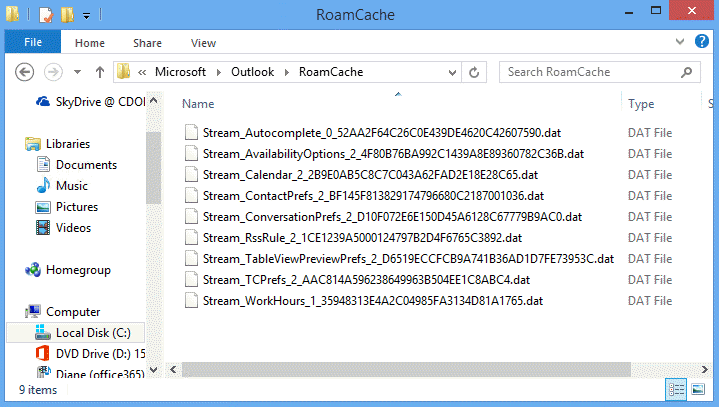
BTW - if they were in the autocomplete list, you can get that back. Find the steam_autocomplete file and copy it to the new windows. Change the file name to the one created by the new profile.
Instructions here:
It appears that they are in the autocomplete list found in the RoamCache directory. My question now - if I copy and rename this old.dat file will I lose anything that has occurred in outlook from the time it was reinstalled a few days ago to the present time? Does that make sense?
 
I did a fresh install of Windows 11 but before doing that I made an image of the drive using "Backup and Restore".
However, I did not export the contacts or anything else from Outlook before doing the fresh Win11 install (my mistake). Is there a way to retrieve the Outlook Contacts? I have mounted the VHD from that image and have access to what looks like every file on the old C drive.

The email accounts used inside Outlook are all Gmail account, if that makes a difference, but it doesn't look like contacts are part of the Gmail account as they are not available when using a browser to access Gmail.
I'm not sure what other information you might need to help me out.

Thanks,
Les

These steps you are looking for are the same steps as for an Outlook migration to a new computer.
Install MS-Office and Outlook (using 64-bit version now-days).

Basically, just restore your old "Outlook_Data" folder that had your .PST files in it ... likely in My Documents or your Windows user-folder.

From my notes:

Start and use Wizard to MANUALLY setup first/main/default email account. Only do your main one now.
Go ahead and place your old Outlook_Data folder. It contains the Folders.pst & archive.pst among others.
In Outlook-2021, select the main Outlook data-file (like Folders.pst).
- Apparently, it's no problem to rename the .PST this one time if you need to first. I like Folders.pst .
Eventually, get Folders.PST setup as your Default Data-File, and Delete the temporarily created one.

This above assumes you ARE NOT using iCloud for Windows.

--------------------
As for the Email Accounts themselves, there is no file that stores them. You just recreate them from your notes.

IMAP accounts just sync down to Outlook-2021. Whatever you see up there when logged in with web-mail will mirror down to local computer inside Outlook.
 
Do you know if contacts were in a folder named “(This computer only)" ? If yes, and you can get the Gmail ost file out - then they can be recovered using ost to PST software - you can use the trial version of ost to PST to look in the ost and see if the contacts are there. I generally recommend the stellar or kernel versions.

ETA: if the contacts are there and the ost is small (under 5 GB) I can export it.
I couldn't locate a folder called "This Computer Only" nor could I find any .ost files, at least under the Users folder. I do have a .pst file that I generated from Outlook way back in 2022 but I'm concerned that many contacts may have changed their information.
BTW, I did what you suggested and copied the stream_autocomplete.dat file into the new Outlook directory and that worked quite well for bringing up a contact when typing in the "to" field of an email, so that has been helpful. However it doesn't repopulate the actual Contacts.
 
It appears that they are in the autocomplete list found in the RoamCache directory. My question now - if I copy and rename this old.dat file will I lose anything that has occurred in outlook from the time it was reinstalled a few days ago to the present time? Does that make sense?
You'd lose any new entries in the autocomplete list. If they are people you regularily email, they are in the old autocomplete list anyway.
 
I couldn't locate a folder called "This Computer Only" nor could I find any .ost files, at least under the Users folder. I do have a .pst file that I generated from Outlook way back in 2022 but I'm concerned that many contacts may have changed their information.
BTW, I did what you suggested and copied the stream_autocomplete.dat file into the new Outlook directory and that worked quite well for bringing up a contact when typing in the "to" field of an email, so that has been helpful. However it doesn't repopulate the actual Contacts.
There would be a contacts folder - either in an IMAP data file or in a PST file.

The ost would be in the same Outlook folder as the autocomplete list - \Users\username\AppData\Local\Microsoft\Outlook

A PST would likely be in the documents \ Outlook files folder, but could be anywhere. If you upgraded from Outlook 2007, they could be in the Outlook folder where ost files are stored.

Did you have OneDrive "backing up" your documenta folder? If yes, it might be in OneDrive.

The data file that has the contacts should have a last modified date as of when you last opened it in Outlook - which would be around the time you reinstalled Windows.
 
AFAIK, OST files are for your Exchange account (your locally cached stuff). Outlook-365 is just how you pay for it (subscription instead of one-time-payment).

If you are running Outlook-2021 on your local computer (like a consumer or small-business) I think you are looking for your .PST files (like folders.pst and archive.pst). They should be in a folder together. Just restore that whole folder.

PST file is everything ... including archived Emails, Tasks, Calendars, (non-iCloud) Contacts, all sort of stuff ... your Outlook.

As far as I can tell, you didn't mess-up (yet) or miss a step. You have a full backup there to restore files from, so you are right on course.
 
Similar threads
Thread starter Title Forum Replies Date
DoctorJellybean Use OST file location for fresh installation? Using Outlook 1
V Starting Fresh with a new PST file. Using Outlook 0
J unable to get my new install of Outlook to display mailboxes in the single-line format. Using Outlook 1
P 3 of 5 PST files don't install from d:\outlook but only from D:\ Using Outlook 7
e_a_g_l_e_p_i I can't believe what I am seeing when trying to install Outlook 2021 Using Outlook 9
David in Mississippi New (Feb 2020) install of Outlook 365 - Cannot specify PST for different accounts Using Outlook 0
R Unable to install without email account Using Outlook 4
jChambler Cant install BCM on windows 10 BCM (Business Contact Manager) 12
J Install BCM Client without an local SQl Database BCM (Business Contact Manager) 6
Chris Grew How Long To Install BCM BCM (Business Contact Manager) 2
icacream reinstall outlook after new install win7 Using Outlook 2
R Cannot Install Outlook Invalid XML Using Outlook 2
makinmyway Trouble Installing BCM Outlook 2013; Endless Install Loop Happens Using Outlook 0
B OL2010 and install custom WYWO form Using Outlook 1
D 2013 BCM Won't Install BCM (Business Contact Manager) 1
S Recover Autocomplete After Computer Failure Re-install Using Outlook 3
T Office2013 and BCM on Windows 8.1 -- install of BCM does not work? BCM (Business Contact Manager) 2
A how to install or enable categories in OL 2013 for calendar and contacts Using Outlook 5
O RE-install of BCM and previous sync profile conflicts BCM (Business Contact Manager) 3
D Can't install here Using Outlook 3
O What are best practices for a re-install Office 13 w/BCM with OS re-install BCM (Business Contact Manager) 1
N How to install BCM for Outlook 2013 in Office 365 Small Business Premium BCM (Business Contact Manager) 1
J Office + Outlook 2013 installed, but I need to install Outlook 2010 Using Outlook 2
C VBA problem in new install Using Outlook 3
B Can't install Calendar Printing Assistant - Windows 7 64bit&Office 2010 32bit Using Outlook 2
S BCM Install Issues BCM (Business Contact Manager) 2
L Cannot install BCM 2010-"Outlook 2010 Not Installed" but it is! BCM (Business Contact Manager) 1
T BCM Install fails Both w Off. Pro 2010 Beta & on reinstall Off.Pro BCM (Business Contact Manager) 5
T Install BCM on SBS 2008 Standard server BCM (Business Contact Manager) 1
M OL2007 Add-in won't install on OL2010 Outlook VBA and Custom Forms 1
D BCM install problem on Win7 BCM (Business Contact Manager) 3
D business contact manager did not install with outlook 7 BCM (Business Contact Manager) 2
S Trying to install BCM 2010 x64, getting error BCM (Business Contact Manager) 8
E Install BCM on windows 7 BCM (Business Contact Manager) 2
H Fail to install BCM 2007 (English) on Windows 7 64 bit (Danish) BCM (Business Contact Manager) 3
S Failed to install Business Conctact Manager 2007 BCM (Business Contact Manager) 1
R RE: Business Contact manager failed to install BCM (Business Contact Manager) 1
I BCM install error on XP SP3 with Outlook 2007 - cant install Interop BCM (Business Contact Manager) 1
S Business Contact Manager 2007 won't install with Windows 7 BCM (Business Contact Manager) 3
D Win7 x64 - Outlook 2010Beta x64 - BCM 2010 x64 does not install BCM (Business Contact Manager) 1
T Can I install BCM on 2 computers w/o buying 2 copies? BCM (Business Contact Manager) 1
S BCM in Office Ultimate 2007 Won't Install on W7 Ultimate 32 BCM (Business Contact Manager) 1
K Unable to install business Contact Manager. BCM (Business Contact Manager) 1
M How do I install Outlook 2007 Business Contact Manager on Win7x64 BCM (Business Contact Manager) 1
A What to do if BCM didn't install with 2007 Professional Trial? BCM (Business Contact Manager) 1
M Install problem on Windows 7 BCM (Business Contact Manager) 2
J Install BCM on Windows Vista BCM (Business Contact Manager) 3
O BCM didn't install w small business outlook 2007 BCM (Business Contact Manager) 1
H Failed install BCM (Business Contact Manager) 2
S BCM install fails at SQL install BCM (Business Contact Manager) 1

Similar threads

Back
Top