Outlook ribbon customisations do not 'stick'

Kika Melo

New Member
Outlook version
Outlook 2016 32 bit
Email Account
Exchange Server
Operating system::    Windows 11
Outlook version:     2505, build 16.0.188
Email type or host:    Exchange, Microsoft 365

I have seen a few threads elsewhere on this, but none provides a truly working clarification and solution.
Simply put -- I am looking for ways to make customized edits (remove some options, add others, etc.) to my MS Office Outlook ribbon stick, i.e., remain saved and implemented. For example, I don't need nor want "Find Time" or "Dictate", etc. However, I go and customise that ribbon, save it and, for no identifiable reason (on the same session or after launching a new Outlook session), that customisation is gone and the default settings with those unwanted entries are back on the ribbon. Why does this happen and how can I cure it for good?

[I am using MS Outlook 365, ver 2505, build 16.0.18827.20102, 64-bit from a University Exchange server.]
 
Don't have a fix. But this might help you debug.

Office UI Customizations are in:
Code:
%LOCALAPPDATA%\Microsoft\Office
See Backing up all Ribbon and Quick Access Toolbar (QAT) customizations at once - Robert 365 for more details.

Could something be stopping your Outlook from updating those files?
Thank you very much for all the comments and suggestions you sent me, Hornblower!
I will look into all of them shortly, starting with the post by Robert 365.
Will definitely report back as soon as!
 
Don't have a fix. But this might help you debug.

Office UI Customizations are in:
Code:
%LOCALAPPDATA%\Microsoft\Office
See Backing up all Ribbon and Quick Access Toolbar (QAT) customizations at once - Robert 365 for more details.

Could something be stopping your Outlook from updating those files?
I cannot think of anything which would be preventing Outlook from updating the files. They seem to be updated after I do the changes, in the sense that those changes are applied and become functional. However, they eventually disappear and the Ribbon reverts to showing all the rubbish (for my purposes) that MS insists on showing there.
 
Removing office web add-ins from the toolbar doesn't work - they sync back down after a restart. But you shouldn't have find time - it was retired.

Better is to create custom ribbons with the buttons you want. Put it before home tab and it should display first when you start outlook.
 
Removing office web add-ins from the toolbar doesn't work - they sync back down after a restart. But you shouldn't have find time - it was retired.

Better is to create custom ribbons with the buttons you want. Put it before home tab and it should display first when you start outlook.
Thanks, Diane. However, I don't think I am trying to remove 'web add-ins from the toolbar'!? What do you mean by this? Please give me an example, as we may be talking of the same thing using different terminology.
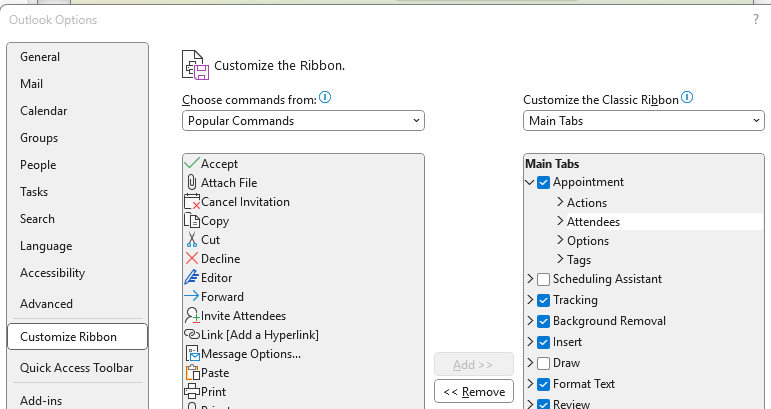
What I am trying to customise, i.e., remove, are entries under the Main Tabs, under 'Customise the Classic Ribbon'. These are not 'web add-ins' are they?
Here is a screenshot as an example, if I want to remove 'Attendees' from the Ribbon under Appointments:

1751009886459.png


If I click 'Remove' and OK, that entry indeed disappears from the Ribbon, but at some point it reappears on the Ribbon (still not sure if only if I close Outlook or also in the same session, when I try to set up another appointment).
 
Assuming 1 Microsoft account - File > Info page, at the bottom, click Manage Add-ins. Anything on that list is a web add-in. Find time was a web addin (is now built into outlook as Scheduling poll but is still a web-based app).

This was a Microsoft notification to business admins: The FindTime add-in will stop working and be removed from Outlook for Windows, Web and Mac. Scheduling Poll is the replacement feature, which is built directly into Outlook clients for all users as a native feature.
Introducing Scheduling poll in Outlook! | Microsoft Community Hub


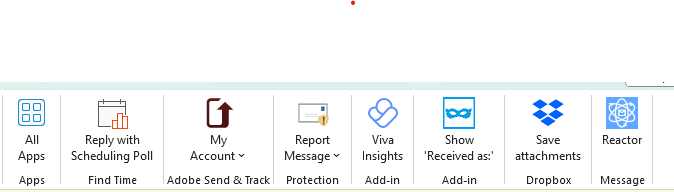
Or, when viewing the inbox - click All Apps. All add-ins under all apps are web add-ins. Unless you have a lot of com add-ins, most of the add-ins on the ribbon after the all apps button are web add-ins.
1751034802404.png
 
Assuming 1 Microsoft account - File > Info page, at the bottom, click Manage Add-ins. Anything on that list is a web add-in. Find time was a web addin (is now built into outlook as Scheduling poll but is still a web-based app).

This was a Microsoft notification to business admins: The FindTime add-in will stop working and be removed from Outlook for Windows, Web and Mac. Scheduling Poll is the replacement feature, which is built directly into Outlook clients for all users as a native feature.
Introducing Scheduling poll in Outlook! | Microsoft Community Hub


Or, when viewing the inbox - click All Apps. All add-ins under all apps are web add-ins. Unless you have a lot of com add-ins, most of the add-ins on the ribbon after the all apps button are web add-ins.
View attachment 4579
Thanks, Diane.
No, when I click the All Apps on the main Outlook (365, on the windows computer) window (showing Mail), It is empty and says 'You don't have any Apps yet. Select Add Apps to browse and install Apps'. So, this is definitely not part of the issue I am having, which is related to the native features of the Ribbon.
My pet hates are:
One Note (Send to OneNote) - I have just closed Outlook, from which I had already removed it many times from the Mail ribbon, and it is back there!
Immersive
Attendees (Calendar)
Teams (Share to Teams)
Zoom (add Zoom meeting)
Skype​

... and a few others which are now out of my sight but from time to time repopulate the respective Ribbon (i.e., under Mail or Calendar).
 
Kika,

>> native features of the Ribbon

Clarification please. Are you trying to remove standard Outlook Ribbon commands? Where "standard" means those commands that are defined by Microsoft? Not ones that you added?

As far as I know, this is not allowed. You can only Hide (uncheck) standard groups. Not remove commands from them.
Customize the ribbon in Office - Microsoft Support

>> I have not done changes to the Ribbon in the other MS Office programs

As a test, please do try and to do similar changes to another Office program ribbon. To see if the problem is only Outlook or any Office program.

>> They seem to be updated after I do the changes, in the sense that those changes are applied

But are the files in %LOCALAPPDATA%\Microsoft\Office being updated? i.e. Is the Last Modification time being updated?
 
Kika,

>> native features of the Ribbon

Clarification please. Are you trying to remove standard Outlook Ribbon commands? Where "standard" means those commands that are defined by Microsoft? Not ones that you added?

As far as I know, this is not allowed. You can only Hide (uncheck) standard groups. Not remove commands from them.
Customize the ribbon in Office - Microsoft Support

>> I have not done changes to the Ribbon in the other MS Office programs

As a test, please do try and to do similar changes to another Office program ribbon. To see if the problem is only Outlook or any Office program.

>> They seem to be updated after I do the changes, in the sense that those changes are applied

But are the files in %LOCALAPPDATA%\Microsoft\Office being updated? i.e. Is the Last Modification time being updated?
I am trying to remove STANDARD Ribbon commands. It can be done: I successfully do it and the deed shows when I press OK.
What does not work is that the change does not 'stick'. As I explained, the removed commands repopulate the ribbon after variable and unpredictable lengths of time.
 
Similar threads
Thread starter Title Forum Replies Date
R Outlook ribbon menu default? Using Outlook 7
TomHuckstep Remove Send/Receive All Folders (IMAP/POP) button from Outlook 365 Ribbon Using Outlook 2
kburrows Outlook 365 - Ribbon Customizations Disappear Using Outlook 0
M Disable Contact Card Results when using "Search People" in Outlook Ribbon Using Outlook 7
M In Outlook Calendar remove the buttons: 'Today' and '<' (Back a day) and '>' (Forward a day) that are below the Ribbon and above the calendar display. Using Outlook 0
L Outlook Office 365 client: won't remember my setting File, not to collapse ribbon Using Outlook 2
I Retention policies on outlook 2016 ribbon Using Outlook 2
Wayne Dardis Calling Ribbon Button in Outlook 2016 Outlook VBA and Custom Forms 6
Diane Poremsky Customize the Outlook Toolbar, Ribbon or QAT Using Outlook 0
I Ribbon buttons grayed-out in Outlook 2013 Using Outlook 2
P Outlook 2007 Calendar Ribbon has changed and I can't fix it Using Outlook 10
G Adding 3rd-Party Add-In to Home Ribbon in Outlook 2010 Using Outlook 1
E Outlook Ribbon Customization and Deployment Using Outlook 1
C Outlook Calendar Ribbon with iCloud Using Outlook 2
S Outlook 2010 Ribbon - Creating Links To Websites or EXE Files Using Outlook 4
M Move 'Reply All' on Ribbon in Outlook 2010 Using Outlook 2
J Executing Ribbon Command from Code Outlook 2010 Outlook VBA and Custom Forms 3
R Build custom ribbon in Outlook 2007 Outlook VBA and Custom Forms 3
S Outlook Classic on 2024 Using Outlook 10
L Fresh Install of Windows 11, saved previous image, how to retrieve Outlook Contacts Using Outlook 10
C Can't Use Custom Contact form in Outlook Classic since early January 2026 Outlook VBA and Custom Forms 7
e_a_g_l_e_p_i Need help updating email in Outlook 2021 Using Outlook 10
V Outlook spam filter misbehaving Using Outlook 9
L what are the downsides of running both classic and new outlook on same win 11 pc? Using Outlook 2
P Preventing permanent deletions in Outlook on the Web Using Outlook 0
L any trick to embedding images in new outlook and outlook on the web contacts? Using Outlook 4
L new outlook contacts searching Using Outlook 5
R Outlook 2010 Outlook 2010 migration question Using Outlook 2
W New Outlook PEOPLE blank Using Outlook 6
C New Outlook issues with Gmail, particularly labels/folders Using Outlook 3
E What is the next workaround for macro in New Outlook 1.2025.1111.100 Outlook VBA and Custom Forms 3
E Need to digitally sign macro but VBA\Outlook crash Outlook VBA and Custom Forms 4
P Outlook 2003 no longer opens "without" Folder List Showing in Navigation Pane Using Outlook 2
Hornblower409 Outlook 2010 - Never ending update Using Outlook 0
V Outlook created new profile? Using Outlook 1
J Outlook inbox question Using Outlook 4
T How to Add AT&T Contacts to Outlook 365 Using Outlook 5
F Outlook 2021 outlook on iPhone Using Outlook 1
F Outlook 2021 Outlook on iPhone asks for password Using Outlook 0
P ics calendar entries suddenly open up new Outlook Using Outlook 3
P Outlook "forgets" password until system rebooted Using Outlook 2
N Why does Outlook keeping adding to the email address I have in my notes portion of a contact? Using Outlook 2
M Anyone integrated AI website builders with Outlook for automated client communications? Using Outlook 4
V Gmail in Outlook Using Outlook 2
T Where has the Copilot icon gone in my Outlook desktop client? Using Outlook 10
P New way by Microsoft to get people to use the new Outlook Using Outlook 4
C How to keep emails in account in Outlook after closing the IMAP account Using Outlook 1
cymumtaz IMAP calendars in New Outlook Using Outlook 5
T Constantly Have To Log In To Outlook On The Web Using Outlook.com accounts in Outlook 2
T Cannot Find Outlook Noted On Android Using Outlook 4

Similar threads

Back
Top