Outlook 365 What happened to the "Today" button?

Chris Bedford

Member
OS Version(s)
  1. Windows
Outlook version
Outlook 365 64 bit
Email Account
IMAP
Operating system::    Windows 11
Outlook version:     Classic Outlook
Email type or host:    SMTP

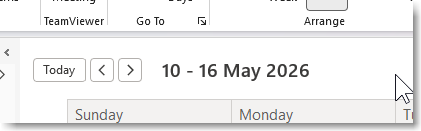
In the top left corner of the calendar (in week view; I've never used any other so I wouldn't know) I used to have prev / next buttons, "Jump to Today" button, and the dates currently displayed, like this

[ < ] [ > ] [Today] 10 - 16 May 2026

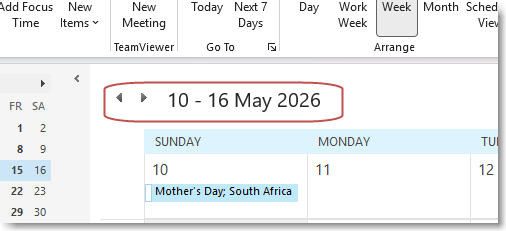
But some time in the last week or two, "Today" has disappeared. I often have to flip around to see other days, but I need to keep only one week displayed so I can see hour-by-hour details and this is going to make admin even more tedious than it already is. WHY, MICROSOFT, WHY?

1778665780846.png
 
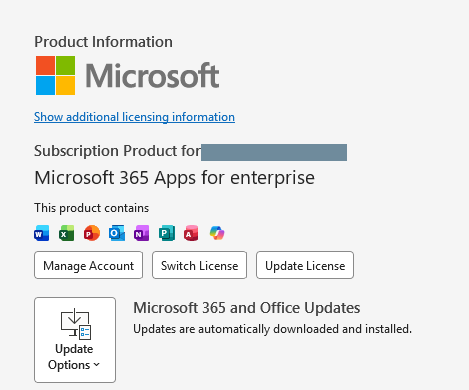
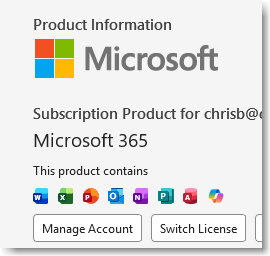
What is your version? I have Version 2606 (Build 20105.20000 Click-to-Run) (beta channel)

I don't recall it missing in older versions, but that doesn't mean much. With the older prev and next buttons in your screen shot, it looks like an older build.

I have a today button in the calendar
1778678327509.png


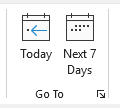
and just above it on the Home ribbon:
1778678375290.png
 
Hi Diane

Ha ha I've never even looked on the ribbon. Can you make a sentence with the words "If", "snake", and "bitten". But to answer your question, 2605 (20026.20022 Click-to-Run) and also,

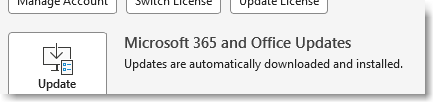
1778679018174.png


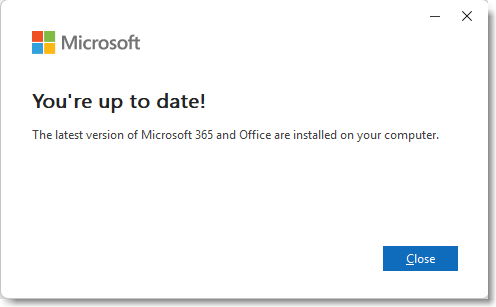
But just to be sure, I clicked the Update Now button and
1778678914268.png


Maybe you are on an inside track for updates and 2606 will fix this?

(Why does my previous upload keep coming back despite my best efforts to delete it? 🥴)

1778678954491.png
 
Similar threads
Thread starter Title Forum Replies Date
P What happened? Using Outlook 1
D What happened to the "Dr."??? Using Outlook 5
Victor_50 Outlook 365 Quick search by period (today, yesterday, last week) completely missing in newest OL 365 Using Outlook 0
R unable to filter tasks when start date is on or before today Using Outlook 4
S Outlook 2016 Arrange tasks by date, additional custom sorting, but still use friendly terms like Today, Tomorrow, This week? Using Outlook 1
S Changing colors of today's appointments, but not recurring ones Using Outlook 33
M In Outlook Calendar remove the buttons: 'Today' and '<' (Back a day) and '>' (Forward a day) that are below the Ribbon and above the calendar display. Using Outlook 0
D Add date next to day name in Outlook Today calendar view Using Outlook 1
K Accentuating today in Outlook calendar month view Using Outlook 2
D Outlook macro with today's date in subject and paste clipboard in body Outlook VBA and Custom Forms 1
S stop calendar date reverting to today Using Outlook 7
Diane Poremsky Make 'today' stand out more in the calendar Using Outlook 0
T OL 2010 "Outlook Today" Entries Disappear Using Outlook 0
A Show ALL of today's appointments in To-Do Bar Using Outlook 1
F Outlook 2007 Calendar Appointments not in Outlook Today view Using Outlook 11
S Custom view in todo bar with "Today," "tomorrow" groupings Using Outlook 2
A OUTLOOK TODAY SCREEN Using Outlook 1
smokiibear Custom Today Page Using Outlook 1
T Events Not Showing In Outlook Today Using Outlook 3
W Midnight bug - Outlook Today & reminders Using Outlook 5
M Filter today's mail Using Outlook 2
smokiibear How to modify Today Page to Include tasks from other task folders Using Outlook 1
S 2010 outlook today looks like an empty email box Using Outlook 4
M Outlook Today. How to rename IMAP inbox accounts to something else than inbox? Using Outlook 4
V Advanced Find - [Today]-3 ? Using Outlook 4
G Customize Outlook Today folder Using Outlook 0
M How can I get new styles for Outlook Today 2003? Using Outlook 1
E Calendar View - Go to Today (Alt+O keystroke gone in 2010) Using Outlook 2
B 2003 >> 2010 outlook today security changes (Iframes? Href?) Using Outlook 1
B link to group schedules from Today screen Using Outlook 2
R Getting my Claendar additions to appear in Outlook Today Using Outlook 7
C Missing "Customise Outlook Today" button Using Outlook 4
H Outlook 2007 - hide completed tasks from Outlook Today -Solution Using Outlook 2
S Outlook 2007 caendar hangs when I select today's day BCM (Business Contact Manager) 4
M How do I get Outlook Today to show appts from multiple calendars? Using Outlook 5
M Today(S) function in DASL Filter Outlook VBA and Custom Forms 1
I Today function in Outlook Forms Outlook VBA and Custom Forms 1
N VBA code to show today's date + a sequencial number in subject lin Outlook VBA and Custom Forms 1
D Get a list of today's events from Outlook Outlook VBA and Custom Forms 2
J Hide/Disable the X button on BrowseForFolder Dialog Using Outlook 4
B Please remind me how I added this message button Outlook VBA and Custom Forms 0
G Add Map It button to Custom Contacts Form in Outlook Outlook VBA and Custom Forms 1
J Outlook 2021 ScanPST errors (yet again ... sorry): repair button missing Outlook 2021 Using Outlook 7
S Outlook 2002- "Send" button has disappeared. Help please. Using Outlook 1
TomHuckstep Remove Send/Receive All Folders (IMAP/POP) button from Outlook 365 Ribbon Using Outlook 2
Witzker How to get the button Karte ( map) in custom contact form Outlook VBA and Custom Forms 2
J Want to create a button on the nav bar (module add-in) to run code Outlook VBA and Custom Forms 2
B How to create a button that sorts and selects the most recent message with ONE click Using Outlook 2
jehan2256 "History" button in Business Contact Manager Using Outlook 1

Similar threads

Back
Top