
Using Exchange, the calendar cannot be synchronized.

test1

Member
OS Version(s)
  1. Windows
Outlook version
Outlook 2019 64-bit
Email Account
POP3
Operating system::    windows11
Outlook version:     outlook 2021
Email type or host:    exchange domain : neucloud.te

I bound to Outlook through Exchange.

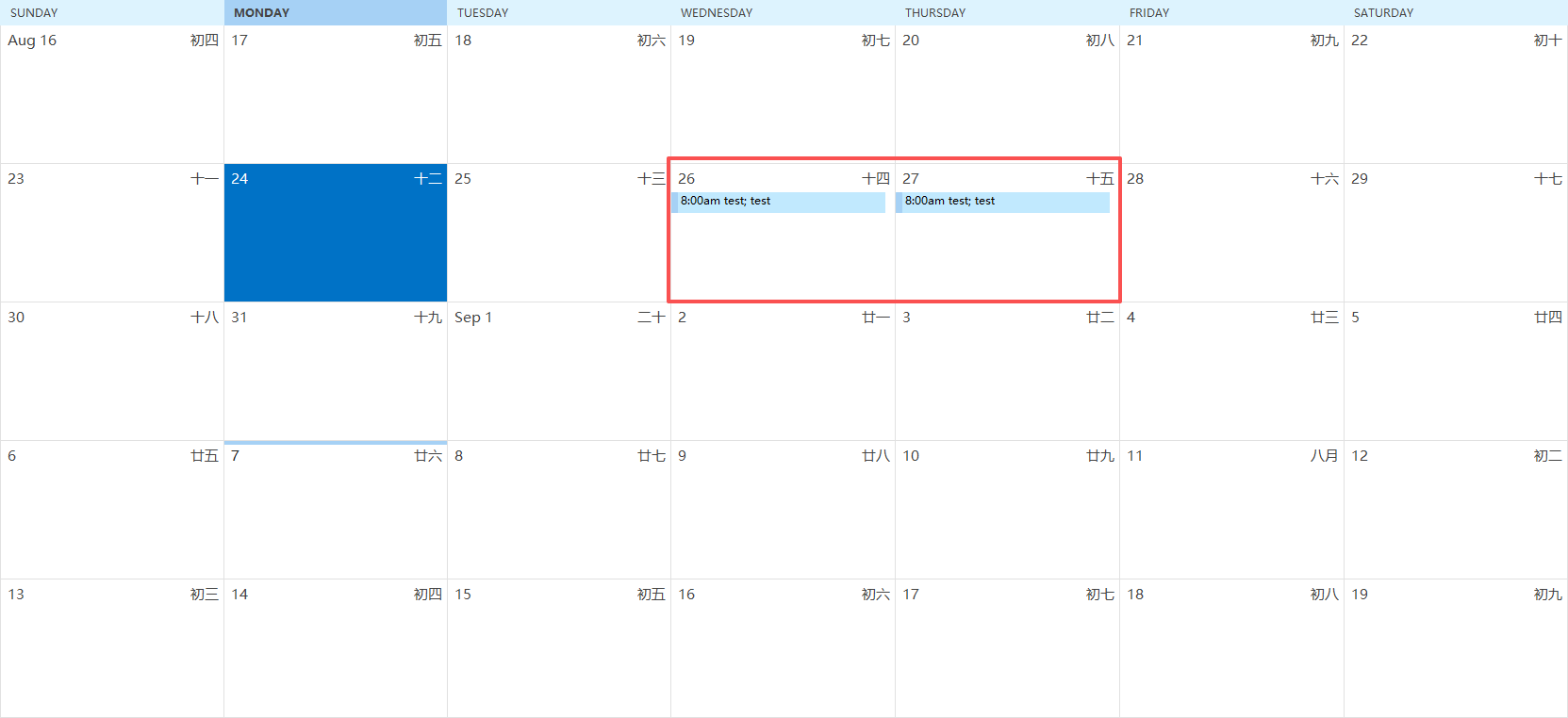
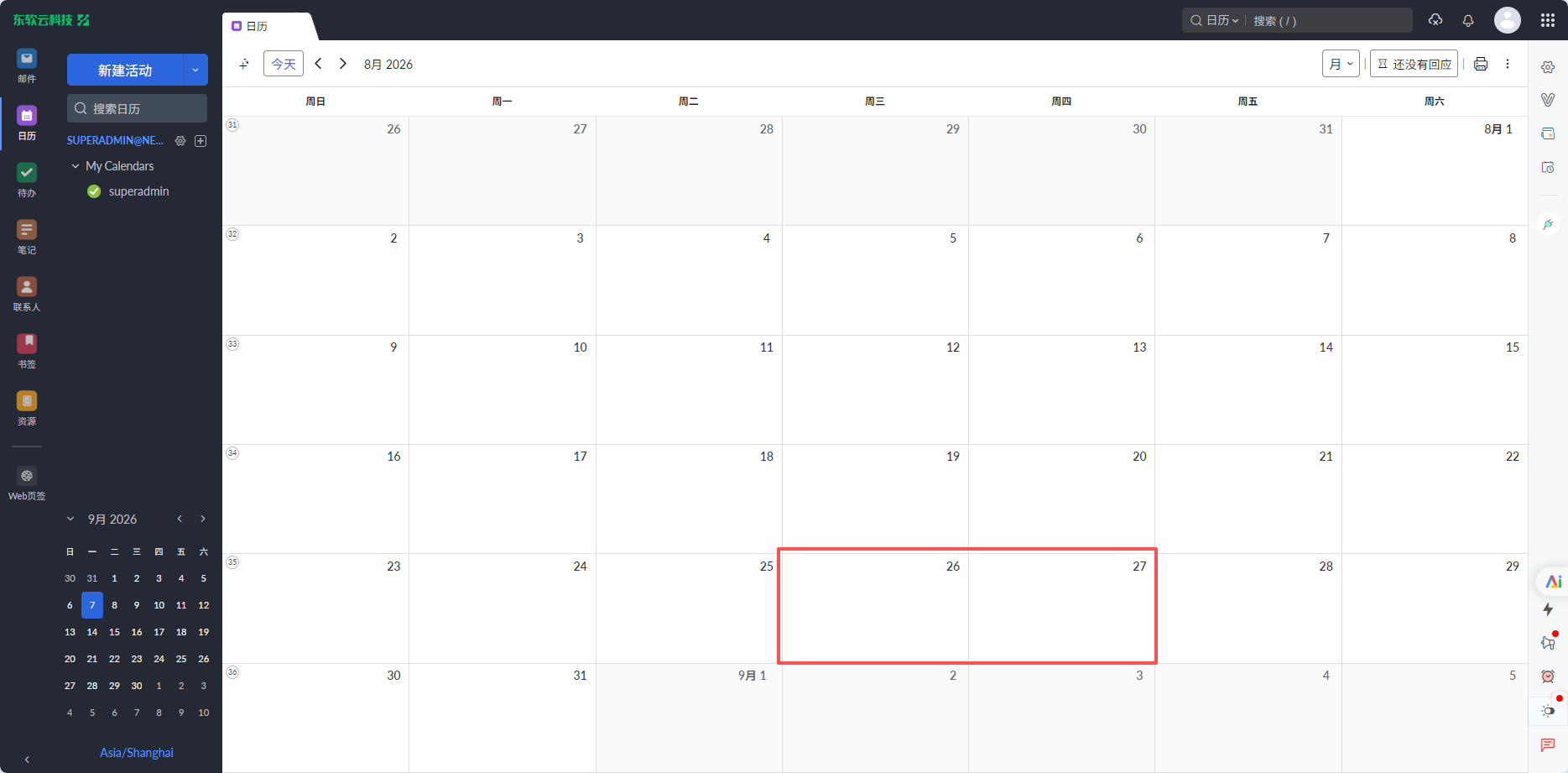
The emails are working fine, but the calendar created in Outlook cannot be synchronized to the calendar of the email service provider.

I used the built-in software of Apple and it was also Exchange, so it could synchronize normally.

I have also uploaded the log file of Outlook as an attachment.

Please check
1789029489880.png

1789029524362.png
 
I bound to Outlook through Exchange. The emails are working fine, but the calendar created in Outlook cannot be synchronized to the calendar of the email service provider. I used the built-in software of Apple and it was also Exchange, so it could synchronize normally. I have also uploaded the log file of Outlook as an attachment. Please check
If mail works but only the Outlook-created calendar items don’t show up on the provider side, first check which calendar you’re creating them in. Outlook can still have a local “On My Computer” calendar or another data file calendar, and those won’t sync to Exchange no matter how nicely they behave locally. Create a test appointment directly in the Exchange mailbox calendar, not a local calendar, then check webmail or another device. If it still doesn’t sync, remove and re-add the Exchange account in Outlook, making sure it is added as Exchange, not IMAP. Also check whether Outlook is fully updated. I can’t inspect attachments directly here, so if the log shows specific sync errors, paste the relevant lines and we can narrow it down.
 
I bound to Outlook through Exchange.

The emails are working fine, but the calendar created in Outlook cannot be synchronized to the calendar of the email service provider.

I used the built-in software of Apple and it was also Exchange, so it could synchronize normally.

I have also uploaded the log file of Outlook as an attachment.

Please check

View attachment 4832
View attachment 4833
If the calendar cannot be synchronized with Exchange, first check the Exchange account settings, server connection, and calendar permissions. Make sure the account is properly connected and that calendar synchronization is enabled.

If the issue continues, you can use a PST Viewer Tool to open the PST file without Outlook and check the calendar data stored in the file. This can help you confirm whether the calendar items are present in the PST and view them without connecting to Exchange.
 
Team, please check the error.

1789353780005.png


Later, i will use the PST Viewer Tool to check the calendar data.
 
Similar threads
Thread starter Title Forum Replies Date
B Setting Default calendar - using exchange mailbox and a .pst Using Outlook 2
S Using POP3, Exchange server, and iPhone sync - can't sync to POP3 calendar Exchange Server Administration 0
Diane Poremsky Set Another Data File as Default When Using an Exchange Account Using Outlook 0
Diane Poremsky Save Sent Items in Shared Mailbox using an Exchange Server Cmdlet Using Outlook 0
M Using .Restrict with a UserProperty in an Exchange folder Outlook VBA and Custom Forms 4
Diane Poremsky Cut the Clutter: Using Exchange Online’s Clutter Folder Using Outlook 0
R Exchange - Locating a user that has log files but is not found using powershell Exchange Server Administration 1
J IPAD Outlook OWA App - Help using Exchange 2007 Using Outlook 4
Thomas Young Using On-Premises Exchange with Exchange Online Protection Exchange Server Administration 2
H Facility Mangaement using Exchange Resource Mailbox, Conflicts properties Using Outlook 5
B Using hosted exchange to sync outlook 2010 calendars and contacts to BB Z10 Using Outlook 4
T Problems when using different profiles. Exchange+IMAP Using Outlook 3
T What is the best way of using the Classic Outlook client to change my email address? Using Outlook 5
T Outlook 2010 Originating & Using a Template, how & where? Using Outlook 2
U Showing images on company newsletter using Mailchimp Using Outlook 3
Y Using The Non-Office Subscription Copy of Office Using Outlook 3
D Send email from Outlook Alias using Mac? Using Outlook 7
H using VBA to edit subject line Outlook VBA and Custom Forms 0
e_a_g_l_e_p_i Need clarification on 2-Step Verification for Gmail using Outlook 2021 Using Outlook 10
e_a_g_l_e_p_i Outlook 2021 not letting me setup my Gmail using pop Using Outlook 1
O How to find out the domain and server settings that my Outlook is using? Using Outlook 2
S Outlook 2019 Custom outlook Add-in using Visual Studio Outlook VBA and Custom Forms 0
D Outlook 2021 Using vba code to delete all my spamfolders not only the default one. Outlook VBA and Custom Forms 0
M using excel to sort outlook appointment items Outlook VBA and Custom Forms 4
R Advise on using multiple instances of network files based on customers Outlook VBA and Custom Forms 8
HarvMan Using Emojis in Outlook 365 Using Outlook 3
T Outlook 2019 Not Using Auto Compete After Deletion of 365 Using Outlook 1
M USING INITIALS AS RECIPIENTS Using Outlook 1
T Outlook 2019 Using Gmail aliases in Outlook Using Outlook 6
M Saving emails using Visual Basic - Selecting folder with msoFileDialogFolderPicker Outlook VBA and Custom Forms 6
Z Import Tasks from Access Using VBA including User Defined Fields Outlook VBA and Custom Forms 0
justicefriends How to set a flag to follow up using VBA - for addressee in TO field Outlook VBA and Custom Forms 11
M Extract "Date sent" from emails (saved to folder using drag and drop) Outlook VBA and Custom Forms 1
I Outlook for Mac 2019 using on desktop and laptop IMAP on both need help with folders Using Outlook 1
David McKay VBA to manually forward using odd options Outlook VBA and Custom Forms 1
H Stationery using between OL 2019 and OL 2010 Using Outlook 0
P Prevent Outlook 2016 from using DASL filter Using Outlook 4
O Calendar - Location: what happens when using my own way of entering locations Using Outlook 1
M Disable Contact Card Results when using "Search People" in Outlook Ribbon Using Outlook 7
K can't get custom form to update multiple contacts using VBA Outlook VBA and Custom Forms 3
S Outlook VBA How to adapt this code for using in a different Mail Inbox Outlook VBA and Custom Forms 0
pcunite Outlook 2019/O365 Build 13127.20408 errors when using MAPI calls Using Outlook 1
B Change Font and Font size using VBA Outlook VBA and Custom Forms 9
M Outlook 2013 reminder email by using Outlook vba Outlook VBA and Custom Forms 2
X Using Outlook 2013 and Outlook 365 Using Outlook 1
A Going to folder using shortcuts Using Outlook 3
A Outlook replies not using "delivered to" address in From Using Outlook 1
Terry Sullivan E-Mails Sent Using a Group Box Result in 70 Kickbacks Using Outlook 4
O Email not leaving Outbox when using Excel VBA to sync Outlook account Outlook VBA and Custom Forms 4
K Using Outlook 2016 to draw Using Outlook 1

Similar threads

Back
Top