Rule on a shared mailbox only runs when my Outlook is open

sari_ops_bgr

New Member
OS Version(s)
  1. Windows
Outlook version
Outlook 365 64 bit
Operating system::    Windows 11
Outlook version:     Outlook 365 64-bit
Email type or host:    Exchange Online (shared mailbo

Hi all. We have a shared mailbox for delivery confirmations, about 30 people have access, I'm the one who set it up. Outlook 365, 64 bit, Windows 11, Exchange Online.
I made a rule on the shared mailbox that moves anything from our courier's address into a subfolder and flags it. It works, but only when my Outlook is running. If I'm out for the day, nothing moves and on Monday there are two hundred messages in the inbox and people complain.
From what I read, the rule is client-side because of the flag action, so it lives on my PC. Is that right? If I remove the flag and only keep the move, will it run on the server instead? Or do I have to create the rule while logged into the shared mailbox itself in OWA?
Thanks, Sari
 
Small update in case someone finds this later. I made a copy of the rule without the flag action, only "move to folder", and the "(client only)" note next to it in the Rules list is gone. Left Outlook closed over lunch and the courier mails were in the subfolder when I came back, so it looks like it runs on the server now.
The flag was only there so people notice new ones, so I'll try a view with conditional formatting on the subfolder instead. If anyone has a better way to make new items stand out for everyone on a shared mailbox, I'm listening.
 
Yeah, there are a few actions (and some conditions) that force the rule client side, so it only runs when that client is opened. Except, shared mailboxes add a complication if opened as shared - the rule only runs when it's opened as an account.

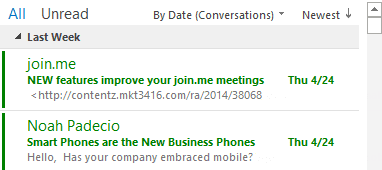
Conditional formatting is probably the best option - you can use a formatting rule for messages received in the last day (or 2) so only new messages are highlighted. I have instructions here - you can use any age - just enter it as "today and 2 days ago"
 
Thanks Diane, that explains why it behaved differently on my colleague's PC, she has it added as a shared mailbox, not as an account. I went with your suggestion and set the view on the subfolder to show anything received in the last 2 days in bold dark red, everything older stays normal.

Funny thing, I copied the idea from home. My brother follows our local football club, and on the club's website the next match sits in its own box on top while everything else is further down, so he never has to scroll to see what's coming. Same logic, new items stand out and the rest fades into the background.

People in the office noticed it on the first morning without me saying anything, which is the best test. One more question: if I change the view on the shared mailbox, does it change for everyone, or does each person have to apply it themselves?
 
Similar threads
Thread starter Title Forum Replies Date
O VBA rule on multiple computers using shared mailbox Outlook VBA and Custom Forms 1
I shared mailbox - can i create a rule (vba) for every user? Outlook VBA and Custom Forms 1
S Rule not running in Outlook Classic unless... Using Outlook 9
S Create search-folder/rule/filter looking at FROM a distro list that has nested distro lists Using Outlook 1
E Create Rule to Forward Email if Subject Begins With Using Outlook 2
P VBA to add email address to Outlook 365 rule Outlook VBA and Custom Forms 0
HarvMan Outlook 365 - Rule to Move an Incoming Message to Another Folder Using Outlook 4
B Modify VBA to create a RULE to block multiple messages Outlook VBA and Custom Forms 0
D VBA - unable to set rule condition 'on this computer only' Outlook VBA and Custom Forms 5
CWM330 This rule has a condition that the server cannot process? Using Outlook 1
A rule name into message - how? Outlook VBA and Custom Forms 5
O Mail rule issue Using Outlook 3
A manual rule sends mail to wrong folder Using Outlook 5
Aussie Outlook 365 Rule runs manually but returns the error code "an unexpected error has occurred" when incoming mail arrives Using Outlook 1
bhamberg Finding a rouge rule... Using Outlook 6
D How to get this rule to work Using Outlook 0
B Seeking help with Outlook rule Using Outlook 2
K Run a script rule to auto 'send again' on undeliverable emails? Outlook VBA and Custom Forms 1
G Save attachment run a script rule Outlook VBA and Custom Forms 0
R Rogue Outlook Rule ? Using Outlook 2
P Can I create a Rule that sends me an email when I get a Task? Using Outlook 2
E Having some trouble with a run-a-script rule (moving mail based on file type) Outlook VBA and Custom Forms 5
M How create a Rule to filter sender's email with more that one @ sign Using Outlook 1
diver864 vba for a rule to automatically accept meeting requests with 'vacation' in subject, change to all-day event, change to free, don't send reply Outlook VBA and Custom Forms 1
1 Incorrectly Setup a Rule at Domain level to not allow address from outside domain Exchange Server Administration 2
J Transport Rule to detect Keyword question.. Exchange Server Administration 2
T "Words In Recipient's Address" Rule Causes Outlook To Stop Processing Rules Using Outlook 3
R Outlook Autoforward rule do not work for NDR messages Using Outlook 1
R Setup autofoward rule on a particular folder in Outlook Using Outlook 0
N Rule for "on behalf of" - with changing names Using Outlook 2
S Unable to remove rule outlook 2010 Using Outlook 0
O Outlook 2016 This rule will only run when you check your email in Outlook.... Using Outlook 4
Nadine Rule to move attachments with specific name Outlook VBA and Custom Forms 1
N Outlook Email Rule execution through shortcut keys (VBA codes) Using Outlook 1
dweller Outlook 2010 Rule Ignores VBA Script Outlook VBA and Custom Forms 2
O Rule to move (specific) messages from Sent folder to Specific folder Using Outlook 1
S Adding new Exchange (2016) rule very slow down Microsoft Outlook Exchange Server Administration 0
B Outlook rule run a Script doesn't work Outlook VBA and Custom Forms 1
K VBA BeforeItemMove event create rule to always move to its folder. Outlook VBA and Custom Forms 4
icacream Rule based on sender / wrong sender sent to folder Using Outlook 7
Bri the Tech Guy Run Script rule not running for newly arriving messages Outlook VBA and Custom Forms 25
L Making rule to move email to folder from one O365 domain Using Outlook 1
J Assess content of User Defined Field in Rule Using Outlook 3
S Send email via SMTP - use transport rules to add to senders inbox (then rule to move to sent items Exchange Server Administration 1
A Change order of actions in one (!) rule Outlook VBA and Custom Forms 2
J HELP- Rule to auto strip prepend from external emails Using Outlook 0
A Forward Outlook Email by Filtering using Macro Rule Outlook VBA and Custom Forms 44
A rule to flag messages not working Using Outlook 5
Brian Murphy Exchange Online Everything a Transport Rule should do and cannot Exchange Server Administration 1
J Outlook Rules - Changing auto-submit address in multiple rules, according to rule name Outlook VBA and Custom Forms 0

Similar threads

Back
Top