How to view backed up PSTs from Outlook 2007 in Outlook Classic's Folder pane

Post number 2 has been selected as the best answer.

Steve Mc

Senior Member
Outlook version
Email Account
POP3
Operating system::    Windows 11
Outlook version:     Office 2024 Classic
Email type or host:    POP xxx@sbcglobal.net

Again, thanks for all your assistance a few months ago while I converted from Outlook 2007 to Outlook Classic ( 2024). I’m still learning the nuances of Classic, but for the most part, it’s nicely operational for me. However, I just noticed that 2 of my archived ‘year’ files ( 2023 & 2024) are incomplete. I did go back to all your previous responses to my questions, but I’m even closer to 78 now, so I got confused.

I did have the original .pst’s backed up, and would like to have them show in my Classic. I renamed them 2023full.pst and 2024full.pst.

As you can see below, this is what shows in my Classic folder pane. 2023 & 2024 are missing most of the data:

Outlook Classic folder pane:

>Steve**###@sbcglobal.net

>Archives

>Steve**###@att.net

>Steve**####@att.net

>2021

>2022

>2023

  • Deleted items
  • Search folders
>2024

  • Deleted items
  • Search folders
>2025

This is what shows in my Account settings:

Steve**###@sbcglobal.net POP/SMTP ( send from this account by default)

Steve**###@att.net

Steve**####@att.net

And this is what shows in Documents\Outlook Files

Steve**###@sbcglobal.net.pst

Steve**###@att.net.pst

Steve**####@att.net.pst

How can I get my 2 renamed years, 2023full.pst & 2024full.pst to show in Outlook’s folder pane ?

Thanks,
 
How can I get my 2 renamed years, 2023full.pst & 2024full.pst to show in Outlook’s folder pane ?
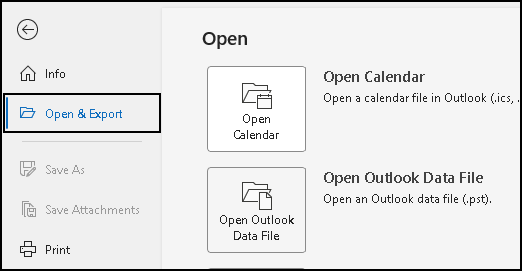
From your Outlook Main Menu:

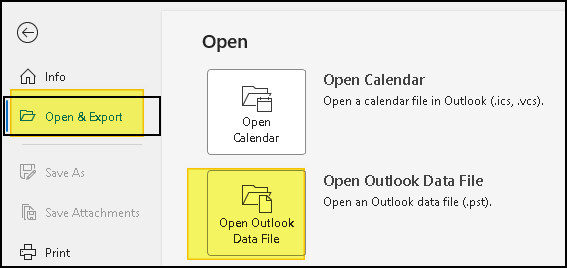
File -> Open and Export -> Open Outlook Data File
1786146871544.png


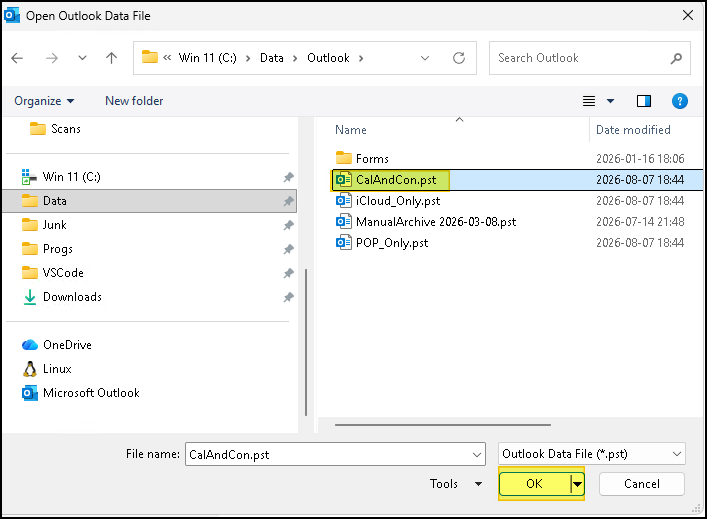
In the Open Dialog, navigate to where you have the files stored, select a PST and [OK].
1786146379510.png


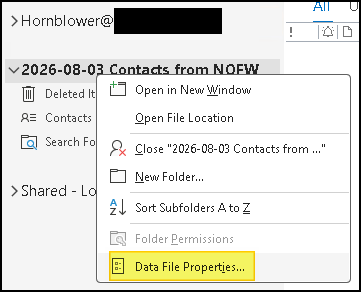
Back in your Folders List you should see the new PST as a top level folder. To rename it, right click the top level folder and choose "Data File Properties"

1786146602208.png


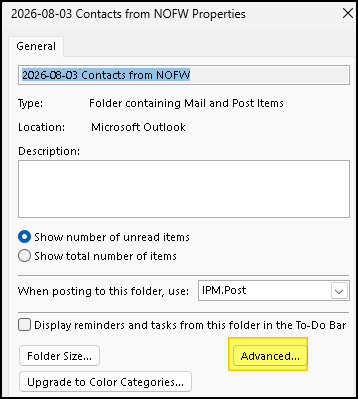
On the Properties Dialog click [Advanced]
1786146666657.png


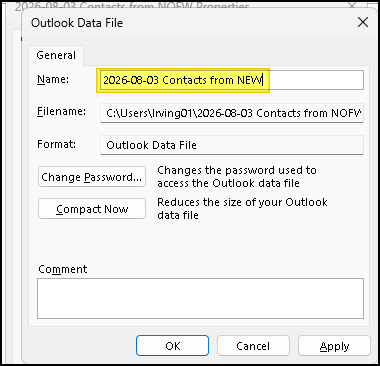
Give it a new Name and [OK] your way out.
1786146749843.png


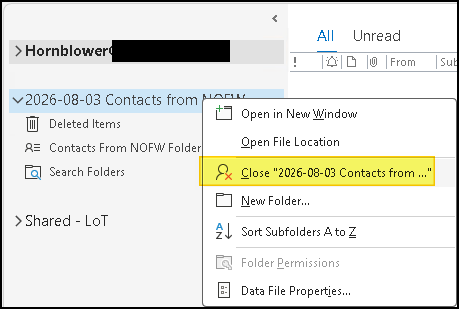
To remove the old ones, right click on top level folder and choose "Close"
1786146787675.png


1786146231861.png
 
Thank you for this. However I won't be able to get to it until probably after the first of the month.
 
Thank you for this. However I won't be able to get to it until probably after the first of the month.

I can't believe how easy that was. Thank you both so much.

I guess I'm paranoid because of all the problemes I've head with this conversion.

Now, how can I safely delete the old , incomplete .pst's of those 2 years ?

Thanks
 
Now, how can I safely delete the old , incomplete .pst's of those 2 years ?
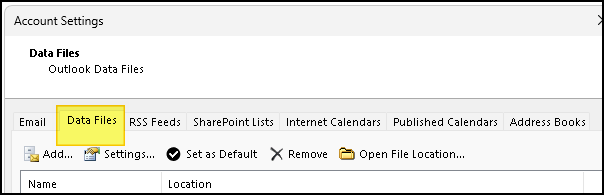
1 -- File -> Account Settings -> Account Settings -> | Data files |. Verify that the old PSTs are no longer listed.

1788290257199.png


2 -- In Windows Explorer, navigate to where you have the old files stored, select a PST and [Delete]

But I would urge you to make a backup to a USB Thumb Drive or some other media before deleting.
 
The 'incomplete' data files are showing in File -> Account Settings -> Account Settings -> | Data files |.

Are you saying that if I delete them in Explorer, they will disappear in Classic ??

Also, I had named the new full data files 2024 full. Once I delete the incomplete 2024 file, how can I rename the 2024 full to 2024 ?

Thanks,
 
The 'incomplete' data files are showing in File -> Account Settings -> Account Settings -> | Data files |.
Did you "Close" the 'incomplete' top level folders from inside Outlook? That should have removed them from the Data Files tab?

Do not delete anything using Windows Explorer until it no longer shows on the Outlook Data Files tab.
 
No.

I don't know how to "Close" the 'incomplete' top level folders from inside Outlook? That should have removed them from the Data Files tab?
 
OK thanks. And please bare with me, my senior years have slowed me a bit.

So after I close it on the data file tab, I could then safetly delete them from the harddrive location?

And also, if I want to rename on of thse psts. how can I do that ?
 
Similar threads
Thread starter Title Forum Replies Date
V View calendar on backed up Outlook file Using Outlook 6
R Larger view Using Outlook 6
R Outlook 2021 change view Using Outlook 2
K Protected View - Files fail, no banner Using Outlook 4
J Outlook 365 Outlook Macro to Sort emails by column "Received" to view the latest email received Outlook VBA and Custom Forms 0
T Problem when requesting to view an email in a browser Using Outlook 0
S Inconsistent view of To-Do List Using Outlook 0
C View doesn't refresh (fields or formatting) Using Outlook 1
D Unable to view older emails in desktop app Using Outlook 0
Commodore MHT files (from "View in browser") Using Outlook 7
J How to create a drop down user defined field that will appear on an inbox view Outlook VBA and Custom Forms 8
O In Agenda-view - How to copy an existing item months ahead or back? Using Outlook 0
J Split reading view with history Using Outlook 2
P Calendar Day View only shows 1 all day event Using Outlook 0
C Can't Locate an Unread Message in my Outlook view pane Using Outlook 0
D Autosort macro for items in a view Outlook VBA and Custom Forms 2
D Anyone tell me where custom view settings are stored? Outlook VBA and Custom Forms 9
D cannot view emails in View pane (in the right pane), I only see one line or nothing Using Outlook 21
B Outlook 2016 Unable to view images or logos on the outlook 2016 emails the same html code works well when i use outlook 2010 Using Outlook 0
P Changing the font that the task view shows Using Outlook 5
E Outlook view grouping keeps changing Using Outlook 3
K UDF with formula not showing on Calendar custom view. Outlook VBA and Custom Forms 0
D Prevent popup of "Do you want to save changes?" when closing after opening an appointment to view Outlook VBA and Custom Forms 2
A How To Get Body of All Emails to view in Blue Using Outlook 1
A How to get body of all emails in outlook 2016 to view in blue color Using Outlook 1
J Weekend View in Calendar Using Outlook 1
D Add date next to day name in Outlook Today calendar view Using Outlook 1
Z See "Change View" Drop Down as a List? Using Outlook 1
Z How to show concatenated categories in list task view? Using Outlook 2
K Accentuating today in Outlook calendar month view Using Outlook 2
W Outlook Calendar does not save view any longer! Using Outlook 3
T How can we view Blocked email addresses Using Outlook 6
N Private check box in table view Using Outlook 0
E Mail sorting view issue Using Outlook 1
P How can I change my calendar view back Using Outlook 3
Y Outlook Task View - Table Format - Customize Reminder Time to Drop-Down Selection Using Outlook 2
G Calendar View in Outlook Office 365 - Doesn't show enough hours, and the 30/60 min choice isn't the solution Using Outlook 4
O How to apply view settings on all accounts and folders Using Outlook 7
D.Moore Folder view settings by VBA macro Outlook VBA and Custom Forms 57
A Add to Outlook Contacts from email - default view Outlook VBA and Custom Forms 1
N Column view fonts Using Outlook 4
J Contact Business card view Using Outlook 11
G Entered data in custom field goes in card and does not stay in list view Outlook VBA and Custom Forms 1
JohnViuf Export task list view settings to other pc Outlook VBA and Custom Forms 16
U HTML Task Alternate Home Page View Control Using Outlook 3
R Quick Access view in File Explorer when saving attachments Using Outlook 0
J Outlook 2016 - Tasks View Settings Missing Using Outlook 1
copperberry How to view all tasks across task folders Using Outlook 3
S View Appointment in Text Wrap in Outlook 2007 Month Calendar View Using Outlook 0
A Day view - print appointment details Using Outlook 1

Similar threads

Back
Top