
remove from this device ?

Steve Mc

Senior Member
Outlook version
Email Account
POP3
Operating system::    Windows 11
Outlook version:     Office 2024 Classic
Email type or host:    POP xxx@sbcglobal.net

I tried to add a Pop account to Outlook , but apparently I didn’t see that option to add it manually when I added a new account. So now I want to remove that account and try to start over.

If I select the option ‘remove from this device’, that will only remove that account from Outlook, and not that same account on Outlook Classic, correct ?
 
If using new outlook, remove from this device will only remove it from that Outlook - the question is asked because 'remove from all devices' would apply to any mobile outlook or new Outlook that also has the account set up. This is because Microsoft syncs the mailbox to the Microsoft cloud then down to new Outlook or mobile outlook - every device would share the same Microsoft cloud mailbox.

Outlook classic does not use the Microsoft cloud - it syncs directly with the pop server. It will not remove a PST if (if using Outlook classic) - only the account from the accounts tab.
 
If using new outlook, remove from this device will only remove it from that Outlook - the question is asked because 'remove from all devices' would apply to any mobile outlook or new Outlook that also has the account set up. This is because Microsoft syncs the mailbox to the Microsoft cloud then down to new Outlook or mobile outlook - every device would share the same Microsoft cloud mailbox.

Outlook classic does not use the Microsoft cloud - it syncs directly with the pop server. It will not remove a PST if (if using Outlook classic) - only the account from the accounts tab.
Once I get it removed, could you provide a step by step process to add a POP (xxx@sbcglobal.net) account to OUTLOOK ?

I do have all the server and secure mail key info, I just need the steps.

And after, I would like to (import?) my Classic xxx@sbcglobal.net.pst to Ouloook, so that it will mirror/replicate my current folders, calendar, etc.

Also, will the new .pst data file also show in Documents\Outlook files ? And if so, would it show as xxx@sbcglobal.net.pst (1) while the original Classic file remains as xxx@sbcglobal.net.pst. ?

Thanks,
 
If you need POP3 and PST files, stick with classic Outlook.

Do you have an Office 365 subscription? That is required to use a PST in new outlook, I'm pretty to import or export - definitely to open a pst in the folder list. Classic Outlook needs to be installed to use pst, although this will be changing eventually.

Microsoft will likely try to sync imported mail back to your mail server, so if your quota is small, you may max out the mailbox.

New Outlook doesn't use PST for normal data storage; it stores mail in a weird database format in app data folders. If you want to open a pst, it can share your current pst. If you want a separate pst, make a copy of the one classic Outlook uses.

Microsoft should add the account to new Outlook correctly, but it will be a cloud account - it will not be a typical pop account like you see in classic Outlook as Microsoft syncs all pop and IMAP accounts to the Microsoft cloud and the cloud syncs to new Outlook.

1789239933617.png
 
If you need POP3 and PST files, stick with classic Outlook.

Do you have an Office 365 subscription? That is required to use a PST in new outlook, I'm pretty to import or export - definitely to open a pst in the folder list. Classic Outlook needs to be installed to use pst, although this will be changing eventually.

Microsoft will likely try to sync imported mail back to your mail server, so if your quota is small, you may max out the mailbox.

New Outlook doesn't use PST for normal data storage; it stores mail in a weird database format in app data folders. If you want to open a pst, it can share your current pst. If you want a separate pst, make a copy of the one classic Outlook uses.

Microsoft should add the account to new Outlook correctly, but it will be a cloud account - it will not be a typical pop account like you see in classic Outlook as Microsoft syncs all pop and IMAP accounts to the Microsoft cloud and the cloud syncs to new Outlook.

View attachment 4838
I want to keep My Classic sbcglobal.net account as is (POP) , which also has other alternate accounts, and will always be my primary, but in certain situations, I want Outlook to just to show that primary account and not the alternates accounts. And that is why I'm trying to get a copy of my primary sbcglobal.net POP account from Classic on to Outlook. So apparently I need a 365 subscription to do that, HOWEVER, I don't want 365 to mess with my current Office 2024. So can I just use that feature of 365 , the ability to import my pst file, without 365 messing up any of my Office 2024 setup. And I surely don't want my Classic sbcglobal.net account changed from POP to IMAP.
Thanks for your patience with me, again.
 
I tried to add a Pop account to Outlook , but apparently I didn’t see that option to add it manually when I added a new account. So now I want to remove that account and try to start over.
casino online
If I select the option ‘remove from this device’, that will only remove that account from Outlook, and not that same account on Outlook Classic, correct ?
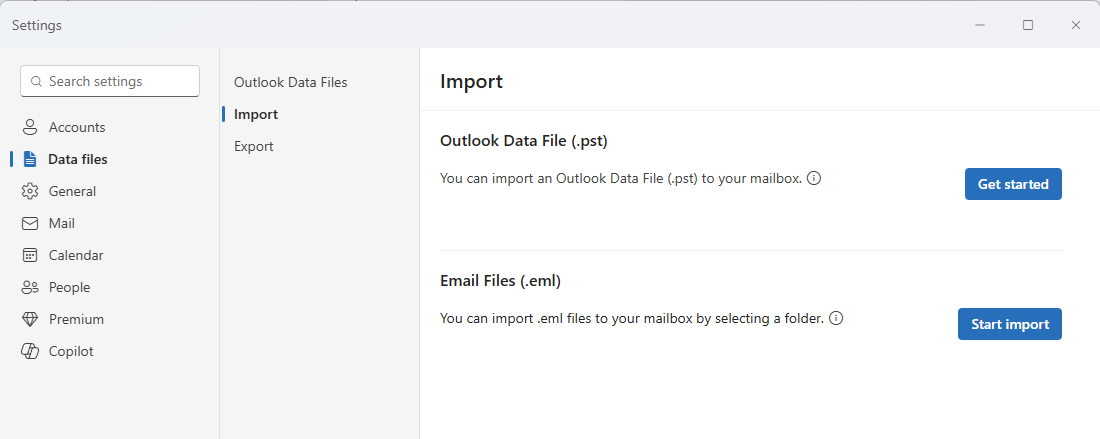
Selecting "Remove from this device" in the modern Outlook interface or Windows settings will only remove the account profile from the new Outlook app, leaving your sbcglobal.net account and its local data in Outlook Classic completely untouched. However, to avoid any confusion, the safest way to remove or add POP accounts in Classic Outlook is through the legacy Control Panel under Mail (Microsoft Outlook) rather than the main Windows Settings app. From there, you can easily set up your POP account manually with the proper inbound and outbound server settings.
 
Selecting "Remove from this device" in the modern Outlook interface or Windows settings will only remove the account profile from the new Outlook app, leaving your sbcglobal.net account and its local data in Outlook Classic completely untouched. However, to avoid any confusion, the safest way to remove or add POP accounts in Classic Outlook is through the legacy Control Panel under Mail (Microsoft Outlook) rather than the main Windows Settings app. From there, you can easily set up your POP account manually with the proper inbound and outbound server settings.
Thank you.

But I gave up on what I was trying to do. It wasn't worth the stress. In addition to needing 365 to add a POP account to Outlook, Hornblower indicated "Microsoft doc says that New "Outlook supports POP, but I've seen multiple reports that it doesn't work for many email hosting services, other than GMail and Yahoo."
 
Thank you.

But I gave up on what I was trying to do. It wasn't worth the stress. In addition to needing 365 to add a POP account to Outlook, Hornblower indicated "Microsoft doc says that New "Outlook supports POP, but I've seen multiple reports that it doesn't work for many email hosting services, other than GMail and Yahoo."

New Outlook doesn't actually use POP - it will sync the mailbox to the Microsoft cloud then that syncs down to new Outlook. If the mailbox supports imap, I believe it will add it as IMAP - but don't have any accounts to test it with and verify that it uses the pop protocol - just Gmail and yahoo (which will always use imap.)

You need a subscription license if you want to open a PST in new Outlook - but the email accounts won't use PST files. They store the mail in a cache file that is not readable/useable outside new Outlook.

Honestly, if you have IMAP or pop accounts, no Exchange online (outlook.com or business side), I don't recommend new outlook. Use classic if you have a license or another mail app (I like eM client).
 
New Outlook doesn't actually use POP - it will sync the mailbox to the Microsoft cloud then that syncs down to new Outlook. If the mailbox supports imap, I believe it will add it as IMAP - but don't have any accounts to test it with and verify that it uses the pop protocol - just Gmail and yahoo (which will always use imap.)

You need a subscription license if you want to open a PST in new Outlook - but the email accounts won't use PST files. They store the mail in a cache file that is not readable/useable outside new Outlook.

Honestly, if you have IMAP or pop accounts, no Exchange online (outlook.com or business side), I don't recommend new outlook. Use classic if you have a license or another mail app (I like eM client).
Yes, I am very happy*( with an asterisk) with Classic, and want to thank you again Diane very much for all your patience with me as I was converting from 2007, to Classic, with an accidental detour to Outlook in the begning of my conversion.

*That asterisk being that my rules work flakely. Meaning, sometime the rule works, and sometimes it doesn't.
 
Similar threads
Thread starter Title Forum Replies Date
G Reply a selected message and remove blank space before signature Outlook 365 version 2406 64BIT Outlook VBA and Custom Forms 2
G Reply a selected message and remove blank space before signature Outlook 365 version 2406 64BIT Outlook VBA and Custom Forms 0
D Auto Remove [EXTERNAL] from Subject + ConversationTopic (WITHOUT Redemption plug-in) Outlook VBA and Custom Forms 5
Rupert Dragwater How do I remove an email ending with @gmail.com Using Outlook 4
E Edit incoming emails to remove a certain sentence added by the "system" Using Outlook 1
O VBA - Regex - remove double line spacing Outlook VBA and Custom Forms 1
TomHuckstep Remove Send/Receive All Folders (IMAP/POP) button from Outlook 365 Ribbon Using Outlook 2
Rupert Dragwater How to permanently remove an email address Using Outlook 9
D Auto Remove [EXTERNAL] from subject - Issue with Macro Using Outlook 21
E Remove flag automatically Using Outlook 4
N Can't create NEW GROUP and add/remove a member from existing Group in Outlook Using Outlook 1
Timmon Remove just one attachment before AutoForward Outlook VBA and Custom Forms 0
Z Remove GMAIL IMAP account from Outlook 2016 Using Outlook 2
C-S-R Manage Add-ins (Remove Wunderlist) Using Outlook 6
O Remove duplicates within two accounts Using Outlook 2
D How to remove a folder, option grayed out Using Outlook 4
T Outlook 2016 remove envelope icon for certain folders Using Outlook 5
M In Outlook Calendar remove the buttons: 'Today' and '<' (Back a day) and '>' (Forward a day) that are below the Ribbon and above the calendar display. Using Outlook 0
P [SOLVED] Auto remove [EXTERNAL] from subject Using Outlook 16
P Add, remove, & reorder folder pane Using Outlook 6
W Remove specific contacts from contact list Outlook VBA and Custom Forms 3
T Cannot remove needless PST Using Outlook 1
Healy Consultants Macro to remove inside organization distribution list email address when reply to all recepients Outlook VBA and Custom Forms 0
S Unable to remove rule outlook 2010 Using Outlook 0
N How to remove signature formatting from Text in Word (accidentally taken from Outlook) Using Outlook 0
B Remove Subject Residual Outlook VBA and Custom Forms 3
P how to remove unwanted PST file default categories assigned to many calendar entries Using Outlook 7
J Remove text to Clean Up Outlook VBA and Custom Forms 1
B Automatically Forward Emails and Remove/Replace All or Part of Body Outlook VBA and Custom Forms 8
D Remove text in subject using VBA Outlook VBA and Custom Forms 4
T Remove Old Location From Tasks Pane Using Outlook 1
A remove or turn off outlook.com contact folder from outlook 2016 Using Outlook 4
R Chancing / remove “ something ” in the subject, online archive Outlook VBA and Custom Forms 8
Morgan Fowler Remove Signature Using Outlook 1
M How to remove a list of specific contacts from Outlook Using Outlook 18
R New Links on Navigation Pane, How to Remove? Using Outlook 1
M VBA to remove deferred delivery on a MeetingItem Outlook VBA and Custom Forms 2
J Remove extra line above signature in reply Outlook VBA and Custom Forms 5
Diane Poremsky How to Remove RSS Support from Outlook Using Outlook 0
Diane Poremsky Remove Attachments From Messages Using Outlook 0
Diane Poremsky Remove Office 2013 Update Banner Using Outlook 0
O Remove duplicate mail items Outlook VBA and Custom Forms 6
Diane Poremsky Remove a password from an Outlook *.pst File Using Outlook 3
G VBA/Macro to remove page colour when replying or forwarding email Outlook VBA and Custom Forms 2
L Fake reminder apperaring (not in calendar) - how to remove? Using Outlook 5
J Your IMAP server wants to alert you to the following: cannot remove system folder Using Outlook 3
A Auto Insert of filename when selecting 'Remove Attachment' Using Outlook 1
C how to remove icons on right hand side outlook 2013 Using Outlook 2
K Remove Manage APPS button for users Exchange Server Administration 1
P Remove name and parenthses from email Using Outlook 1

Similar threads

Back
Top