Outlook app 2021 & iCloud PST issues

Status
Not open for further replies.

DDNorCal

Member
Outlook version
Outlook 2021 64 bit
Email Account
POP3
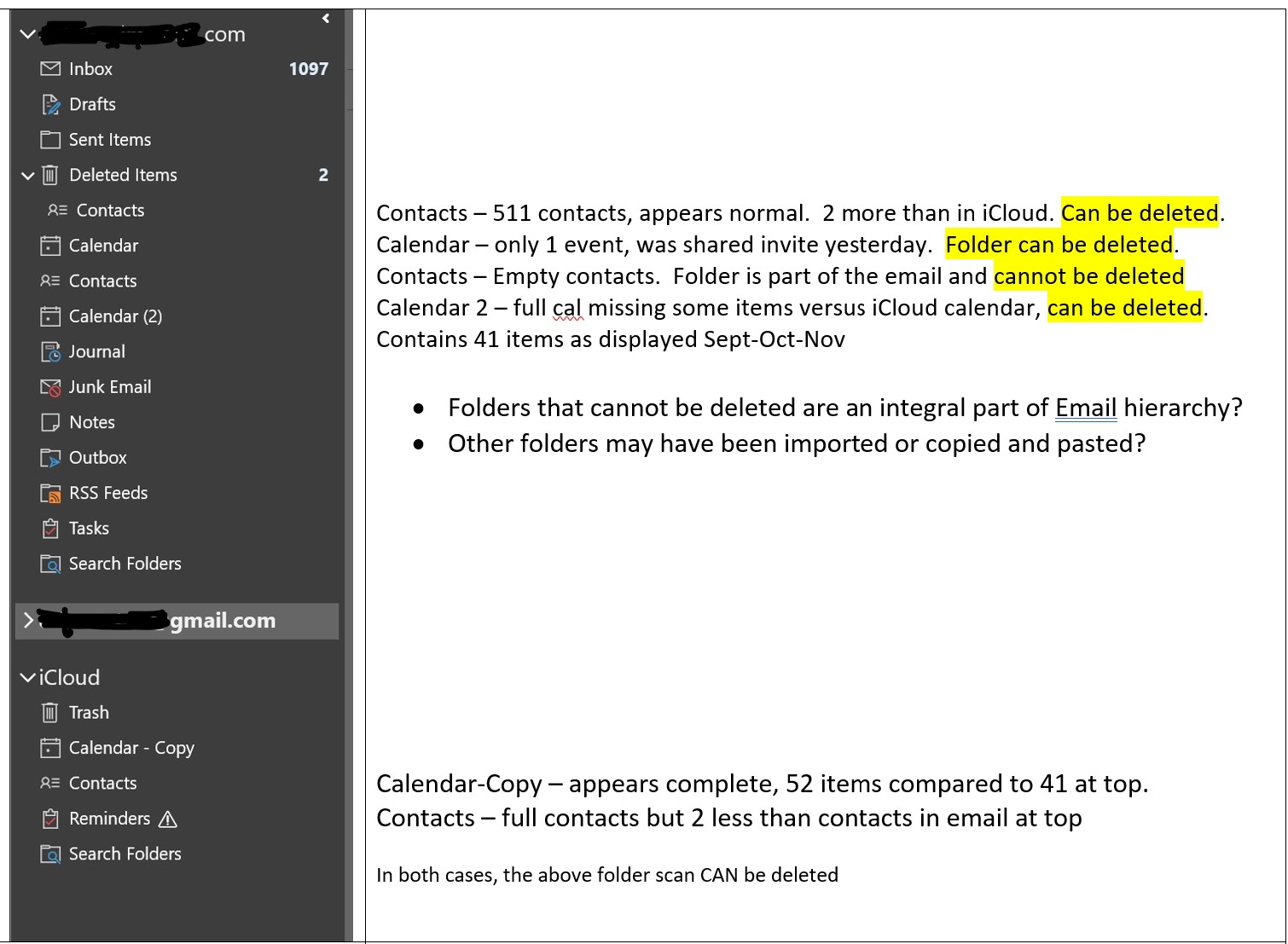
Diane, can you please help me with these issues? I have attached a pic of the Outlook 2021 app structure.

As I mentioned in another post. After the issue with OL.com no longer allowing syncing to iCloud, the MS LV2 tech basically rebuilt a new PST which was no longer connected with OL.com, which would operate in my OL app and sync with iCloud, directly.

This was done with a lot of piecemeal work. Basically, imported Cal from OL.com but re-used the contacts which were in iCloud and brought them into a new PST. It was not that simply, it needed a lot of trial-and-error and took about 3 hours.

I still have some odd situations in the OL app, I’d like to clear up. It is basically working and syncing to iCloud and coming to the two iOS devices.

The problem is there are too many calendars and contacts. Sometimes, a calendar event which I have input manually, somehow lands on the wrong calendar and not the main calendar and does not sync to the iOS devices. Also, I accepted a calendar event sent to me and it landed on a different calendar and not synced to iOS. And not the same calendar as the calendar referenced above.

I cannot remember what the ideal structure looked like before going to Exchange, what data should be in folders and which folders and located where?

I’m missing some general understanding such that I can identify which-Cal-is-which and where should the data reside? Should the Cal be in the main email? Should it be in iCloud? Or should it be in both?

And the same with Contacts? Should they be in both?

I am fearful of deleting anything as I saw previously that while you see something in one place, sometimes it is connected (or is?) the other item, in a different place.

In looking at my wife’s Windows 10 with Office Pro Plus 2016 , she also has iCloud and her structure indicates:
  • There are contacts and calendar within her email account, but they are completely empty.
  • Contacts and Calendar are in iCloud and are the only copies of complete contacts and Calendars.
  • I have a feeling, once iCloud is added to a complete PST, the 1st time, the contacts and calendars are moved to iCloud and then served from the cloud. what you see are not static calendars or local contacts, they are served from iCloud.
Greatly appreciate any assistance you can offer.
Thx Dave

dd pic for attaching to Outlook forum post 10-13-22.jpg
 
What is OL dot com ?

This is how I config and run Microsoft Office Pro 2021 and Outlook-2021 (64-bit) with iCloud for Windows v13.x . I have it running on two different Windows-11 machines (two different users, Apple-Accounts, iCloud-Accounts, iPhones, etc.) Two different everythings and it works and Syncs fine for both of us ... including iCloud Photo Library and the other stuff provided with iCloud for Windows.


Not sure about Calendars, but I know this about Contacts:

Remember, I only have one local Contact setup in Outlook. Its name is “Contacts are in iCloud”. All my other 350 Contacts are in the iCloud. That way, all my Contacts are in my iPhone and everywhere else.

I don't really use Calendars (I just use Reminders in iOS), but they do seem to be working. I expect they work similar to my Contacts.
 
What is OL dot com ?

This is how I config and run Microsoft Office Pro 2021 and Outlook-2021 (64-bit) with iCloud for Windows v13.x . I have it running on two different Windows-11 machines (two different users, Apple-Accounts, iCloud-Accounts, iPhones, etc.) Two different everythings and it works and Syncs fine for both of us ... including iCloud Photo Library and the other stuff provided with iCloud for Windows.


Not sure about Calendars, but I know this about Contacts:

Remember, I only have one local Contact setup in Outlook. Its name is “Contacts are in iCloud”. All my other 350 Contacts are in the iCloud. That way, all my Contacts are in my iPhone and everywhere else.

I don't really use Calendars (I just use Reminders in iOS), but they do seem to be working. I expect they work similar to my Contacts.
Thanks for the reply, Vince.
OL.com is Outlook.com I was using my local Outlook 2016 app to send contacts and calendars to their Exchange server for a few years to sync to iCloud, until they abruptly changed some policies and I could no longer sync to iCloud. That is when I went back to syncing direct to iCloud. But all of my data was stuck in their Exchange server and had to go through a very laborious process to get back to "local" syncing to iCloud. However, I still have some duplicate Contacts and Calendar folders which are empty. Contacts seem to be working ok. The "extra" calendars seem to be linked to something, as I get the odd calendar item which lands only in the wrong calendar folder.

Yes, your latest setup OL app 2021 is very similar to mine.

You did confirm there are no contacts in your email contacts folder. I assume the folder is still there, just empty? Could you confirm if the same applies with your Calendar folder? It is in your email data file? Is it also empty?
Thx Dave
 
Status
Not open for further replies.
Similar threads
Thread starter Title Forum Replies Date
D Gmail mail is being delivered to a different email inbox in Outlook App 2021 Using Outlook 2
D Outlook Desktop App Email Software Using Outlook 0
kburrows "New" Outlook Desktop App Mailbox Size Using Outlook 4
R Outlook 365 How to integrate a third-party app with Outlook to track email and sms? Using Outlook 2
C Outlook (desktop app for Microsoft365) restarts every time I save my VBA? Using Outlook 1
D Office 365 Outlook desktop app prompts for all account passwords on startup Using Outlook 11
D Wishlist How to use 'app password' in Outlook 2003 after Google pulled plug on "less secure apps" Using Outlook 2
S Excel vba code to manage outlook web app Using Outlook 10
P Outlook Mobile App Doesn't Refresh Inbox Using Outlook 0
T Outlook 2010 Advice on syncing OL2010 Calendar and Outlook app Using Outlook 0
C Outlook Mobile app email order randomized and display names stripped Using Outlook 6
Horsepower Google says Outlook 2016 is not a secure app Using Outlook 4
avant-guvnor Outlook for Android app alternative Using Outlook.com accounts in Outlook 3
T Copying Outlook Account Setup For Desktop App Using Outlook 5
Horsepower Outlook app for an individual Using Outlook 5
M Outlook 2016 - Mail Not Syncing With iPhone Outlook App Using Outlook 1
makinmyway Bulk Delete Contacts in iOS Outlook App Using Outlook 4
G Use contacts from"People" app in Win10 in Outlook Using Outlook 1
J IPAD Outlook OWA App - Help using Exchange 2007 Using Outlook 4
J Can I get real Outlook functionality in an Ipad app? Using Outlook 2
A Outlook 2013 IMAP using Google Mail App not syching Sent Mail Using Outlook 3
F This is currently a Lotus Notes app. Can Outlook / Exchange do this ? Using Outlook 3
J Outlook App for Android Exchange Server Administration 2
J ever since I started using Outlook, I cannot get an email from an app I use Using Outlook 2
D Great Outlook App That Allows Contact Search from Desktop Using Outlook 0
D Android/desktop App for sending to Outlook inbox? Using Outlook 1
J 32-bit app using 64-bit Outlook COM objects? Outlook VBA and Custom Forms 3
R Outlook Web App - calendar week number is incorrect Exchange Server Administration 6
T What is the best way of using the Classic Outlook client to change my email address? Using Outlook 4
T Creating a second email account on an Outlook client Using Outlook 2
Daviddavidsonz How to Schedule Emails in Microsoft Outlook Using Outlook 0
S Rule not running in Outlook Classic unless... Using Outlook 9
J column with actual email address in Outlook Classic Using Outlook 2
S Not receving all email since converting from Outlook 2007 to Outlook Classic Using Outlook 3
Rupert Dragwater Outlook 365 taking too long to synchronize each time email is being checked Using Outlook 17
Hornblower409 Outlook VBA Code Example - Unified inbox in Outlook Classic Outlook VBA and Custom Forms 5
J Need replacement for iTunes to locally (USB) sync. iPhone 17 to Classic Outlook 2024 Using Outlook 4
Thomas Fast Best way to manage incoming customer emails automatically in Outlook? Using Outlook 1
I Outlook 2024 Windows 11 Gmail - sudden log in problems Using Outlook 13
S Outlook Classic on 2024 Using Outlook 10
L Fresh Install of Windows 11, saved previous image, how to retrieve Outlook Contacts Using Outlook 10
C Can't Use Custom Contact form in Outlook Classic since early January 2026 Outlook VBA and Custom Forms 7
e_a_g_l_e_p_i Need help updating email in Outlook 2021 Using Outlook 10
V Outlook spam filter misbehaving Using Outlook 9
L what are the downsides of running both classic and new outlook on same win 11 pc? Using Outlook 2
P Preventing permanent deletions in Outlook on the Web Using Outlook 0
L any trick to embedding images in new outlook and outlook on the web contacts? Using Outlook 4
L new outlook contacts searching Using Outlook 5
R Outlook 2010 Outlook 2010 migration question Using Outlook 2
W New Outlook PEOPLE blank Using Outlook 6

Similar threads

Back
Top