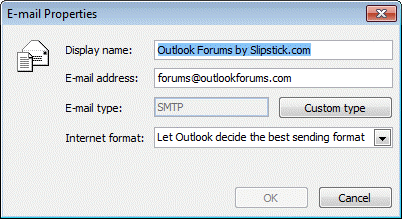
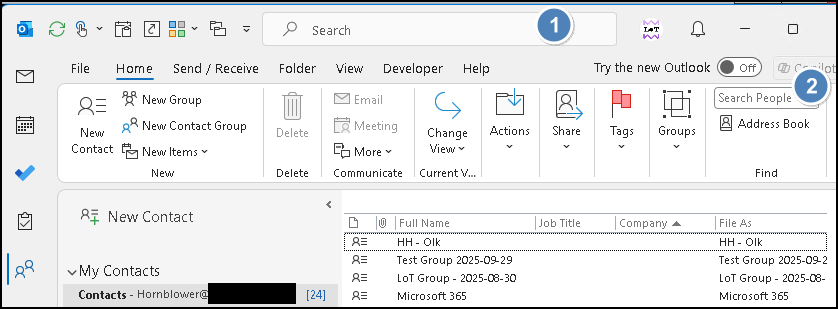
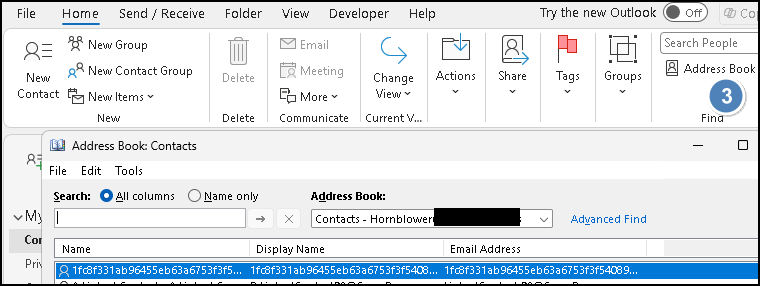
people search returns 'email properties' for one contact

astro46

Senior Member
OS Version(s)
  1. Windows
Outlook version
Outlook 365 64 bit
Email Account
IMAP
Operating system::    win11
Outlook version:     2024 classic
Email type or host:    imap

Using classic outlook '24, on win11.
That one contact is my own contact form. Searches for other names work fine. Enter name in people search field, click on name and get the contact form. But for me it just returns the 'email properties' window

I had a similar problem about 6 months ago, where all people searches failed. then it magically cleared up and worked normally, Until a few weeks ago. Now the current issue.

The outlook .pst folder gets synced with a different computer and the same issue happens there. I have run scanpst on the pst file 4 times. it finds errors and repairs each time. I get the idea that scanpst doesn't really work.

I can access the my contact form from the contact list.

How can I stop this issue and get people search to return my contact form when I search my name?
 
The outlook .pst folder gets synced with a different computer and the same issue happens there. I have run scanpst on the pst file 4 times. it finds errors and repairs each time. I get the idea that scanpst doesn't really work.
It works, but there is always going to be errors, its the nature of a database.

FWIW, search is a little buggy lately but not sure if that is the cause of your problems since only your contact is goofy.

But for me it just returns the 'email properties' window
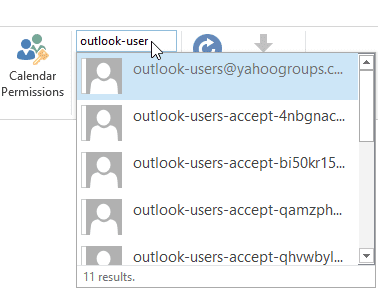
It sounds like it is finding your entry on the autocomplete list, not an actual contact.

If you are actually searching in contacts you can add the In folder field to the view and it will say if it in Contacts or Recipient cache - recipient cache is the autocomplete cache

You can set a registry key to disable the autocomplete cache in search results - info is in this article. You'll use the 2016 key (everything since then is office 16)
 
thanks. I will not be able to try any of this until later tonight or next day. will get back to you with results.
thanks.
 
It works, but there is always going to be errors, its the nature of a database.

FWIW, search is a little buggy lately but not sure if that is the cause of your problems since only your contact is goofy.


It sounds like it is finding your entry on the autocomplete list, not an actual contact.

If you are actually searching in contacts you can add the In folder field to the view and it will say if it in Contacts or Recipient cache - recipient cache is the autocomplete cache

You can set a registry key to disable the autocomplete cache in search results - info is in this article. You'll use the 2016 key (everything since then is office 16)
Diane, I tried emptying the autocomplete cache from file>options>mail. didn't change the error.

When in contacts folder, if I search on my name, I get a list of contacts that have my name in them, and "in folder" field indicates that my contact is in contacts folder, doesn't say "recipient". I presume this means that there is no point to disabling searching in autocomplete cache through registry.

If I click on my name, in list returned from searching for my name while in contacts folder, my contact form appears, as it should Still, if I search for my name in 'search people' search box, if shows my name, and clicking on my name returns a small 'email properties' window.

while waiting to hear back from you, I'll try modifying the contact form or deleting and reinstalling it, as Hornblower409 suggested.
 
I tried changing spelling of my name. People Search returned the same 'email properties' window with the original spelling.

I emailed myself a copy of my contact form, then deleted me from the list of contacts. Closed and re-opened Outlook. People Search still showed me in search list and my 'email properties' windows, when I lciked on my name, even though my contact had been deleted.

I add back my contact form from the emailed contact form. Nothing changes, still see 'email properties' when people searching.

I tried entering a second contact, same name, address, one phone number. Outlook questioned adding another with same name, I said 'go aheard'. Both of my contact forms show up in the Outlook contacts folder (I don't use the contacts folder with my email address or the OUtlook (this computer only) folders. When I search in 'search people' for my name only one option comes up, the one that returns 'email properties. Do I need to rebuild search??
 
though, it seems odd that search is broken on both computers.
 
Similar threads
Thread starter Title Forum Replies Date
A Outlook Advanced Search Problems...returns with an Error: Argument Outlook VBA and Custom Forms 1
V How to disable Server Assisted Search Using Outlook 2
C Search bar moved on its own? Using Outlook 4
A Search People>press enter box disappears. Using Outlook 3
S Create search-folder/rule/filter looking at FROM a distro list that has nested distro lists Using Outlook 1
efire9207 Addressbook Search Using Outlook 4
Victor_50 Outlook 365 Quick search by period (today, yesterday, last week) completely missing in newest OL 365 Using Outlook 0
A Outlook 2021 needs 'enter' for people search Using Outlook 2
M Search message, then (1) Jump to folder & (2) Select message that you searched for Outlook VBA and Custom Forms 6
G Search Folders and Jump to Folder Outlook VBA and Custom Forms 2
A 'search people' now asks me to 'press enter' Using Outlook 11
A Relocate Search Bar in Outlook Using Outlook 2
A Search folder and move the email Outlook VBA and Custom Forms 0
farrissf Outlook 2016 Optimizing Email Searches in Outlook 2016: Seeking Insights on Quick Search vs Advanced Search Features Using Outlook 0
C Advanced search terms for "Outlook Data File" Using Outlook 1
T How to find or display the sub-folder name for an Archive Search Using Outlook 10
P Search folder: all emails sent to or from a domain Using Outlook 1
T Outlook365 search item listed as "potential matches" can't be opened Using Outlook 0
Victor_50 Outlook 2019 Jump to folder from search folder Outlook VBA and Custom Forms 0
E Outlook 365 Save Selected Email Message as .msg File - oMail.Delete not working when SEARCH Outlook VBA and Custom Forms 0
Witzker Outlook 2019 Macro GoTo user defined search folder Outlook VBA and Custom Forms 6
J Outlook search bar in Office 2021 Professional Using Outlook 1
T Outlook 365 Search Box reverting to old location Using Outlook 2
P Outlook 2013 search no longer works Using Outlook 2
C How to search for items in Outbox with multiple accounts? Using Outlook 20
J search doesn't find anything Using Outlook 1
kkqq1122 How would I add Search for attachment name Outlook VBA and Custom Forms 3
A Any way to force sort by/group by on search results with VBA? Outlook VBA and Custom Forms 1
B Search and Find Email by Folder Name Outlook VBA and Custom Forms 2
C Search not accurate, but not indexing Using Outlook 9
J How do you disable address search box when typing @ in body of email? Using Outlook 0
H Outlook 2019 intermittent search results Using Outlook 0
D Create advanced search (email) via VBA with LONG QUERY (>1024 char) Outlook VBA and Custom Forms 2
D Advanced e-Mail search on from/to contact group only searches for first 20 contacts in group Using Outlook 0
mll persistently customise columns in outlook advanced search Using Outlook 3
S vba outlook search string with special characters Outlook VBA and Custom Forms 1
S VBA search string with special characters Outlook VBA and Custom Forms 1
H Search Email Header for Content Type Outlook VBA and Custom Forms 1
P Posts in Folder No Longer Group by Conversation Column After Search Using Outlook 0
O Advanced search - can I use booleans Using Outlook 3
Y Filter unread emails in a search folder vba help Outlook VBA and Custom Forms 0
M Reverting The Outlook Search Box Location (or other undesired additions) Using Outlook 1
M Something went wrong and your search couldn't be completed Using Outlook 1
M Disable Contact Card Results when using "Search People" in Outlook Ribbon Using Outlook 7
J outlook 2007 doesn't let me choose which .pst to search Using Outlook 2
P outlook 2008 search box criteria couldn't be saved Using Outlook 2
C Outlook with Office365 - search across account, by date rate, in multiple folders - how? Using Outlook 2
D Custom Search Folders not refreshing/updating automatically Using Outlook 0
L New Location for the Search Bar Using Outlook 6
T How can you include Junk Email in Search Results like you can include Deleted Items? Using Outlook 3

Similar threads

Back
Top