Can't open embedded links within Nextdoor emails in Outlook 2021

Geldner

Member
Outlook version
Outlook 2019 64-bit
Email Account
POP3
Operating system::    Windows 11 Pro
Outlook version:     Classic Outlook 2021
Email type or host:    IMAP

I have scoured the interwebs for a solution to this. Outlook basically acts like links in a Nextdoor email don't exist period. You can't even select the associated text and do the old right click trick. What's weird is that Google Gmail (web) and Fairmail (Android) have no problem opening these links to the default browser. Maybe the parentheses are causing weirdness? Here's an example of a link:

Code:
(https://nextdoor.com/p/TW6DxkntF_kP?post=3D514221410&utm_source=3Demail&se=
ction=3Dpost&mar=3D%recipient.mark_as_read%&ct=3DGQWJPk9ksGjCWw-PAK3kEBKii9=
J2saVZClvt1T6wEJdoRfpy_fFcx7aHGn6de8f8&ec=3D5JUD4ZdM5aLJOzlYn2-7BYiQKJt-R6p=
7bzzGhlQ1Zfc=3D&token=3DSzhFX9BOJC9FdzMPxrTKFz6mlLeNkyrfcYbay9TAarvSmsLuwqk=
DyT1P5BJ2sMDmRhsYf5XpHgsi_Ikj_gKv2xNxNAiIRaVUGco6aP1cCgM%3D&auto_token=3DJx=
fQMXCMJNLe92XdOkS3vcb_Ydf4LJP4Ipdf-7F0Su-ckbo_MY8IqQM2Efpf34bBFKZx8ft6WYBNP=
k84rr0w-e00xWZeBOsBQwNfrY9DU9U%3D&mobile_deeplink_data=3DeyJhY3Rpb24iOiAidm=
lld19wb3N0IiwgInBvc3QiOiA1MTQyMjE0MTB9&link_source_user_id=3D1468319)

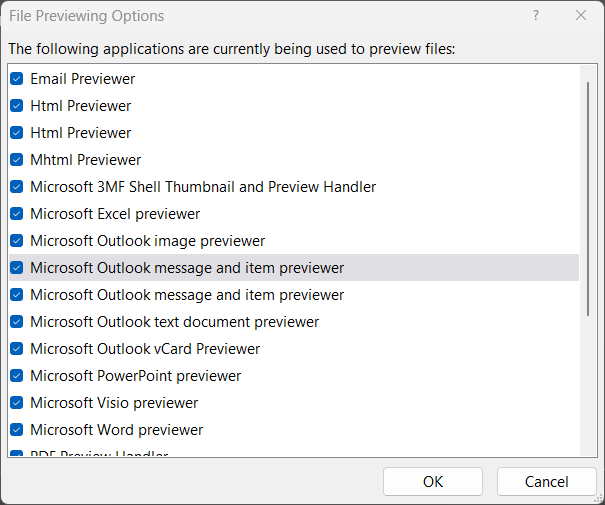
Note that this is Outlook accessing Gmail via IMAP. Also, some of the suggested fixes are not available in Outlook 2021 including choosing the browser for handling links. As a further weirdness, thinking that it might be a preview handler problem, I dove into Outlook's list of handlers and saw multiple entries for the same type of file (HTML and Message specifically). I don't know if that's the problem or not. But, since Taub's tool is no longer available, I see no easy way of troubleshooting these. And even if I open the email out of preview mode, the links still don't work.
OUTLOOK_or1GGEAlOX.png

Thoughts, suggestions, ideas?

Thanks!
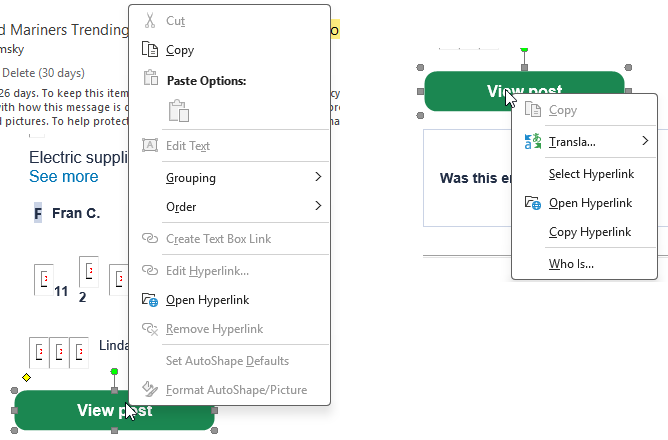
 
So no error messages? BTW - Outlook often doesn't offer Copy Hyperlink if the link is on a button. Copy will copy the button. But a second right click will usually bring up the copy hyperlink option.
1790713694313.png


It's not really an issue with previews and the link appears valid. (It brings up the nextdoor sign in for me because this browser isn't signed in.)

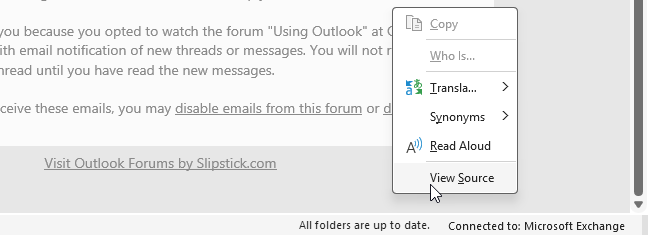
Did you get that link from gmail.com or from outlook? If you right click on the bottom of the message in the preview pane, you'll have the option to View Source. Find the link in the source code - I'm wondering if the https is missing and Outlook is confused - but on my messages from nextdoor, the URLs are all properly formatted. (That I'm using a Microsoft account and not IMAP shouldn't make a difference. )
1790713227553.png
 
So no error messages? BTW - Outlook often doesn't offer Copy Hyperlink if the link is on a button. Copy will copy the button. But a second right click will usually bring up the copy hyperlink option.
View attachment 4847

It's not really an issue with previews and the link appears valid. (It brings up the nextdoor sign in for me because this browser isn't signed in.)

Did you get that link from gmail.com or from outlook? If you right click on the bottom of the message in the preview pane, you'll have the option to View Source. Find the link in the source code - I'm wondering if the https is missing and Outlook is confused - but on my messages from nextdoor, the URLs are all properly formatted. (That I'm using a Microsoft account and not IMAP shouldn't make a difference. )
View attachment 4846
 
No error messages. I copied the source from Google Gmail web. I finally found the View Source option pinned in the main menu. It doesn't show with any mouse click actions. I could post the code but it's very dense and has so many table and span callouts I'm not sure it would help. But the anchors are the same as on Google and there are no "https://" missing. So I have no idea what's going on.
 
I have scoured the interwebs for a solution to this. Outlook basically acts like links in a Nextdoor email don't exist period. You can't even select the associated text and do the old right click trick. What's weird is that Google Gmail (web) and Fairmail (Android) have no problem opening these links to the default browser. Maybe the parentheses are causing weirdness? Here's an example of a link:

Code:
(https://nextdoor.com/p/TW6DxkntF_kP?post=3D514221410&utm_source=3Demail&se=
ction=3Dpost&mar=3D%recipient.mark_as_read%&ct=3DGQWJPk9ksGjCWw-PAK3kEBKii9=
J2saVZClvt1T6wEJdoRfpy_fFcx7aHGn6de8f8&ec=3D5JUD4ZdM5aLJOzlYn2-7BYiQKJt-R6p=
7bzzGhlQ1Zfc=3D&token=3DSzhFX9BOJC9FdzMPxrTKFz6mlLeNkyrfcYbay9TAarvSmsLuwqk=
DyT1P5BJ2sMDmRhsYf5XpHgsi_Ikj_gKv2xNxNAiIRaVUGco6aP1cCgM%3D&auto_token=3DJx=
fQMXCMJNLe92XdOkS3vcb_Ydf4LJP4Ipdf-7F0Su-ckbo_MY8IqQM2Efpf34bBFKZx8ft6WYBNP=
k84rr0w-e00xWZeBOsBQwNfrY9DU9U%3D&mobile_deeplink_data=3DeyJhY3Rpb24iOiAidm=
lld19wb3N0IiwgInBvc3QiOiA1MTQyMjE0MTB9&link_source_user_id=3D1468319)

Note that this is Outlook accessing Gmail via IMAP. Also, some of the suggested fixes are not available in Outlook 2021 including choosing the browser for handling links. As a further weirdness, thinking that it might be a preview handler problem, I dove into Outlook's list of handlers and saw multiple entries for the same type of file (HTML and Message specifically). I don't know if that's the problem or not. But, since Taub's tool is no longer available, I see no easy way of troubleshooting these. And even if I open the email out of preview mode, the links still don't work.
View attachment 4845
Thoughts, suggestions, ideas?

Thanks! juegos en vivo populares
This issue is likely caused by the quote-printable encoding (the =3D parameters) paired with the surrounding raw parentheses breaking Outlook's HTML rendering engine. Since Classic Outlook relies on Word's rendering engine rather than a modern web rendering engine like Chrome or Edge, malformed URL syntax and unescaped characters often cause Outlook to fail at recognizing text as clickable anchors altogether. As a quick workaround, try opening the message in a web browser using the "Actions > View in Browser" option from the message ribbon to properly process and follow those complex Nextdoor tracking links.
 
But the anchors are the same as on Google and there are no "https://" missing. So I have no idea what's going on.
I figured that once I looked at my own messages from nextdoor.

If you click Forward can you click the link (in the forward copy)? You'll need to use Ctrl+Click in the Forward... actually, you might want to try that in the message.

You could try a quick repair - don't use online repair as it will remove office and reinstall it. You shouldn't have a problem with activation, but I don't like to take chances and reserve online repair for serious issues when perpetual versions are involved.
 
This issue is likely caused by the quote-printable encoding (the =3D parameters) paired with the surrounding raw parentheses breaking Outlook's HTML rendering engine. Since Classic Outlook relies on Word's rendering engine rather than a modern web rendering engine like Chrome or Edge, malformed URL syntax and unescaped characters often cause Outlook to fail at recognizing text as clickable anchors altogether. As a quick workaround, try opening the message in a web browser using the "Actions > View in Browser" option from the message ribbon to properly process and follow those complex Nextdoor tracking links.
Yes, I've tried that. Unfortunately Outlook opens the message in Edge using Internet Explorer mode. Nextdoor refuses to accept an IE tagged browser. Outlook used to have a browser selection setting but as of 2021, that's gone. It's like MS doesn't want you actually using Outlook Classic period any more even if it's a better solution for most corporations and businesses.
 
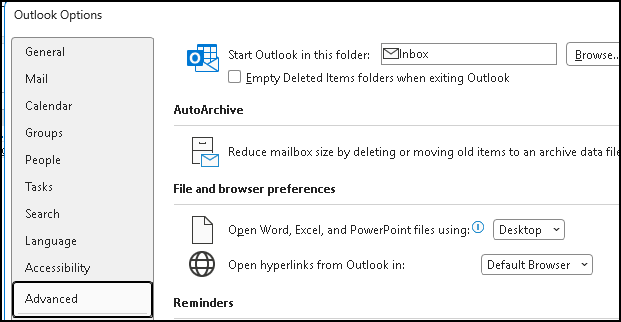
Outlook used to have a browser selection setting but as of 2021, that's gone.
The browser selection option is there in my MS 365 Version 2609. But that's for opening hyperlinks.

1790819619958.png


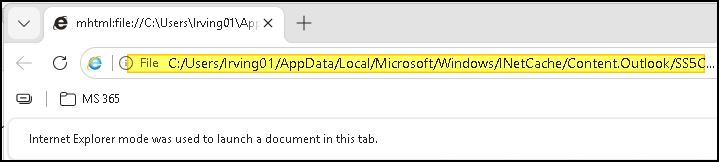
Action/Move -> View in browser uses a different process, that Microsoft has never updated. It creates a temp file and opens it in IE. Which now is Edge in IE Mode. You can see the file in the address bar.

1790819922580.png
 
Yes, I've tried that. Unfortunately Outlook opens the message in Edge using Internet Explorer mode. Nextdoor refuses to accept an IE tagged browser. Outlook used to have a browser selection setting but as of 2021, that's gone. It's like MS doesn't want you actually using Outlook Classic period any more even if it's a better solution for most corporations and businesses.
The browser selection won't apply - when Outlook uses the View in browser option, it creates an MHTML file and only IE can open it.

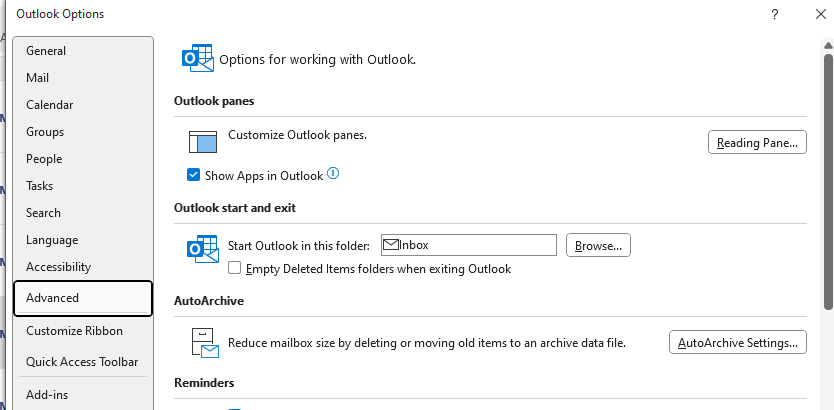
The browser selection was limited to subscriptions at one time. Looks like it still is - (this is from OL 2024, but would apply to older perpetual versions too.) Sometimes they screw up the updates and features that are only for subscriptions slip into the perpetual versions for a couple of weeks (occasionally longer).
1790864542680.png
 
Similar threads
Thread starter Title Forum Replies Date
S HTML Code Embedded in String Within Open Outlook Email Preventing Replace(Application.ActiveInspector.CurrentItem.HTMLBody From Working Outlook VBA and Custom Forms 4
K Embedded photos no longer open with Photos or Photo Viewer Using Outlook 7
P ics calendar entries suddenly open up new Outlook Using Outlook 3
P Windows 11 tries to open New Outlook when the user clicks on the mail icon on a news article Using Outlook 2
A How to open Excel file saved in Outlook folder? Outlook VBA and Custom Forms 4
ughlook Open multiple contacts in NEW Outlook? Using Outlook 3
K Outlook font corrupted in some point sizes, resets on close/open Using Outlook 2
T Cannot open .pst file Using Outlook 2
H Finding text in open email Outlook VBA and Custom Forms 12
chummy Open multiple Hyperlinks to download files Outlook VBA and Custom Forms 3
G Get current open draft message body from VBA Outlook VBA and Custom Forms 1
Rupert Dragwater How to get Outlook 365 to open from websites Using Outlook 5
Witzker Outlook 2019 Edit contact from email does not open the user defined contactform Using Outlook 3
S Leaving ActiveExplorer open for editing after Sub is done Outlook VBA and Custom Forms 0
Commodore PDF attachments started to open in Edge Using Outlook 0
T Outlook 2021 Cannot open attachments Outlook DeskTop 2021 Using Outlook 0
X Open Hyperlinks in an Outlook Email Message (Help with Diane's solution) Outlook VBA and Custom Forms 3
talla Can't open Outlook Item. Using Outlook 0
O Outlook on Android: after sharing / sending a news article, draft remains open. Why? Using Outlook 1
Witzker Open Contact missing in Outlook 2019 Using Outlook 2
L Cannot open PST file for first session each day Using Outlook 6
A How to open a specific link automatically with outlook 2016 Outlook VBA and Custom Forms 6
H Upon opening Outlook, make my popmail inbox open instead of outlook.com inbox Using Outlook 1
sahameed82 SharePoint calendar directly open in Outlook Using Outlook 0
N .pst archive from work will not open/import on Microsoft 365 Exchange Server Administration 0
C Outlook 2016/2019 hangs after being open for an extended period Using Outlook 4
M Where is the setting to *turn off* open calendar in a new window? Using Outlook 3
W Automatically open attachments without automatically printing them Using Outlook 0
Y Open and Save Hyperlink Files in multiple emails Outlook VBA and Custom Forms 9
J How to open OST file in Outlook 2019 & 2016 Using Outlook 1
C Can't Open Outlook 365 Using Outlook 0
D after delete mail, open the next one Outlook VBA and Custom Forms 0
N VBA Script to Open highlighted e-mail and Edit Message Outlook VBA and Custom Forms 5
M outlook won't open! Using Outlook 1
N Open & Save VBAProject.Otm using VBA Code Outlook VBA and Custom Forms 1
E Unable to open Outlook 2010 after adding new email account Using Outlook 4
M other user's mailbox won't open, forms disappeared Using Outlook 42
S SendFromAccount - Problem trying to test existing value in open email Outlook VBA and Custom Forms 2
J Open an outlook email by Subject on MS Access linked table with VBA Outlook VBA and Custom Forms 10
D Add Tetxbox at form open Outlook VBA and Custom Forms 1
U Catching ModuleSwitch events after "open in new window" Outlook VBA and Custom Forms 2
Andrew Quirl Open attachment, manipulate without add-on program? Outlook VBA and Custom Forms 5
S Reminder Dialog Open Button Using Outlook 2
A How to open a specific link automatically with outlook Outlook VBA and Custom Forms 13
S Outlook 2010 Cannot Open Attachments Using Outlook 14
N open the hyperlink in Outlook directly instead of browser Using Outlook 1
S Outlook does not open the .pst file created by the Outlook Using Outlook 5
A open Outlook with multiple windows. Using Outlook 0
K open calendar from address book Outlook VBA and Custom Forms 1
T Double clik behavior on agenda open a new meeting request Using Outlook 1

Similar threads

Back
Top