Color

Status
Not open for further replies.
Thanks. Can you please explain where and how to do that? As I am not aware of what this is and how to do it.
 
In Forms Designer, switch to the properties tab - its the next to the last one on the right. enter a number in the versions field - 1.01 or whatever you want. Then publish. Raise the # every time you publish a new version of the form.
 
Thanks again. But the important question is as follows:

Under each Outlook contact folder (which I have many many of), I had to right click each folder, go to properties, and pick my new form as the form for the folder. I have not had to do that each time i update the form and publish to the same name.

If I add these versions field, will I need update each folder of my contacts to the newest version number somehow?

And I am not clear where the name Form Designer is and the properties tab.
 
As long as the form name is the same, changing the version # will only cause the outlook to update the items to the new form, you won't have to select the form on the folder properties dialog.
 
And I am not clear where the name Form Designer is and the properties tab.
 
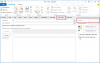
forms designer is when you are using Design this form. :)

design-mode.png
 
Thamks. It shows two areas: Version and Form Number. So what for each area??
 
Once again, I did everything you told me and it works perfectly! And the form of contacts is in perfect shape now!!

I just posted another important question just in case there is a way to do it.

Thanks so much for your support!!
 
Status
Not open for further replies.
Similar threads
Thread starter Title Forum Replies Date
T How to get an EVENT COLOR option in Outlook 2021 ? Using Outlook 0
F Color code certain INBOX emails Using Outlook 2
P Color Code or highlight folders in Outlook 2016 Using Outlook 2
N Help creating a VBA macro with conditional formatting to change the font color of all external emails to red Outlook VBA and Custom Forms 5
D Inbox column color coding Using Outlook 2
J Outlook 2013 Change color of text in data fields of contacts in Outlook 2013? Using Outlook 10
A How to get body of all emails in outlook 2016 to view in blue color Using Outlook 1
B Change row background color of selected item Using Outlook 1
R Setting font and color used when replying to an email Outlook VBA and Custom Forms 3
Mark Foley Color Categories on IMAP mail lost when installing new Windows 7 workstation Using Outlook 12
M Emails sorted by conversation including replies and categorized by color. Using Outlook 1
J Automatic color category according to variable domains Outlook VBA and Custom Forms 4
C Color Code New Calendar Items Using Outlook 2
S Mark as Unread unless Categorized by Color Using Outlook 0
Diane Poremsky Category Color doesn't Display in Inbox Using Outlook 0
Diane Poremsky Printing Calendars with Color Categories Using Outlook 0
E Outlook 2016 Default Blue Color Using Outlook 3
Diane Poremsky Changing Outlook.com color schemes Using Outlook 0
M Trouble using keyboard shortcut for color categories in Outlook 2016 Using Outlook 3
A Keep color categories when saving vCards Using Outlook 1
Diane Poremsky How to Upgrade to Color Categories Using Outlook 0
Diane Poremsky Create a list of color categories and merge or restore the list using VBA Using Outlook 0
J Color Alignment on the Calendar? Using Outlook 2
Simon How does the sender/organizer to dictate the color of a meeting invitation. Using Outlook 3
B Sub Calendar-Color Coding Issue Using Outlook 4
D Calendar - color coded items are now the same color Using Outlook 2
B Color Categorizing 365 Using Outlook 8
J Change Default View - Color and font Using Outlook 3
Tom.Schaefer Color for Mail-folder in OL2013 Using Outlook 1
D Outlook 2013 Categories won't print In color Using Outlook 2
K Color Categories for Accounts and Contacts BCM (Business Contact Manager) 0
M Background Color? Using Outlook 1
C Sync color categories on a Public Calendar across Office 365, PCs, Macs Using Outlook 1
D Background color for an entire day in Outlook 2010 Using Outlook 1
Commodore Color options in 2010... Using Outlook 0
U Color coded contacts Using Outlook 4
T Setting Color codes for each user of a shared Calendar Using Outlook 1
P Changing all email signatures (font, color) at once in outlook 2007 Using Outlook 2
M Assigning a specific font color to new emails using rules when they arrive Using Outlook 3
L Background Color Is An Issue Using Outlook 3
J Color categories with shared mailbox Using Outlook 1
F Color Coding Emails - Outlook 2007 SP-3 Using Outlook 1
C Apply Category Color for Appointment Background Color Using Outlook 2
N Changing background color on replies and forwards Using Outlook 1
E Calendar Thumbnail current day background color Using Outlook 3
M How do you change the obnoxious color of the email headers on Outlook 2013? Using Outlook 2
W Outlook 2010 Share calendar but keep color formatting Using Outlook 2
B Need help adding a background color to the compact list items in Month view. Using Outlook 1
J Text color when creating a new Task is not consistent Using Outlook 1
S Color catagories Using Outlook 1

Similar threads

Back
Top