POP vs. IMAP

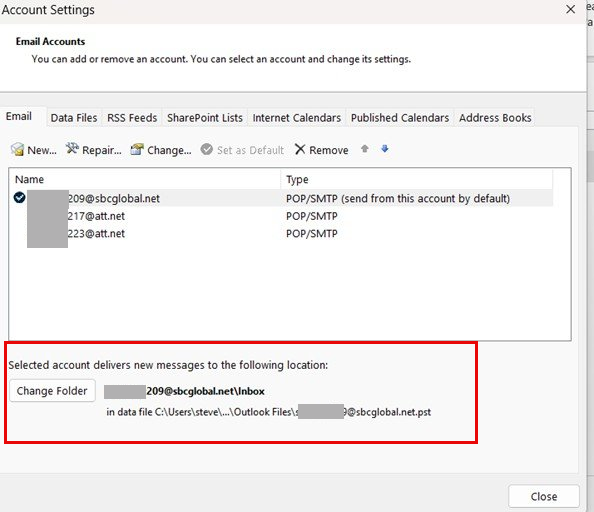
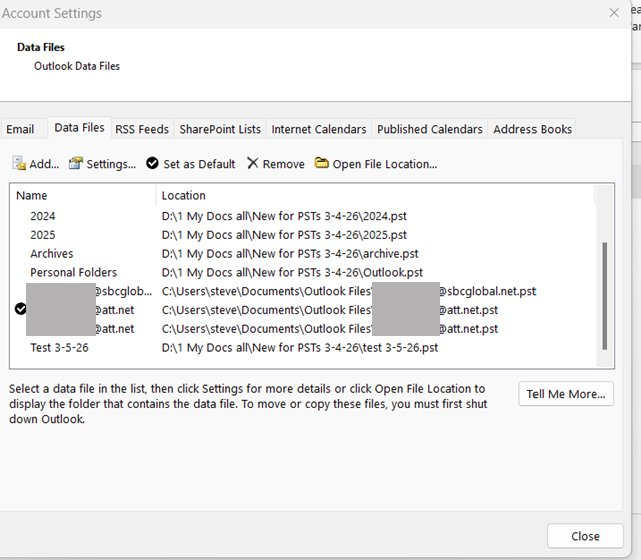
Ok, I finally, after a month and a half, was able to get my Secure Mail Keys from ATT for my accounts, so I can now proceed to transfer my 2007 PSTs to Classic. However, although I was able to transfer as you suggested the PSTs to my new accounts, I now want to transfer fresh , new copies of those .psts, but unfortunately, because it was such a nightmare dealing with ATT, I don’t remember how I did it. I thought it would come back to me, but when I looked at the attached data screenshots, I got confused. 209 indicates the default account in the account screenshot, which I want, but 217 is checked in the data screenshot, which makes me wonder is that the default.


What I would like to do, and would surely appreciate a primer on how to transfer my 2007.psts as follows:

Outlook.pst to the 209 account

Archive.pst to the 223 account

And haven’t yet decided where I want to put the yearly .psts, but perhaps in the 217 account.

And should I delete the existing .pst files ( except the 209, 217, & 223 )prior to adding the current ones ?

Much appreciated.

[see image in response below]
1776224071659.png
 
Last edited by a moderator:
If you want to use a specific PST as the delivery location for an account, select the account and click the change folder button. (You already have them added to the profile.) You can remove these PST that Outlook just created once you change the delivery locations.

If the plan is to remove the Outlook and archive psts, you can import them in the data file you want them in. File > Open & Export > Import and Export. You will need to remove the PST from the profile if you are going to import them into another pst.

Otherwise, no need to remove PST files from the profile yet - but they can be removed and added back as needed.

1776223913542.png
 
If you want to use a specific PST as the delivery location for an account, select the account and click the change folder button. (You already have them added to the profile.) You can remove these PST that Outlook just created once you change the delivery locations.

If the plan is to remove the Outlook and archive psts, you can import them in the data file you want them in. File > Open & Export > Import and Export. You will need to remove the PST from the profile if you are going to import them into another pst.

Otherwise, no need to remove PST files from the profile yet - but they can be removed and added back as needed.

View attachment 4708
I'm sorry, but I'm confused.

The data files that are currenly in there are current only thru March 4th. I want to use the updated psts ( dated April 14th).

Also, I thought you had told me prior, not to use the import/export feature. Was that not to use Export from Outlook 2007 ? To get those data files as they are currently showing in Outlook Classic, if my memory serves, On March 4th I copied the Outlook 2007 pst files from my laptop onto the hard drive of my desktop, and then in Outlook Classic, did a data file add from from those pst files on my hard drive.
 
I don't recommend using import, no, but there are times you might need to. If you are leaving mail on the server, mail received since the last send / receive for the PST will be downloaded - or if it was deleted from the server, can be imported or moved from the PST it is in, to the one you want to use.

Typically how it do it: add the account as POP - if Outlook finds a PST named with the email address, it should use it. If not, it should ask if you want to use an existing PST - if not, it will create a new pst. You change the delivery location and remove the newly created pst.

If mail is left on the server, Outlook should download the new mail (although with a 2007 pst, all bets are off - it might download everything again - not difficult to clean up though).
 
If you want to use a specific PST as the delivery location for an account, select the account and click the change folder button. (You already have them added to the profile.) You can remove these PST that Outlook just created once you change the delivery locations.

If the plan is to remove the Outlook and archive psts, you can import them in the data file you want them in. File > Open & Export > Import and Export. You will need to remove the PST from the profile if you are going to import them into another pst.

Otherwise, no need to remove PST files from the profile yet - but they can be removed and added back as needed.

View attachment 4708
Thank you so much for all your help and patience. I was able to transfer all my .psts to Outlook Classic, and it seems to have worked properly. A couple of questions so far as I’m navigating/learning Classic. And as I go along, I will post my new questions with a proper title in a new thread, but while I’m here…

~ My rules, play a sound does not work. When I select the rules, and select the play .wav, it doesn’t play, but instead opens up to the c:\Windows\Media screen, and whichever .wav sound I pick, and select it to play, it just re-opens to that same screen.

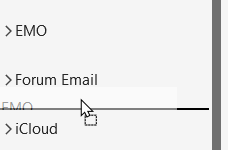
~ In the far left folder pane, is there a way to sort my accounts differently ?

E.g. , they are now top to bottom, 217, 209, 2021, 2022, 2023,2024,2025, archives, 223. I would like them to be 209, archives, 223, 217, 2021, 2022, 2023,2024,2025 .

Thanks
 
~ My rules, play a sound does not work. When I select the rules, and select the play .wav, it doesn’t play, but instead opens up to the c:\Windows\Media screen, and whichever .wav sound I pick, and select it to play, it just re-opens to that same screen.

~ In the far left folder pane, is there a way to sort my accounts differently ?

E.g. , they are now top to bottom, 217, 209, 2021, 2022, 2023,2024,2025, archives, 223. I would like them to be 209, archives, 223, 217, 2021, 2022, 2023,2024,2025 .

Because you moved the pst, you will need to edit the rule and add a sound. But I will test it to see if Microsoft broke something.

you can drag PST files up and down the list -
1776304115323.png
 
Because you moved the pst, you will need to edit the rule and add a sound. But I will test it to see if Microsoft broke something.

you can drag PST files up and down the list -
View attachment 4721
Thank you.

The draging worked great.
Regarding the sound, I did edit and even tried new rules, but still no sound. I do believe, like you wonderd, that Microsoft did break something in Windows 11, because that same problem manifested itself on my Windows 11 laptop even before I did the conversion.
 
Regarding the sound, I did edit and even tried new rules, but still no sound.
Do I understand correctly - You have a .wav file defined for the Rule, but it just does not play?

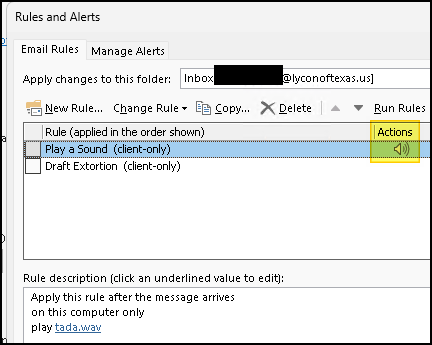
File -> Manage Rules and Alerts, select your Rule.
Does it show the Speaker icon under Actions?

1776392454451.png
 
To be sure the Rule is actually firing - Add another Action like Assign a Cat. Anything that will show that the Rule actually ran.
 
Similar threads
Thread starter Title Forum Replies Date
TomHuckstep Remove Send/Receive All Folders (IMAP/POP) button from Outlook 365 Ribbon Using Outlook 2
e_a_g_l_e_p_i A few question before I decide to switch to Pop from imap Using Outlook 9
L Gmail POP, Android IMAP, Outlook 2013 setup close Using Outlook 5
E POP vs IMAP on iDevices Using Outlook 3
V Switching from IMAP to POP Using Outlook 3
D is it possible to have both a POP and IMAP account in Outlook 2013? Using Outlook 5
L IMAP and POP email in same Outlook system Using Outlook 1
M Converting from POP to IMAP with Comcast Using Outlook 5
P Changing from POP to IMAP; will this setup work? Using Outlook 1
B Outlook 11 for Mac - Imap or Pop Account Type Using Outlook 6
S Converting outlook 2010 pop account and folders to imap with gmail Using Outlook 1
Diane Poremsky Help required for multiple identities when switching from POP to IMAP Using Outlook 1
V Yahoo via POP Using Outlook 5
B Trying to Merge Gmail and POP/SMTP inboxes Using Outlook 4
e_a_g_l_e_p_i Outlook 2021 not letting me setup my Gmail using pop Using Outlook 1
CWM330 I'm thinking about switching back to POP Using Outlook 11
C Pop Server Changing Verizon/Aol to Yahoo Using Outlook 6
C Transfer Autocomplete from Pop to Exchange Using Outlook 3
P PST file is getting huge under POP 3 Using Outlook 2
H In outlook 365 POP mail Inbox, email takes a long time or never arrives. Using Outlook 1
B Copy/Move Exchange inbox to Pop inbox Using Outlook 4
O Get Outlook on your phone for free - web page pop up Using Outlook 8
J Change POP account to Forwarder - What happens in Outlook? Using Outlook 2
P Contacts gone missing in Outlook 2013 POP Using Outlook 4
I Make a macro in line rather than pop out Outlook VBA and Custom Forms 0
CWM330 Infomational pop up Using Outlook 2
J Why are emails for a different pop account copied to outlook.com account? Using Outlook 1
T Adding "Mark As Complete" btton to Task Remindet Pop-Up Using Outlook 3
G Outlook calendar entry corrupted. Constant pop up when you open outlook. Unable to delete or remove. Using Outlook 2
Jennifer Murphy Exit Without Sending pop-up restarts countdown Using Outlook 11
V Question on pop email Using Outlook 2
M Link POP account with Outlook.fr Using Outlook 1
C Outlook 2013 Windows Phone, Outlook 365/2013 POP Using Outlook.com accounts in Outlook 5
M Rule to pop a warning dialogue on certain actions Using Outlook 1
M Blank Pop-up Window when click "Manage Sharing" BCM (Business Contact Manager) 1
R Cant reinstall POP email account Using Outlook 2
S PoP up reminder while opening the outlook? Outlook VBA and Custom Forms 1
S Pop up reminder while i close outlook Outlook VBA and Custom Forms 5
T Constantly Occuring Login Pop-Up Window Using Outlook 1
P POP mail password popup after I deleted the accopunt Using Outlook 6
Sarge USMC Outlook 13 not displaying POP inbound emails Using Outlook 12
S Transferring POP emails from Outlook 2002 to Outlook.com email in Outlook 2013 Using Outlook.com accounts in Outlook 8
O Outlook 2013 EAS Account and POP Account - Common Sent Folder Using Outlook.com accounts in Outlook 21
S categories are being cut off after selecting from category pop up form Using Outlook 3
K EAS and POP folders in Outlook 2013 Using Outlook.com accounts in Outlook 4
A How to disable the pop-up “Reponses to this meeting will not be tallied." Using Outlook 0
O Multiple Exchnage profiles simultaneously and hovering pop-up contact card ! Using Outlook 17
D Imported Tasks - Pop Up does not work Using Outlook 3
S Removing an Exchange Server account, retaining POP accounts Exchange Server Administration 1
S No Pop Up Reminders in Outlook 2013 Using Outlook 1

Similar threads

Back
Top