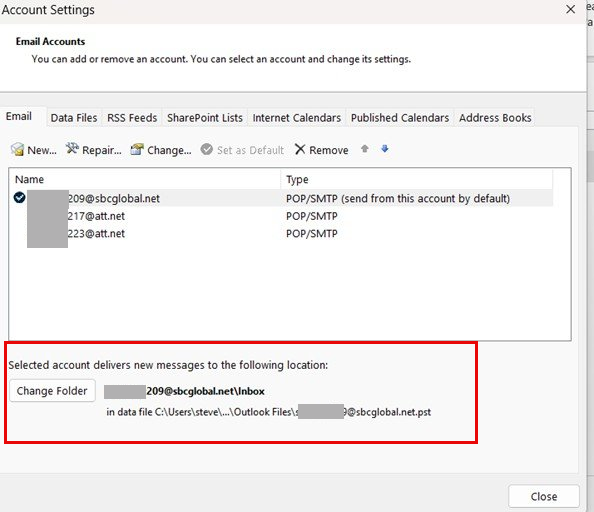
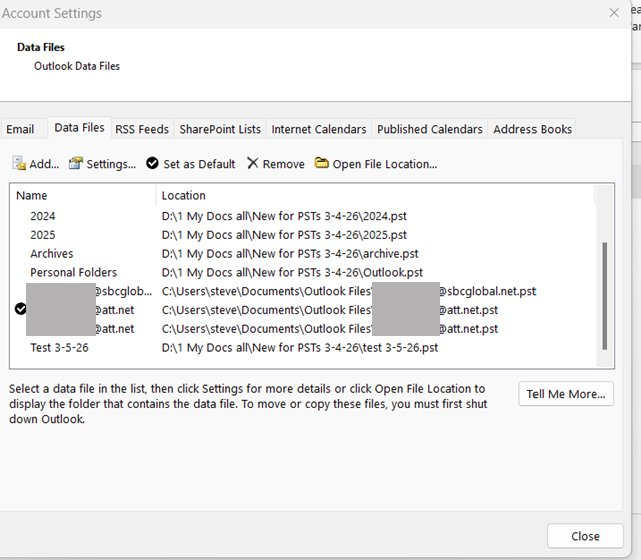
Ok, I finally, after a month and a half, was able to get my Secure Mail Keys from ATT for my accounts, so I can now proceed to transfer my 2007 PSTs to Classic. However, although I was able to transfer as you suggested the PSTs to my new accounts, I now want to transfer fresh , new copies of those .psts, but unfortunately, because it was such a nightmare dealing with ATT, I don’t remember how I did it. I thought it would come back to me, but when I looked at the attached data screenshots, I got confused. 209 indicates the default account in the account screenshot, which I want, but 217 is checked in the data screenshot, which makes me wonder is that the default.
What I would like to do, and would surely appreciate a primer on how to transfer my 2007.psts as follows:
Outlook.pst to the 209 account
Archive.pst to the 223 account
And haven’t yet decided where I want to put the yearly .psts, but perhaps in the 217 account.
And should I delete the existing .pst files ( except the 209, 217, & 223 )prior to adding the current ones ?
Much appreciated.
[see image in response below]
What I would like to do, and would surely appreciate a primer on how to transfer my 2007.psts as follows:
Outlook.pst to the 209 account
Archive.pst to the 223 account
And haven’t yet decided where I want to put the yearly .psts, but perhaps in the 217 account.
And should I delete the existing .pst files ( except the 209, 217, & 223 )prior to adding the current ones ?
Much appreciated.
[see image in response below]
Last edited by a moderator: